iFT Series Hardware Installation Manual ADPRO
14 27817_05
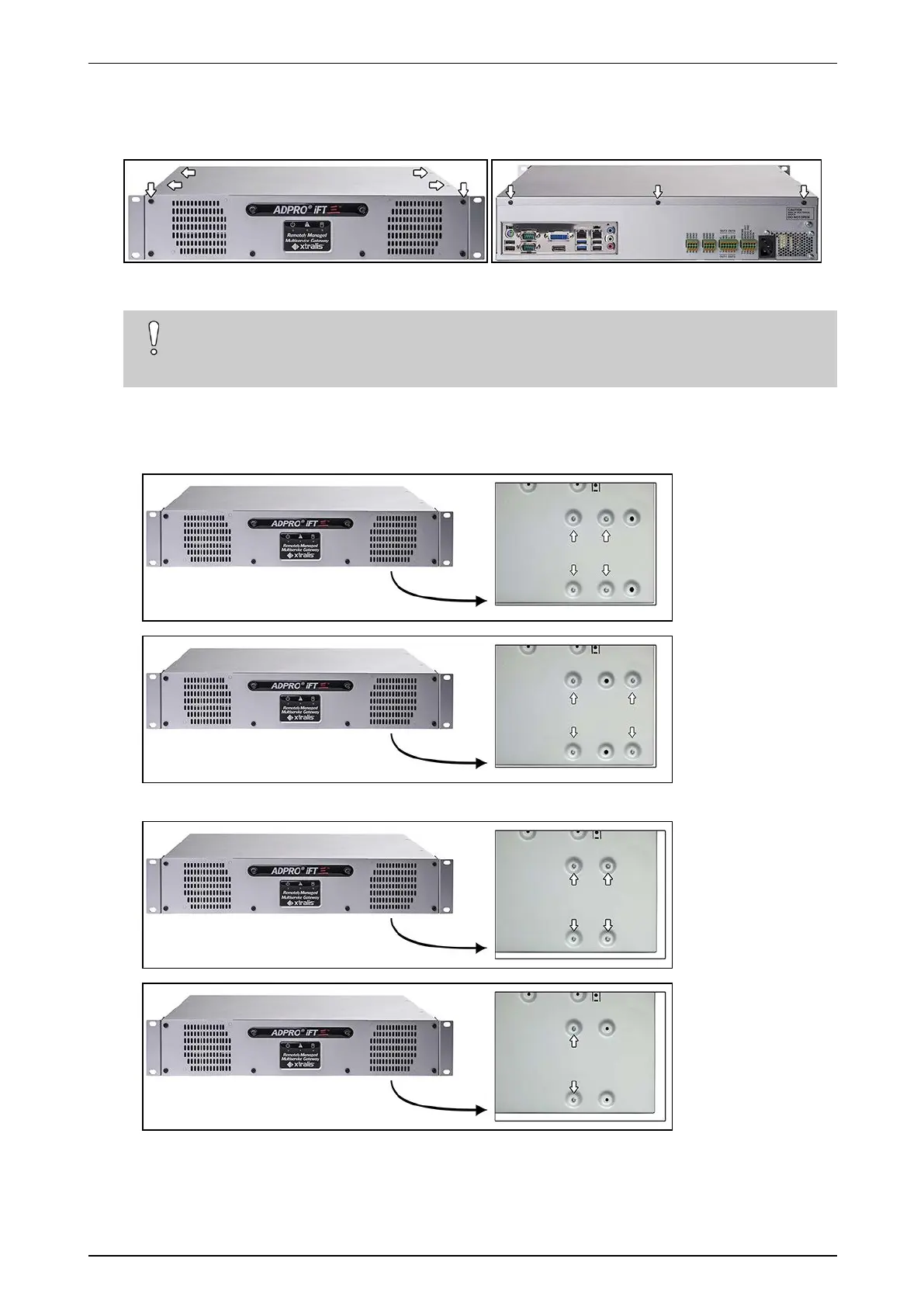
Toinstallthefirstharddisk,proceedasfollows:
1. Stopthedevice,switchoffthepowersupply,andthenremovethetopcover:unscrew2screwsatthefront,
4atthetop,and3attheback.
2. Fixtheharddisktothebottomofthecasing.
Caution!
Ifyoutiltthecasing,restitcarefullyonthesides,butnotontheback.Youmaydamagethe
connectorsifyoudo.
Dependingontheavailableholesinthecasingandtheharddisk,thefollowingoptionsexist:
o
Casingwith6 screw holes inthebottom:usethefirst4holes,ortheouter4holeswith4diskscrews
(#17434080):
o
Oldcasingwith4 screw holes inthebottom:use4oronly2diskscrews(#17434080):


 To Next Page