ADPRO iFT Series Hardware Installation Manual
27817_05 55
whichistherangeoftheIPcameranetwork).
Aftertheconfiguration,youcanconnecttheIPmodulestothePIRdetectors,andfinallyaddtheIPmodulesto
theXOclient.
13.8.2 Setting up the IP Modules
TheIPmodulesonlyworkwiththeXOclientsoftwareiftheyhaveastaticIPaddressandusetheUDP
communicationprotocol.Furthermore,youmustsetuptheserialportsoftheIPmodules.
TosetuptheIPmodules,proceedasfollows:
1. ConnecttheIPmodulestothenetwork,andmakesurethatyourPCisinthesamenetwork.
2. DownloadandinstalltheLantronixDeviceInstallerprogram(availablefrom
www.lantronix.com/products/deviceinstaller).
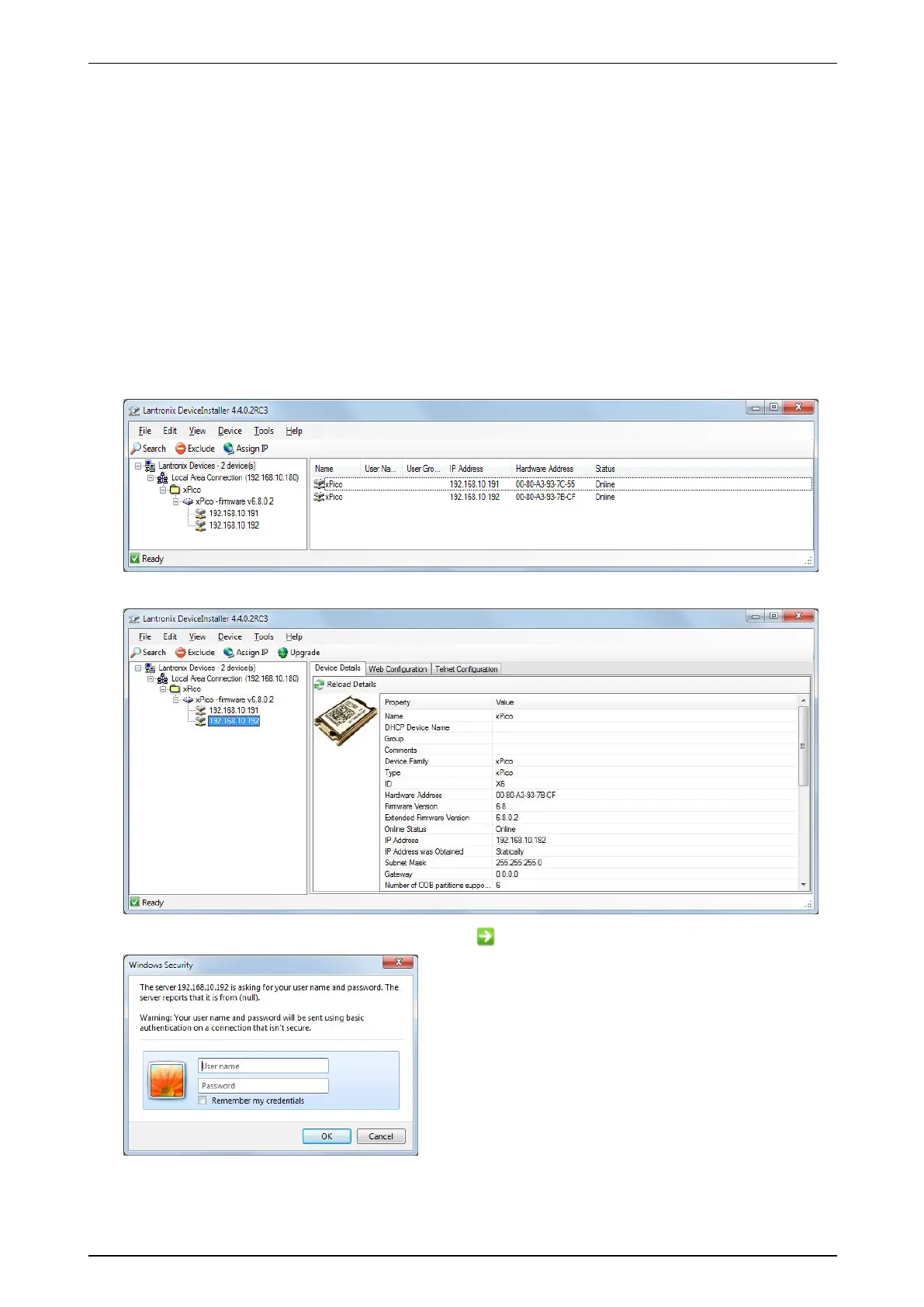
3. LaunchDeviceInstaller.ItautomaticallystartssearchingfortheIPmodules(xPicodevices)onthenetwork.
Ifthesearchdoesnotstartautomatically,clickSearch.
4. Toconfigureamodule,double-clickitinthelist.
5. ClicktheWeb Configuration tab,andthenclickthe buttontoconnecttothemodule.


 To Next Page