ADPRO iFT Series Hardware Installation Manual
27817_05 37
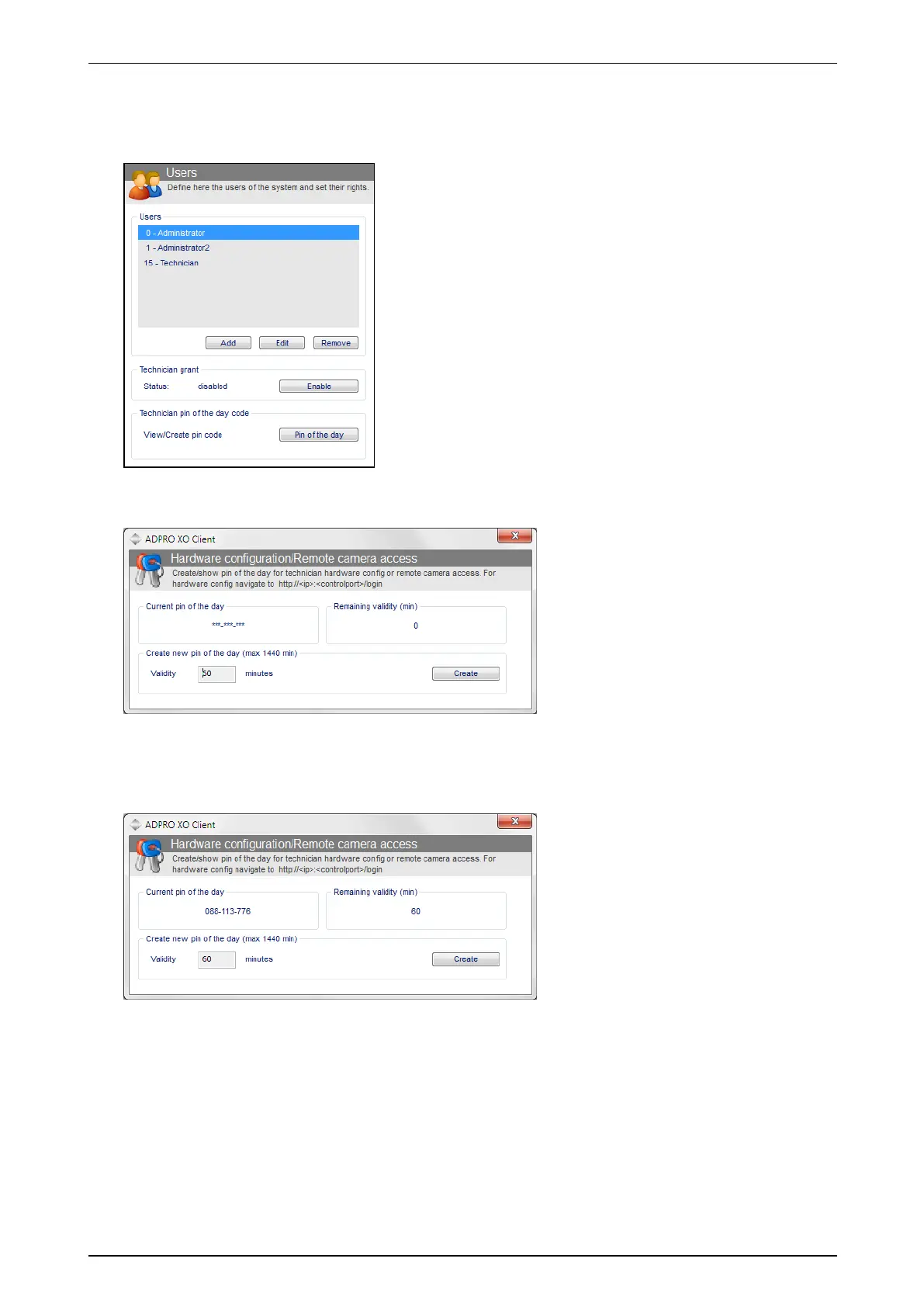
Tologontothehardwareconfigurationtool,proceedasfollows:
1. LogontotheXOclientasanAdministrator.
2. ChooseSystem>General >Users.
3. UnderTechnician grant,clickEnable.
4. UnderTechnician pin of the day code,clickPin of the day.Thefollowingwindowappears:
5. IntheValidity box,enterthetime(inminutes)thatthePINhastoremainvalid.Themaximumtimeis
1440minutes=24h.
6. ClickCreate.AnewPINappearsunderCurrent pin of the day.ThecounterintheRemaining Validity
(min) boxdisplaysforhowlong(inminutes)thenewcodeisstillvalid.
7. Writedownthecode(includingthedashes),orkeepthewindowopenandmoveitwhereyouwillbeableto
seeitwhileloggingontothehardwareconfigurationtool.



 To Next Page