38
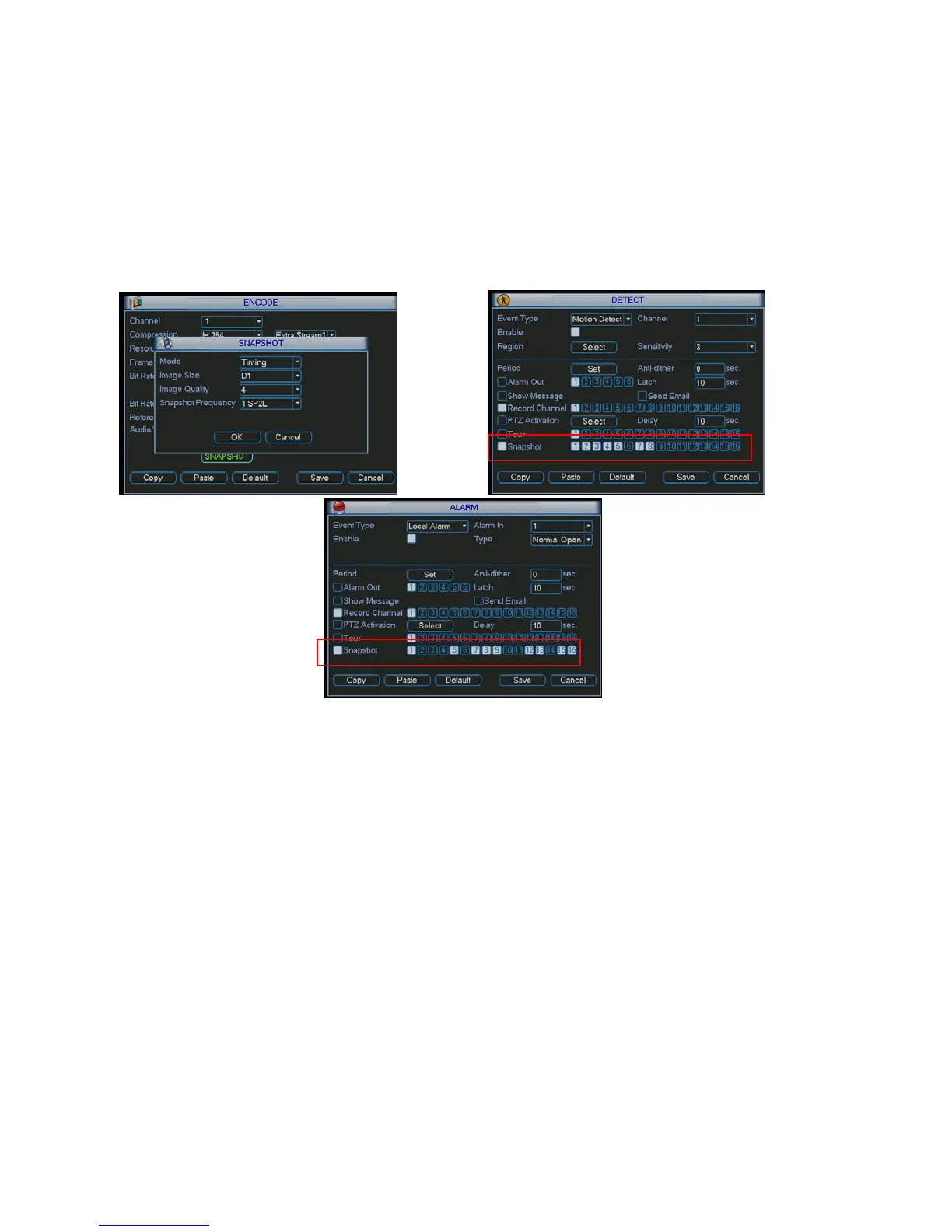
4.4.2.2 Activation Snapshot
Please follow the steps listed below to enable the activation snapshot function. After you enabled
this function, system can snapshot when the corresponding alarm occurred.
z In Encode interface, click snapshot button to input snapshot mode, size, quality and
frequency.
z In General interface please input upload interval.
z In Detect interface please enable snapshot function for specified channels. Or in alarm
interface please enable snapshot function for specified channels.
Please refer to the following figure for detail information. See Figure 4-15.
Figure 4-15
4.4.2.3 Priority
Please note the activation snapshot has the higher priority than schedule snapshot. If you have
enabled these two types at the same time, system can activate the activation snapshot when
alarm occurs, and otherwise system just operates the schedule snapshot.
4.4.3 Image FTP
In Network interface, you can set FTP server information. Please enable FTP function and then
click save button. See Figure 4-16.
Please boot up corresponding FTP server.
Please enable schedule snapshot (Chapter 4.4.2.1) or activation snapshot (Chapter 4.4.2.2) first,
now system can upload the image file to the FTP server.



 To Next Page