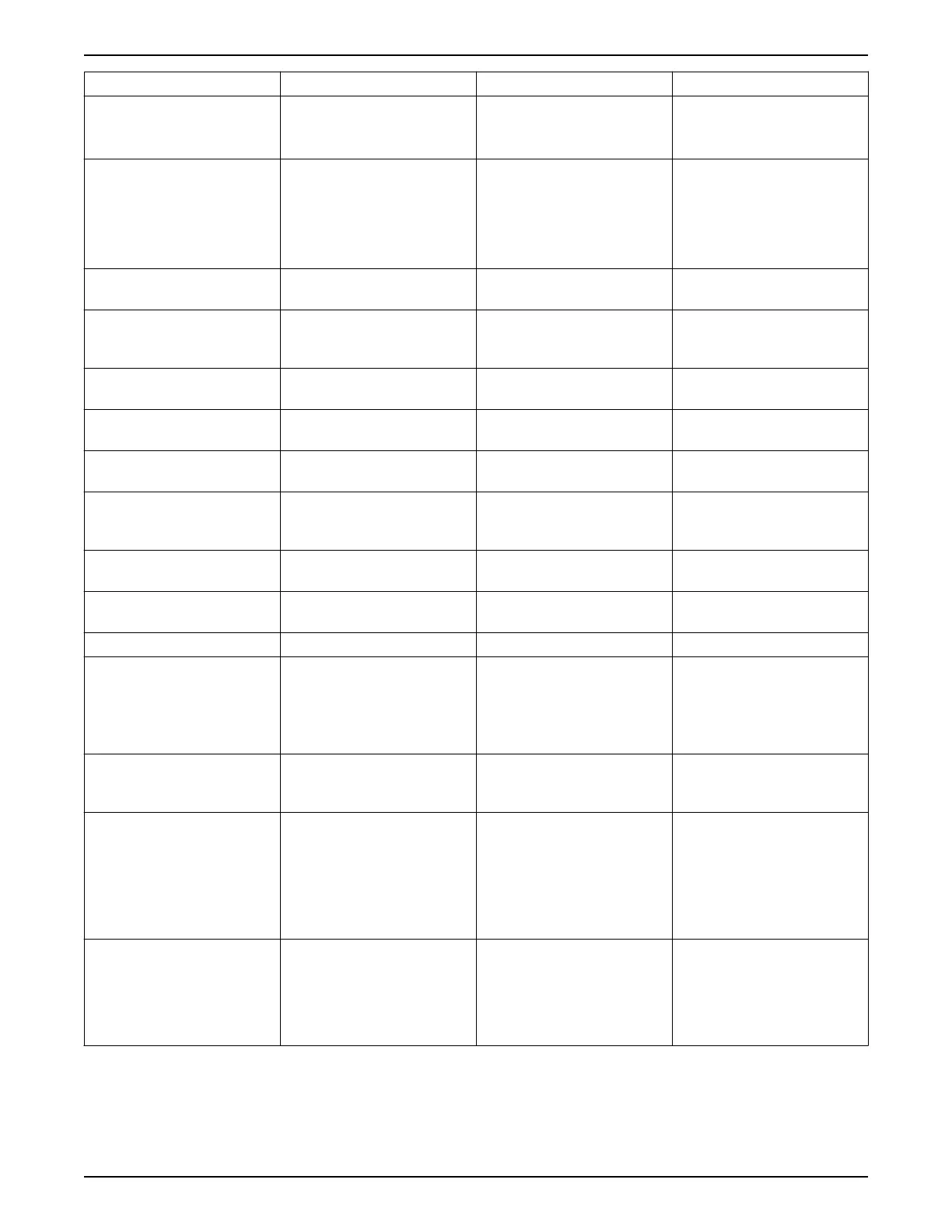
Warning/Alarm Description Cause Remedy
48 — 1.8 V supply low The power supply is measured on
the control card.
The 1.8 V DC supply used on the
control card is outside of allowable
limits.
Check for a defective control card.
If an option card is present, check
for an overvoltage condition.
49 — Speed limit When the speed is not within the
specified range in [4–11] Motor
Speed Low Limit [RPM] and [4–13]
Motor Speed High Limit [RPM],
the frequency converter will show
a warning.
When the speed is below the
specified limit in [1–86] Trip
Speed Low [RPM] (except when
starting or stopping) the frequency
converter will trip.
50 — AMA calibration failed Contact your Xylem supplier or
Xylem Service Department.
51 — AMA check Unom and Inom The settings for motor voltage,
motor current, and motor power
are wrong.
Check the settings in [1–20] to [1–
25].
52 — AMA low Inom The motor current is too low. Check the setting in [4–18]
Current Limit.
53 — AMA motor too big The motor is too big for the AMA to
operate.
54 — AMA motor too small The motor is too small for the AMA
to operate.
55 — AMA Parameter out of range The parameter values of the motor
are outside of the acceptable
range. AMA will not run.
56 — AMA interrupted by the user The AMA has been interrupted by
the user.
57 — AMA timeout Try to restart AMA again. Repeated
restarts may overheat the motor.
58 — AMA internal fault Contact your Xylem supplier.
59 — Current limit The current is higher than the
value in [4–18] Current Limit.
Ensure that motor data in [1–20]
through [1–25] are set correctly.
Possibly increase the current limit.
Be sure that the system can
operate safely at a higher limit.
60 — Pump Protect (North
America)/External Interlock
(International)
A digital input signal is indicating
a pump protection external to the
controller is active.
62 — Output frequency at
maximum limit
The output frequency has reached
the value set in [4–19] Max Output
Frequency.
Check the application to
determine the cause. Possibly
increase the output frequency. Be
sure the system can operate safely
at a higher output frequency. The
warning will clear when the output
drops below the maximum limit.
65 — Control card over
temperature
The cut-out temperature of the
control card is 80°C.
Check that the ambient operating
temperature is within limits.
Check for clogged filters.
Check fan operation.
Check the control card.
7 Warnings and alarms
144 Aquavar
®
Intelligent Pump Controller - 150 HP to 600 HP INSTRUCTION MANUAL







 To Next Page