Parameter number Description Set to
[8-56] Preset Reference Select* Determines the control location of the preset
reference selection function. Set to Digital
input to use a digital input only. Set to Bus to
use only the serial bus only. Set to Logic AND
to use the serial bus AND a digital input. Set to
Logic OR to use the serial bus OR a digital
input.
* The Set-up Select and Preset Reference Select functions are used to control other pre-
configured functions in the controller. To avoid interfering with these functions, it is
recommended to control this function via digital inputs.
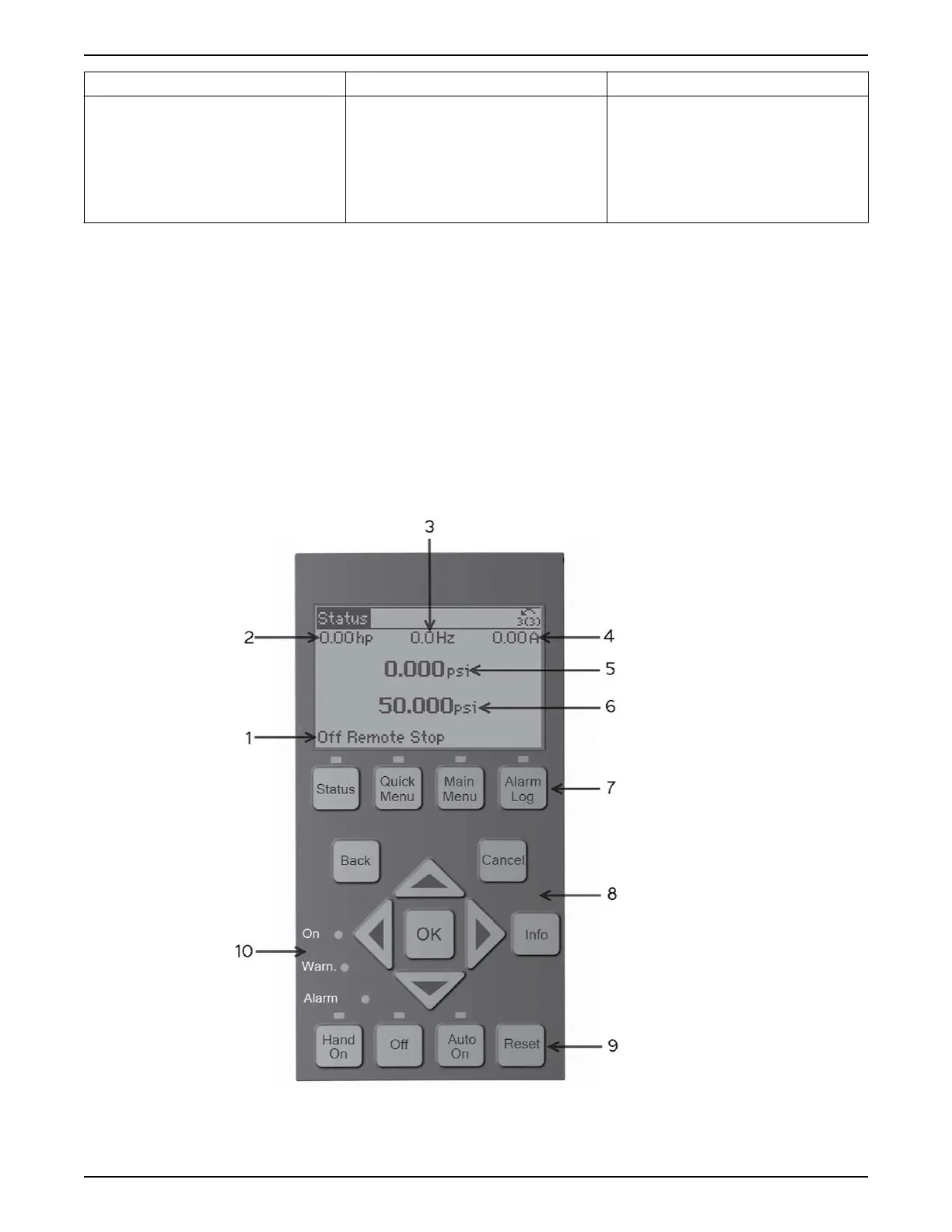
5.19 Local control panel
The controller is equipped with a local control panel (LCP). The LCP combines the status
screen and keypad found on the front of the controller. The LCP is the user interface to the
controller. The LCP allows the user to perform various functions such as:
• Start, stop and control speed with the keypad when in local/Hand mode
• View and display the status of the controller, pump and system
• Provides access to all parameters and start up functions
• Manually reset the controller after a fault
• Perform parameter backup
Figure 86: Default configuration
5 Electrical Installation
Aquavar
®
Intelligent Pump Controller - 150 HP to 600 HP INSTRUCTION MANUAL 75







 To Next Page