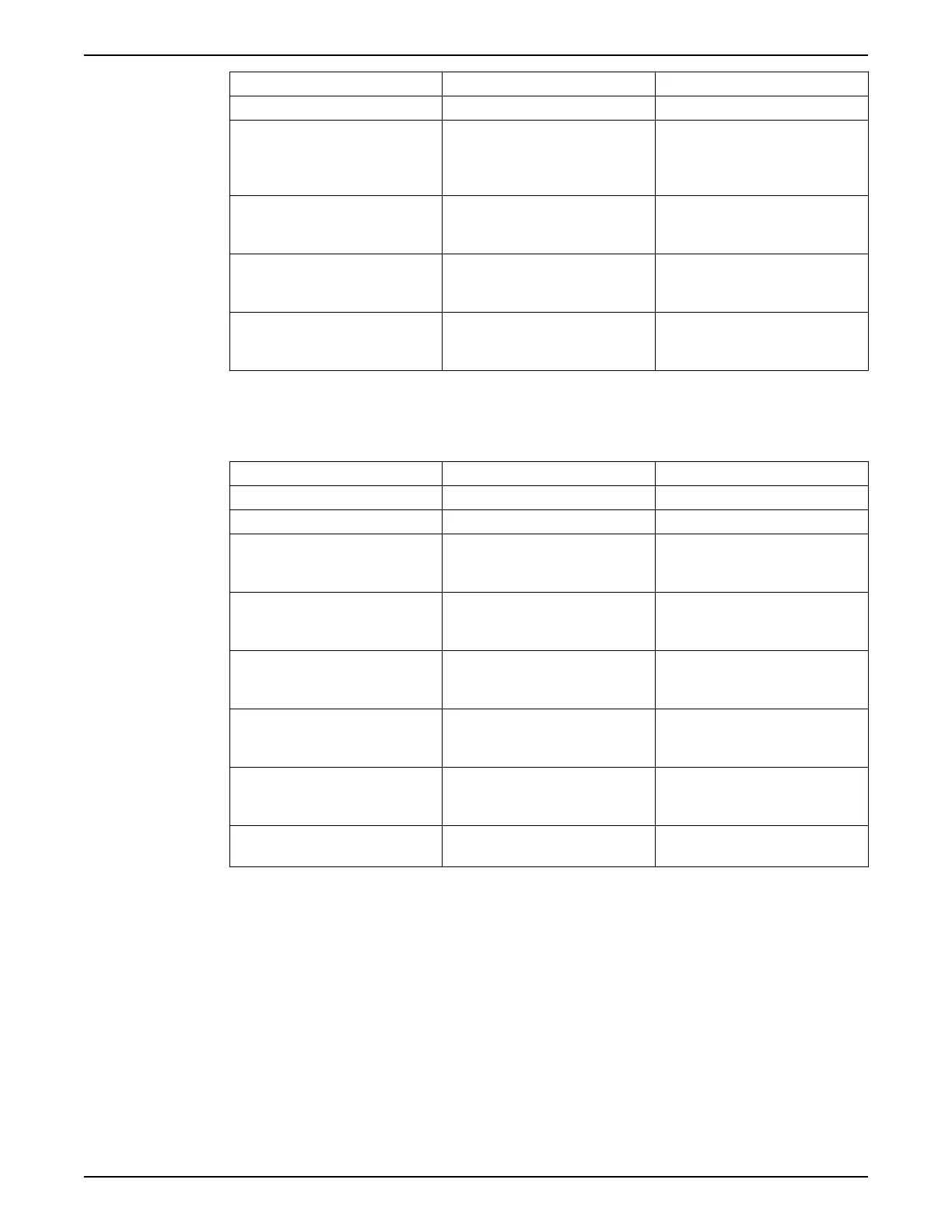
Parameter Number Parameter Description Set To
[20-03] Feedback 2 Source Analog Input 54*
[20-05] Feedback 2 Source Unit Units for the second feedback source.
For a differential pressure transducer,
use the same units as found in 20-02,
psi is default
[20-12] Reference/Feedback Unit Select as appropriate for application.
For example, set to psi when using
pressure feedback.
[20-13] Minimum Reference/Feedb. Minimum transducer feedback value.
For example, for a 0-300psi
transducer, set to 0.
[20-14] Maximum Reference/Feedb. Maximum transducer feedback
value. For example, for a 300psi
transducer, set to 300.
* To use AI 53, configure parameters [6-14], [6-15], [6-17] to Analog Input 53 that has only
a current-type input.
Table 12: Parameters for an additional transducer used for monitoring
Parameter number Description Set to
[0-24] Display Line 3 Large Ext. 1 Feedback [Unit]
[21-14] Ext.1 Feedback Source Analog Input 54*
[21-10] Ext.1 Ref./Feedback Unit Select as appropriate for application.
For example, set to psi when using a
pressure transducer.
[21-11] Ext.1 Minimum Reference Minimum transducer feedback value.
For example, for a 0-300psi
transducer, set to 0 psi.
[21-12] Ext.1 Maximum Reference
Ext. 1 Maximum Reference
Maximum transducer feedback
value. For example, for a 300 psi DP
transducer, set to 300 psi.
[6-24]* Terminal 54 Low Ref./Feedb.Value Minimum transducer feedback value.
For example, for a 0-300 psi
transducer, set to 0.
[6-25]* Terminal 54 High Ref./Feedb.Value Maximum transducer feedback
value. For example, for a 300 psi
transducer, set to 300.
[6-27]* Terminal 54 Sensor Fault (North
America) / Live Zero (International)
Disabled
* To use AI 53, configure parameters [6-14], [6-15], [6-17] and set [21-14] to Analog Input
53 that has only a current-type input.
Speed control through an analog input
The controller can be configured for speed control through an analog input. The
controlling source can be either an external control device such as a PLC, BMS (building
management system) or potentiometer. The output from the external control device can
be either a voltage or current output signal. Be sure to set the analog input configuration
switches based on the type of output signal. The diagrams below show the connections
for an external speed command.
• Speed control mode can be configured using the Start-Up Genie.
5 Electrical Installation
Aquavar
®
Intelligent Pump Controller - 150 HP to 600 HP INSTRUCTION MANUAL 69







 To Next Page