Page 66 FT-950 OPERATING MANUAL
VOX
(
SSB/AM/FM MODES: AUTOMATIC TX/RX SWITCHING USING VOICE CONTROL
)
Instead of using the microphone’s PTT switch or the front panel
[
MOX
]
switch to activate the transmitter, the VOX (Voice
Operated TX/RX Control) system provides hands-free, automatic activation of the transmitter, based on voice input into
the microphone.
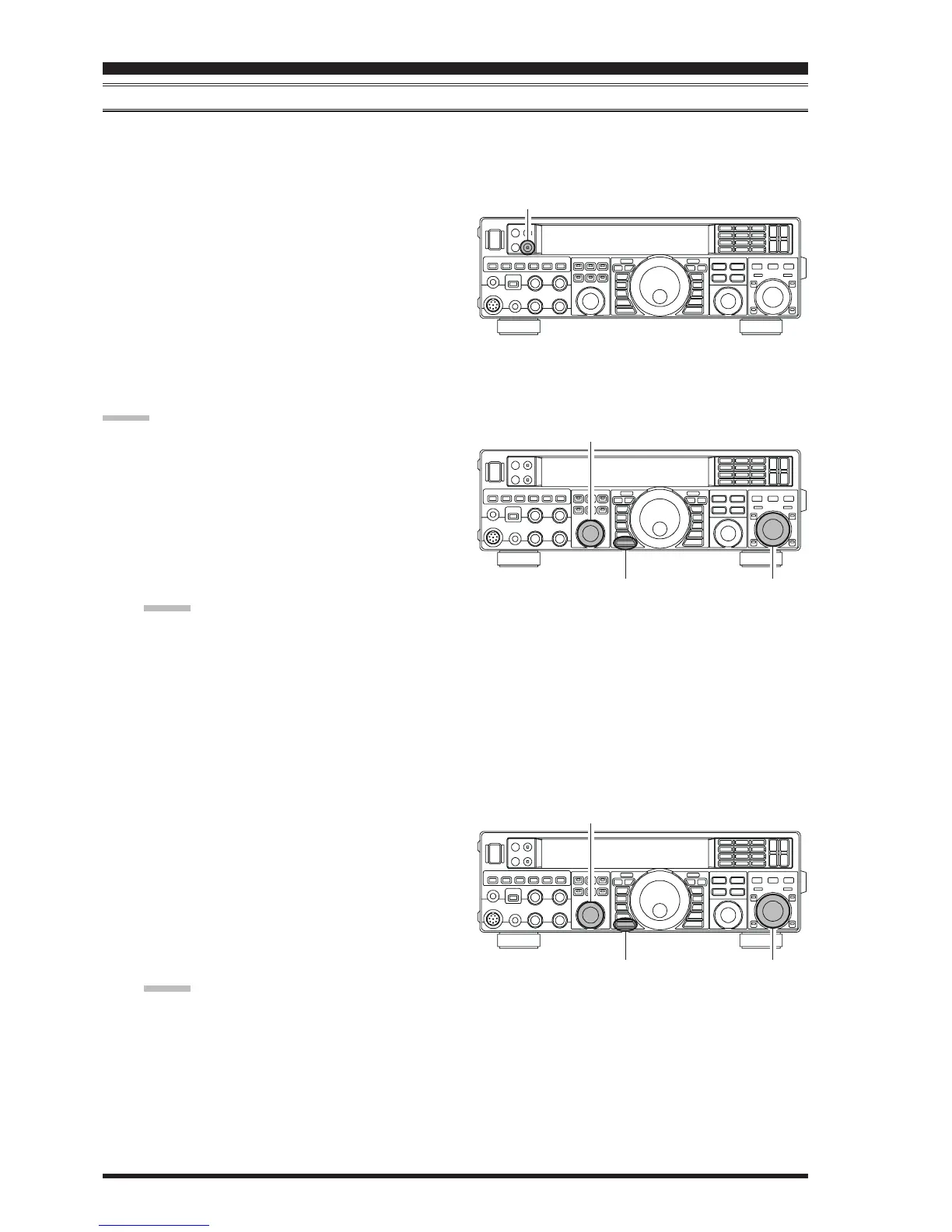
1. Press the
[
VOX
]
button to activate the VOX circuitry.
The LED inside the
[
VOX
]
button glows red.
2. Without pressing the PTT switch, speak into the mi-
crophone in a normal voice level. When you start speak-
ing, the transmitter should be activated automatically.
When you finish speaking, the transceiver should re-
turn to the receive mode (after a short delay).
3. To cancel VOX and return to PTT operation, press the
[
VOX
]
button again. The LED inside the
[
VOX
]
but-
ton will disappear, signifying that the VOX circuitry
has been turned off.
ADVICE:
The VOX Gain may be adjusted to prevent accidental
transmitter activation in a noisy environment. To ad-
just the VOX Gain:
Press the
[
VOX
]
button to activate the VOX cir-
cuitry, if necessary.
Press the
[
MENU
]
button momentarily to engage
the Menu mode.
Rotate the
[
SELECT
]
knob and select Menu item
“
115 TGEN V GAIN115 TGEN V GAIN
115 TGEN V GAIN115 TGEN V GAIN
115 TGEN V GAIN”.
ADVICE:
Press the
[
SELECT
]
knob to toggle the Menu item
display between “
115 TGEN115 TGEN
115 TGEN115 TGEN
115 TGEN” and “
V GAINV GAIN
V GAINV GAIN
V GAIN”.
While speaking into the microphone, rotate the
[
CLAR/VFO-B
]
knob to the point where the trans-
mitter is quickly activated by your voice, without
background noise causing the transmitter to acti-
vate.
When you satisfied with the setting, press and hold
in the
[
MENU
]
button for one second to save the
new setting and exit to normal operation.
The “Hang-Time” of the VOX system (the transmit/
receive delay after the cessation of speech) may also
be adjusted via the Menu mode. The default delay is
500 msec. To set a different delay time:
Press the
[
VOX
]
button to activate the VOX cir-
cuitry, if necessary.
Press the
[
MENU
]
button to engage the Menu.
Rotate the
[
SELECT
]
] knob and select Menu item
“
116 TGEN VOX DLY116 TGEN VOX DLY
116 TGEN VOX DLY116 TGEN VOX DLY
116 TGEN VOX DLY”.
ADVICE:
Press the
[
SELECT
]
knob momentarily to toggle
the Menu item display between “
116 TGEN116 TGEN
116 TGEN116 TGEN
116 TGEN” and
“
VOX DLYVOX DLY
VOX DLYVOX DLY
VOX DLY”.
Rotate the
[
CLAR/VFO-B
]
knob while saying a
brief syllable like “Ah” and listening to the hang
time for the desired delay.
When your adjustments are complete, press and
hold in the
[
MENU
]
button for one second to save
the new setting and exit to normal operation.
The Anti-Trip setting adjusts the level of negative re-
ceiver audio feedback to the microphone, to prevent
receiver audio from activating the transmitter (via the
microphone). This setting can also be adjusted via
Menu item “
117 TGEN ANTIVOX117 TGEN ANTIVOX
117 TGEN ANTIVOX117 TGEN ANTIVOX
117 TGEN ANTIVOX”.
VOX operation may be engaged on either Voice modes
(SSB/AM/FM) or on AFSK-based Data modes. Use
Menu item “
114 TGEN VOX SEL114 TGEN VOX SEL
114 TGEN VOX SEL114 TGEN VOX SEL
114 TGEN VOX SEL” (the selections are
“
niCniC
niCniC
niC (MIC)” and “
dAtAdAtA
dAtAdAtA
dAtA (DATA)”).
TRANSMITTER CONVENIENCE FEATURES
[
VOX
]
Button
[
CLAR/VFO-B
]
Knob
[
MENU
]
Button
[
SELECT
]
Knob
[
CLAR/VFO-B
]
Knob
[
MENU
]
Button
[
SELECT
]
Knob













 To Next Page