Page 69FT-950 OPERATING MANUAL
TRANSMITTER CONVENIENCE FEATURES
SPLIT-FREQUENCY OPERATION
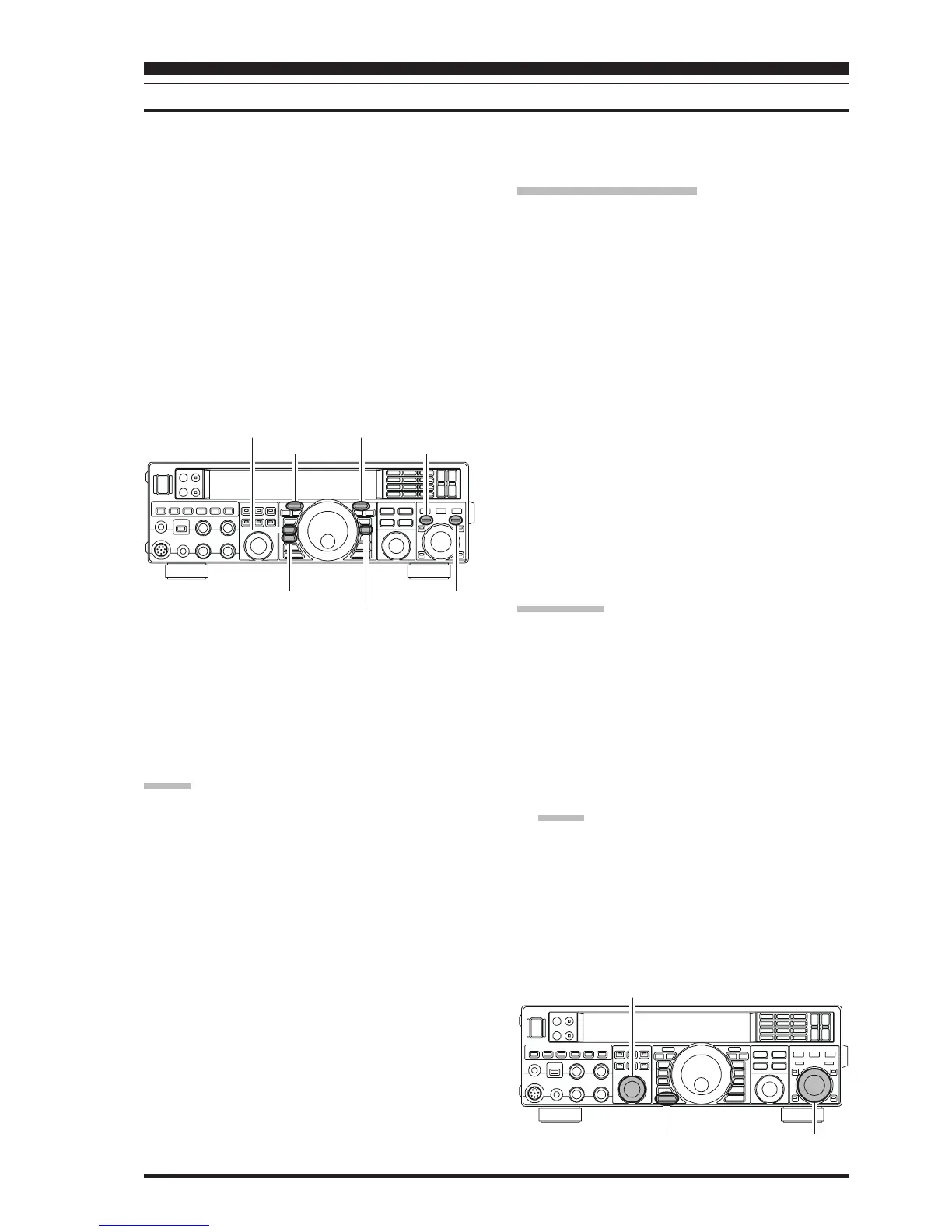
A powerful capability of the FT-950 is its flexibility in Split Frequency operation using the VFO-A and VFO-B frequency
registers. This makes the FT-950 especially useful for high-level DX-peditions. The Split operation capability is very
advanced and easy to use.
1. Press the
[
VFO-B
(
RX
)]
Indicator/Switch, then rotate
the
[
CLAR/VFO-B
]
knob to set the desired VFO-B
frequency.
2. Press the
[
VFO-A
(
RX
)]
Indicator/Switch, then rotate
the Main Tuning Dial knob to set the desired VFO-A
frequency.
3. Now press the
[
SPLIT
]
button. The front panel Indi-
cator/Switch LEDs will look like this:
[
VFO-A
(
RX
)]
Indicator/Switch: “ON”
(LED glows Green)
[
VFO-A
(
TX
)]
Indicator/Switch: “OFF”
(LED Off)
[
VFO-B
(
RX
)]
Indicator/Switch: “OFF”
(LED Off)
[
VFO-B
(
TX
)]
Indicator/Switch: “ON”
(LED glows Red)
During Split operation, the VFO-A register will be used
for reception, while the VFO-B register will be used for
transmission. If you press the
[
SPLIT
]
button once more,
Split operation will be cancelled.
You may also press the
[
VFO-A
(
TX
)]
Indicator/Switch to
return transmit frequency control to the VFO-A register,
thereby canceling Split operation.
ADVICE:
During normal (non-split) VFO-A operation, you may
simply press the
[
VFO-B
(
TX
)]
Indicator/Switch (lo-
cated on the upper right of the
[
CLAR/VFO-B
]
knob)
to engage Split operation. The
[
VFO-B
(
TX
)]
Indica-
tor/Switch will glow Red when you press the
[
VFO-
B
(
TX
)]
Indicator/Switch.
During Split operation, pressing the
[
A
X
W
B
]
button will
reverse the contents of the VFO-A and VFO-B. Press
the
[
A
X
W
B
]
button once more to return to the original
frequency alignment.
During Split operation you may listen to the TX fre-
quency temporarily while pressing the
[
TXW
]
button
located on the bottom left of the Main Tuning Dial
knob.
It is possible to set different operating modes (for ex-
ample, LSB and USB) on the two VFOs used during
Split operation.
During Split operation it is also possible to set the VFO-
A and VFO-B to different Amateur bands if you use a
multi band antenna.
[
VFO-A
(
RX
)]
Button
[
VFO-B
(
RX
)]
Button
Quick Split Operation
The Quick Split feature allows you to set a one-touch off-
set of +5 kHz to be applied to your radio’s VFO-B (trans-
mit) frequency, compared to the VFO-A frequency.
1. Start with regular transceiver operation on the VFO-
A.
[
VFO-A
(
RX
)]
Indicator/Switch: “ON”
(LED glows Green)
[
VFO-A
(
TX
)]
Indicator/Switch: “ON”
(LED glows Red)
[
VFO-B
(
RX
)]
Indicator/Switch: “OFF”
(LED Off)
[
VFO-B
(
TX
)]
Indicator/Switch: “OFF”
(LED Off)
2. Press and hold in the
[
SPLIT
]
button for one second
to engage the Quick Split feature, and apply a frequency
5 kHz above the VFO-A frequency to the VFO-B fre-
quency register. Press and hold in the
[
SPLIT
]
button
for two seconds to increment the VFO-A frequency to
+5 kHz.
The VFO configuration will then be:
[
VFO-A
(
RX
)]
Indicator/Switch: “ON”
(LED glows Green)
[
VFO-A
(
TX
)]
Indicator/Switch: “OFF”
(LED Off)
[
VFO-B
(
RX
)]
Indicator/Switch: “OFF”
(LED Off)
[
VFO-B
(
TX
)]
Indicator/Switch: “ON”
(LED glows Red)
QUICK POINTS:
The operating mode applied to the VFO-B register will
be the same as that in use on the VFO-A register.
The offset of VFO-B from the VFO-A is programmed
via the Menu and is set to +5 kHz at the factory. How-
ever, other offsets may be selected using the following
procedure:
1. Press the
[
MENU
]
button to engage the Menu mode.
2. Rotate the
[
SELECT
]
knob to select Menu item “
030030
030030
030
GENE Q SPLITGENE Q SPLIT
GENE Q SPLITGENE Q SPLIT
GENE Q SPLIT”.
ADVICE:
Press the
[
SELECT
]
knob momentarily to toggle the
Menu item display between “
030 GENE030 GENE
030 GENE030 GENE
030 GENE” and “
QQ
QQ
Q
SPLITSPLIT
SPLITSPLIT
SPLIT”.
3. Rotate the
[
CLAR/VFO-B
]
knob to select the desired
offset. The available selections are –20kHz ~ +20kHz
(factory default: +5 kHz).
4. Press and hold in the
[
MENU
]
button for one second
to save the new setting and exit to normal operation.
[
A
X
W
B
]
Button
[
VFO-B
(
TX
)]
Button
[
TXW
]
Button
[
SPLIT
]
Button
[
VFO-A
(
TX
)]
Button
WXWXWXWXWXWXWXWXWXWZYXWZYXWZYXWZYXWZY
[
CLAR/VFO-B
]
Knob
[
MENU
]
Button
[
SELECT
]
Knob













 To Next Page