Page 81FT-950 OPERATING MANUAL
CONTEST MEMORY KEYER
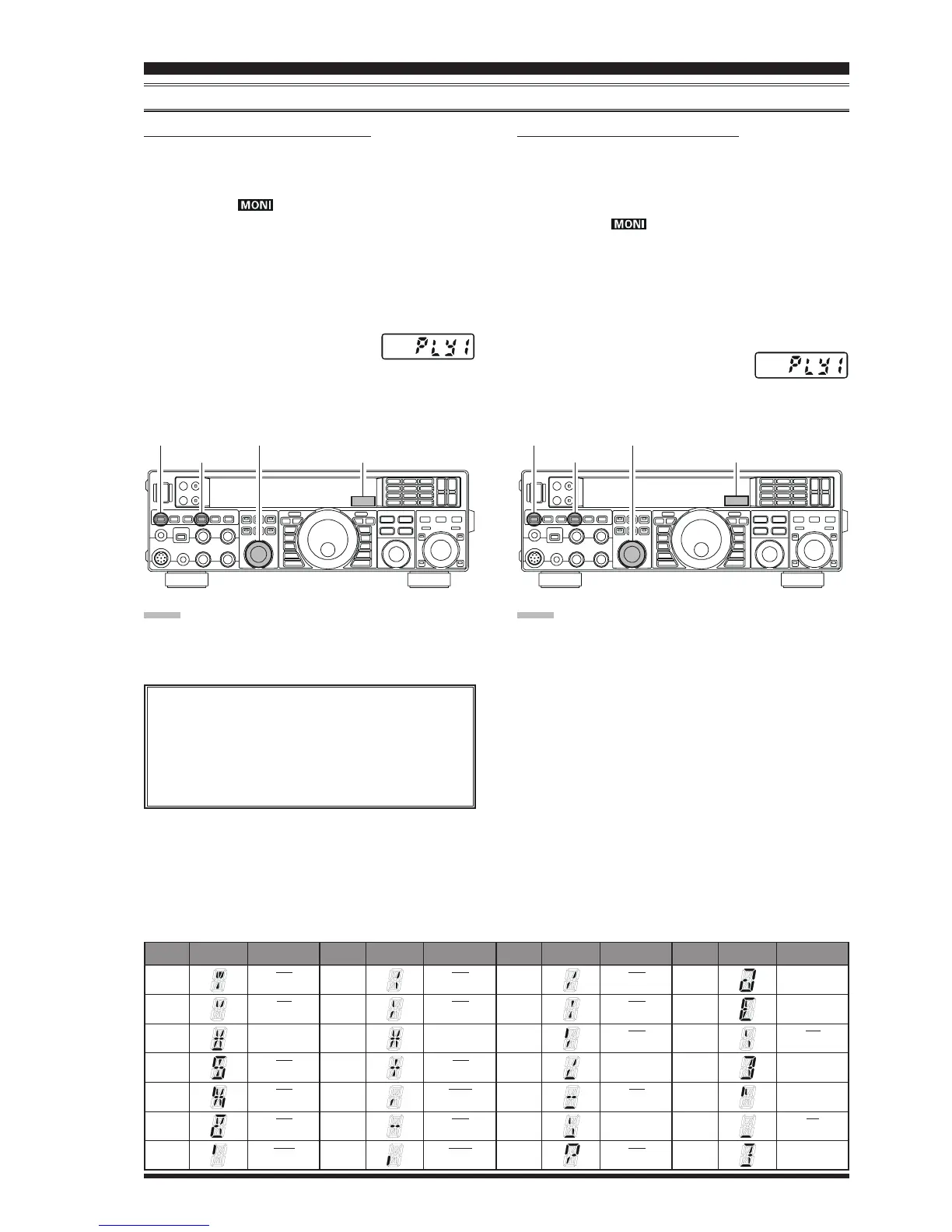
CHECKING THE CW MEMORY CONTENTS
1. Be sure that Break-in is still turned “Off” by the
[
BK-IN
]
button.
2. Press the
[
MONI
]
button momentarily to enable CW
monitor. A “ ” icon will appear in the display.
3. Press and hold the
[
SELECT
]
knob for one second to
activate the Contest Memory Keyer. You will see one
of following indications in Multi-Display Window on
the display; “
rEC1rEC1
rEC1rEC1
rEC1”, “
rEC2rEC2
rEC2rEC2
rEC2”, “
rEC3rEC3
rEC3rEC3
rEC3”, “
rEC4rEC4
rEC4rEC4
rEC4”, “
rEC5rEC5
rEC5rEC5
rEC5”,
“
PLY1PLY1
PLY1PLY1
PLY1”, “
PLY2PLY2
PLY2PLY2
PLY2”, “
PLY3PLY3
PLY3PLY3
PLY3”, “
PLY4PLY4
PLY4PLY4
PLY4”, or “
PLY5PLY5
PLY5PLY5
PLY5”.
4. Rotate the
[
SELECT
]
knob to select the CW Memory
Register (“
PLY1PLY1
PLY1PLY1
PLY1” through “
PLY5PLY5
PLY5PLY5
PLY5”)
whichever one you just recorded.
5. Press the
[
SELECT
]
knob momentarily. You will hear
the results in the sidetone monitor, but no RF energy
will be transmitted.
TEXT
!
“””
#
$
%%
%%
%
&
‘’’
DISPLAY CW CODE
SN
AF
---
SX
KA
AS
WG
TEXT
(
“)”
*
+
,,
,,
,
---
.
DISPLAY CW CODE
KN
KK
---
AR
MIM
DU
AAA
TEXT
//
//
/
“:”
;
<
==
==
=
>
?
DISPLAY CW CODE
DN
OS
KR
---
BT
---
IMI
TEXT
@@
@@
@
“[”
\\
\\
\
]
^^
^^
^
__
__
_
‘}’
DISPLAY CW CODE
@
---
AL
---
---
IQ
---
ON-THE-AIR CW MESSAGE PLAYBACK
1. Press the
[
BK-IN
]
button to enable transmission. Ei-
ther Full- or Semi-break-in will be engaged, depend-
ing on the setting of Menu item “
043 A1A BK-IN043 A1A BK-IN
043 A1A BK-IN043 A1A BK-IN
043 A1A BK-IN”.
2. Press the
[
MONI
]
button momentarily to enable CW
monitor. A “ ” icon will appear in the display.
3. Press and hold the
[
SELECT
]
knob for one second to
activate the Contest Memory Keyer. You will see one
of following indications in Multi-Display Window on
the display; “
rEC1rEC1
rEC1rEC1
rEC1”, “
rEC2rEC2
rEC2rEC2
rEC2”, “
rEC3rEC3
rEC3rEC3
rEC3”, “
rEC4rEC4
rEC4rEC4
rEC4”, “
rEC5rEC5
rEC5rEC5
rEC5”,
“
PLY1PLY1
PLY1PLY1
PLY1”, “
PLY2PLY2
PLY2PLY2
PLY2”, “
PLY3PLY3
PLY3PLY3
PLY3”, “
PLY4PLY4
PLY4PLY4
PLY4”, or “
PLY5PLY5
PLY5PLY5
PLY5”.
4. Rotate the
[
SELECT
]
knob to select the CW Memory
Register (“
PLY1PLY1
PLY1PLY1
PLY1” through “
PLY5PLY5
PLY5PLY5
PLY5”)
that you wish to transmit.
5. Press the
[
SELECT
]
knob momentarily. The pro-
grammed message will be transmited on the air.
CW CONVENIENCE FEATURES
NOTE:
Adjust the monitor level using the
[
MONI
]
knob.
NOTE:
If you subsequently decide to use the “Message Memory”
technique for memory storage, please note that the con-
tents of a message stored using text input will not be trans-
ferred over when you select “Message Memory technique”
on a particular memory register (the Menu Mode Setting
is set to “tyP2”).
[
BK-IN
]
Button
[
SELECT
]
Knob
Multi-Display Window
[
MONI
]
Button
[
BK-IN
]
Button
[
SELECT
]
Knob
Multi-Display Window
[
MONI
]
Button
Deleting Previously-stored Characters
Use the Main Tuning Dial knob to select the last
correct letter in the message. Now rotate the
[
CLAR/VFO-B
]
knob to select the “}” character;
everything after the “}” character will be deleted.













 To Next Page