11 Monitor and Cue
102 PM5D/PM5D-RH V2 / DSP5D Owner’s Manual Operating section
Using the Cue/Solo functions
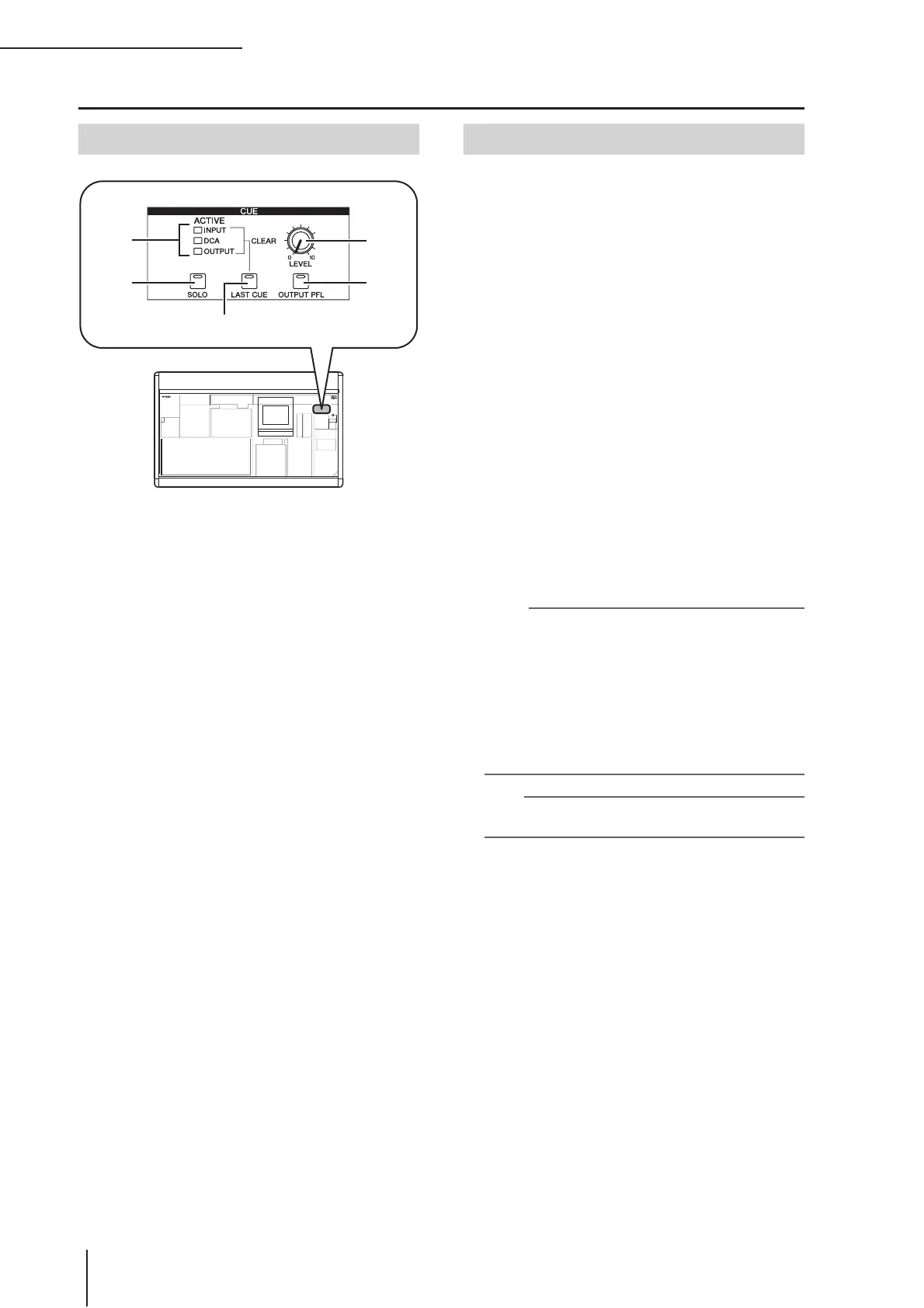
A [INPUT]/[DCA]/[OUTPUT] LEDs
These LEDs indicate the monitoring status. If even one
[CUE] key is on, the LED of the group to which that
key belongs will light. If a special Cue signal such as
KEY IN CUE or EFFECT CUE is active, all three LEDs
will light.
B [SOLO] key
This selects how monitoring will occur when you use
the [CUE] keys. If this key is on, monitoring will oper-
ate in SOLO mode. If this key is off, monitoring will
operate in CUE mode.
C [LAST CUE] key
This selects the mode of operation when more than
one [CUE] key is on. Turning the key on selects LAST
CUE mode; turning the key off selects MIX CUE
mode. When you switch this mode, Cue will be turned
off for all channels.
D CUE [LEVEL] knob
This adjusts the signal level that is sent from the CUE
OUT jacks.
E [OUTPUT PFL] key
This switches the location from which the signal is sent
to the CUE bus when you turn on the [CUE] key of an
output channel (MIX channel, MATRIX channel, STE-
REO A/B channel). If this key is on, the PFL (pre-
fader) signal will be sent. If this key is off, the POST
ON (immediately after the [ON] key) signal will be
sent.
The PM5D lets you select either SOLO mode or CUE
mode when using the [CUE] key to monitor signals. Use
the [SOLO] key in the CUE section of the panel to switch
the mode.
In CUE mode, holding down the [SOLO] key will switch
to SOLO mode; the [CUE] keys of all channels will go
dark. Conversely in SOLO mode, pressing the [SOLO] key
will immediately switch to CUE mode.
These modes differ as follows.
• CUE mode
The cue signals of channels / DCA groups whose
[CUE] key is on will be sent via the CUE bus and out-
put from the CUE OUT jacks (Cue function). Choose
this method when you want to monitor a signal with-
out affecting other channels. When the PM5D is in the
default state, the cue signal can also be monitored from
the MONITOR OUT jacks.
• SOLO mode
Only the channels / DCA groups whose [CUE] key is
on will be output from the MIX/MATRIX/STEREO
buses, and other channels / DCA groups will be muted
(Solo function). The MONITOR OUT jacks also will
output only the signal from these same channels / DCA
groups.
Note
• If an input channel is soloed, the on/off setting of the output
channels will remain unchanged; only the signal of the corre-
sponding input channel will be sent to the buses. If an output
channel is soloed, the on/off setting of the input channels will
remain unchanged; the signal will be sent only to the corre-
sponding bus.
• If a DCA group is soloed, only the signals of input channels
belonging to that DCA group will be output to the corre-
sponding buses. However if output channels are assigned to
DCA groups 7/8, signals will be sent only to buses belong-
ing to that DCA group.
Hint
If desired, you can exclude specific channels from Solo opera-
tions (
➥
p.241).
Items in the CUE section
2
3
4
5
1
About CUE mode and SOLO mode


 To Next Page