PM5D/PM5D-RH V2 / DSP5D Owner’s Manual Operating section 47
5
Input channel operations
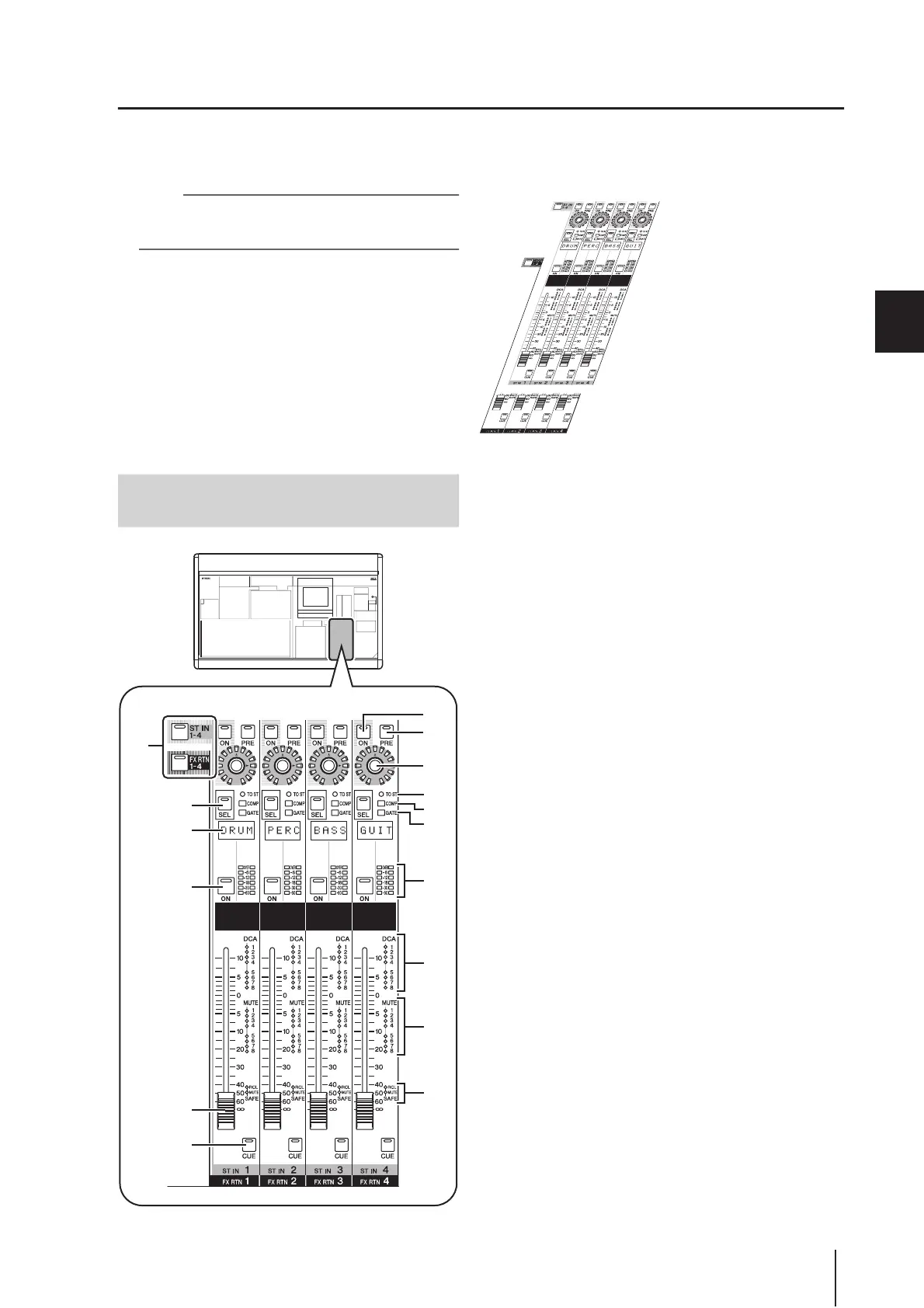
ST IN/FX RTN channel strip
In this section you can control the ST IN channels and FX RTN channels.
This section is layered as shown in the diagram below; choose the ST IN layer when you want to control the ST IN channels,
or the FX RTN layer when you want to control the FX RTN channels.
Note
If the console is cascade-connected to a DSP5D, you can use
user-defined keys (
➥
p.148) or the FADER MODE key
(
➥
p.149) to select a DSP5D layer.
A [ST IN 1-4]/[FX RTN 1-4] keys
These keys select the layer that will be controlled by the
ST IN/FX RTN channel strip. Press the [ST IN 1-4] key
to control ST IN channels 1–4, or press the [FX RTN 1-
4] key to control FX RTN channels 1–4.
Items
2–P below are the same as in the INPUT channel
strip (➥ p.45). However since FX RTN channels do not
have a gate or compressor, the [GATE] LED (
L) and
[COMP] LED (
K) are not used.
B [PRE] key
C ENCODER [ON] key
D Encoder
E [SEL] key
F Name indicator
G CH [ON] key
H Fader
I [CUE] key
J [TO ST] LED
K [COMP] LED
L [GATE] LED
M Meter LEDs
N DCA assign LEDs
O MUTE assign LEDs
P [RCL SAFE]/[MUTE SAFE] LEDs
FX RTN 1-4 layer
ST IN 1-4 layer
Items in the ST IN/FX RTN channel
strip
8
7
6
5
1
9
4
2
3
M
P
O
N
J
K
L


 To Next Page