18 Surround pan
142 PM5D/PM5D-RH V2 / DSP5D Owner’s Manual Operating section
This chapter explains how to use the surround pan functionality.
About surround pan
“Surround pan” is functionality that, when used with a multi-channel playback system, lets you place the signal of an input
channel in two-dimensional space or move the sound image between front/back and left/right. (To move the surround pan
image, you can use the mouse, the CURSOR [√]/[®]/[π]/[†] keys, or the MIX encoders etc.)
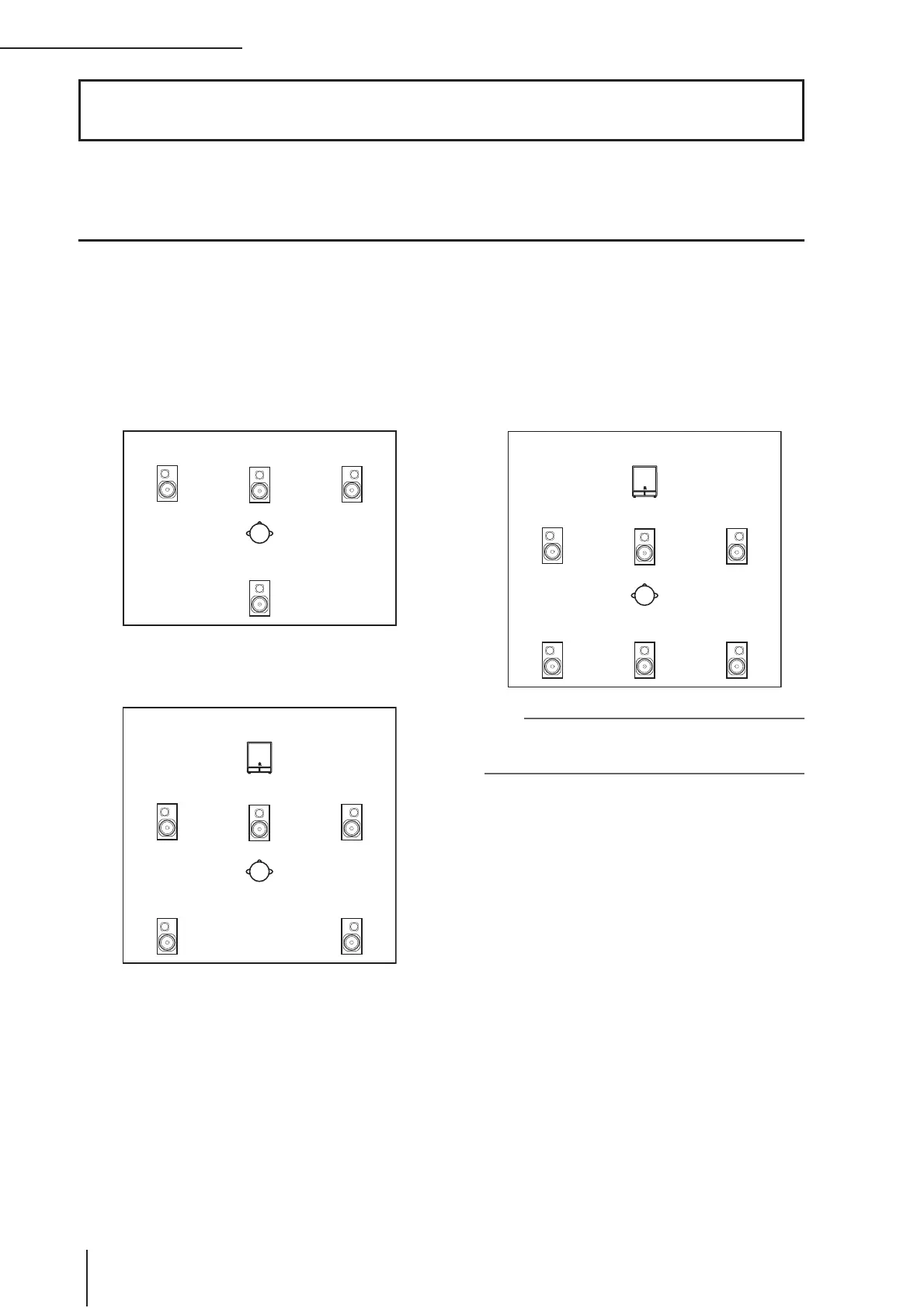
The PM5D lets you choose from the following three surround modes, depending on the number of channels in your sur-
round environment.
• 3-1ch
This mode uses four channels; left and right front,
front center, and rear (surround).
• 5.1ch
This mode uses six channels; left and right front, left
and right rear, front center, and subwoofer.
• 6.1ch
This mode uses seven channels; 5.1ch with the addi-
tion of rear center.
Hint
The surround mode can be selected in the MIXER SETUP
screen (SYS/W.CLOCK function) or SURR SETUP screen
(MATRIX/ST function).
18 Surround pan
Front L Center Front R
Rear (surround)
Subwoofer
Rear L Rear R
Front L Center Front R
Subwoofer
Rear L Rear R
Front L Center Front R
Rear center


 To Next Page