MON/CUE function
234 PM5D/PM5D-RH V2 / DSP5D Owner’s Manual Reference section
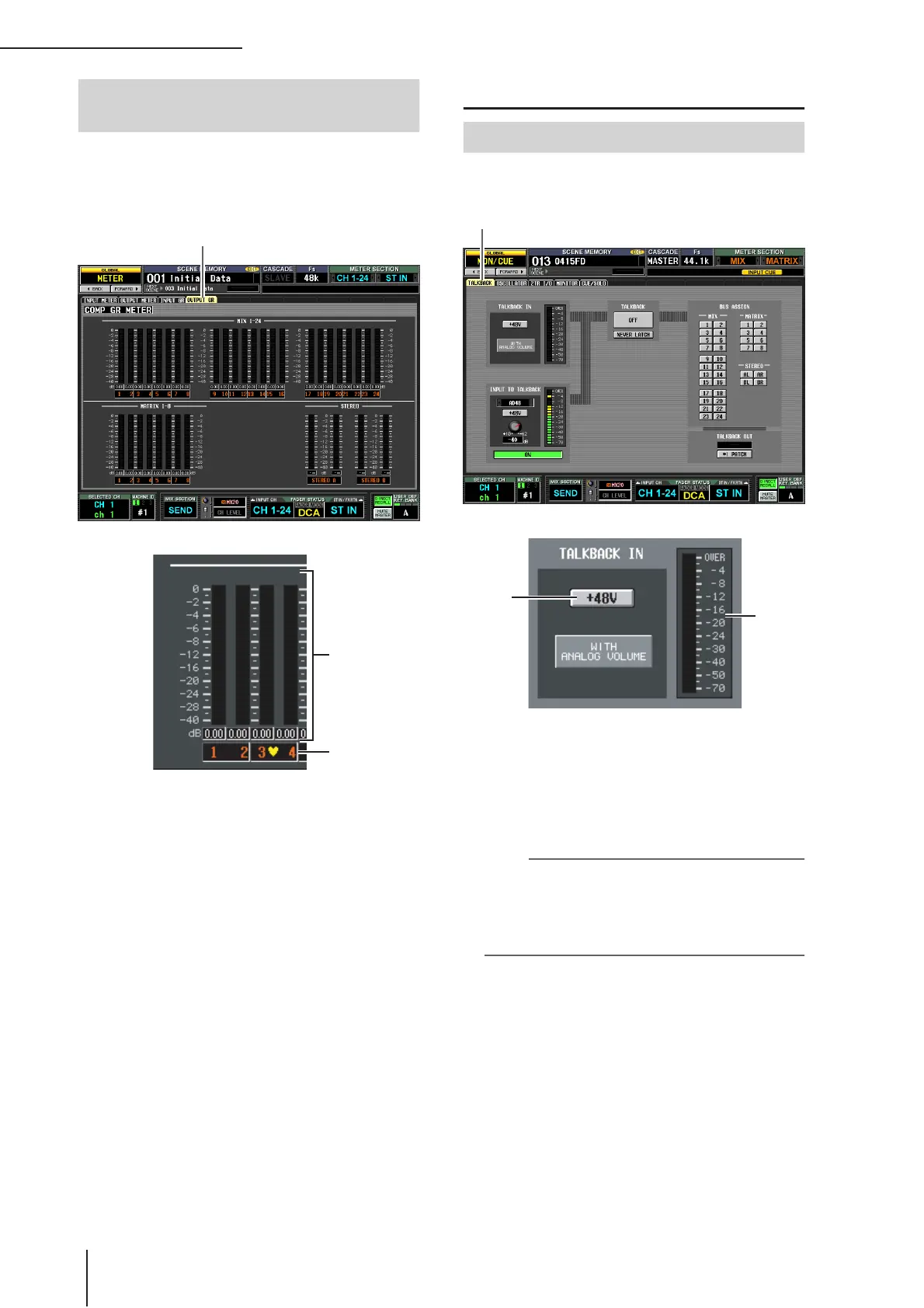
This screen contains meters that show the amount of gain
reduction produced by the compressor for each output
channel (MIX channels 1–24, MATRIX channels 1–8, STE-
REO A/B channels).
A Meters
These peak level meters indicate the amount of gain
reduction for each channel. The current master level
value is shown in the box below.
B Pair icon
This indicates the pairing status of two adjacent odd-
numbered/even-numbered channels.
MON/CUE function
In this screen you can switch talkback on/off, and select the
talkback destination.
A Level meter (TALKBACK jack level meter)
This level meter indicates the peak level of the signal
being input from the TALKBACK jack of the top panel.
B +48V (TALKBACK jack phantom power)
This button switches phantom power on/off for the
TALKBACK jack.
Note
• The WITH ANALOG VOLUME icon below the button indi-
cates that the LEVEL volume in the TALKBACK section of
the panel will affect only the signal being input from the
TALKBACK jack.
• If the DSP5D is selected, the TALKBACK IN field is not
displayed.
OUTPUT GR (Output Gain Reduction)
screen
OUTPUT GR
1
2
TALKBACK screen
TALKBACK
1
2


 To Next Page