OUTPUT EQ function
252 PM5D/PM5D-RH V2 / DSP5D Owner’s Manual Reference section
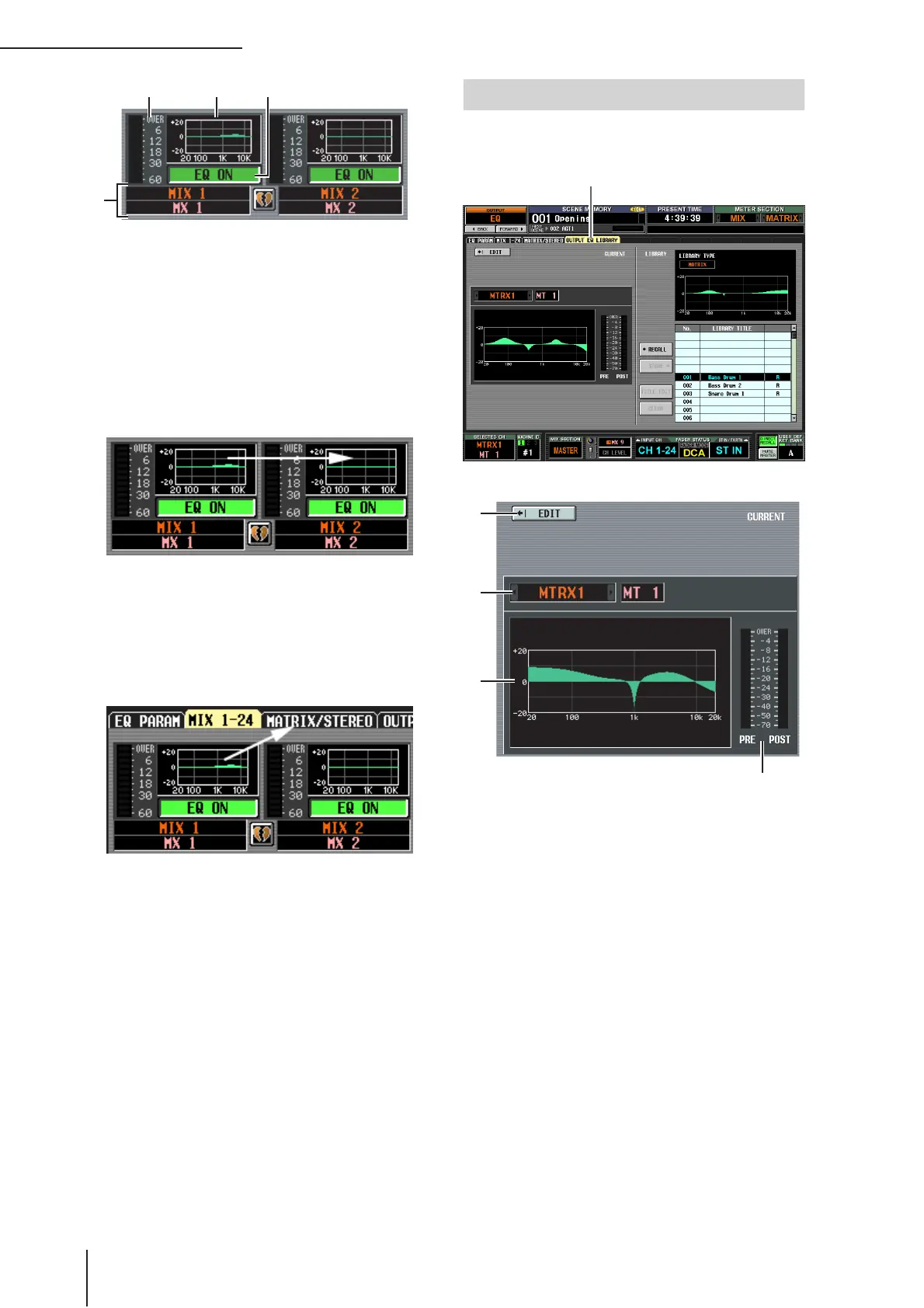
A EQ graph
This mini-graph shows the approximate EQ response
for each output channel.
When you click the graph at which the cursor is cur-
rently located, the EQ PARAM screen for that channel
will appear.
In this screen you can drag and drop the mini-graph
from the desired channel to copy its EQ settings.
(When you drag and drop the mini-graph, a message
will ask you to confirm the copy operation.)
You can also copy EQ settings between the MIX 1-24
screen and the MATRIX/STEREO screen. First drag the
mini-graph over the MIX 1-24 tab or MATRIX/STE-
REO tab in the screen (the screen will switch). Then
drag and drop the mini-graph onto the desired chan-
nel, and a message will ask you to confirm the copy
operation.
You can also copy settings between the eight-band EQ
of a MIX channel or STEREO A/B channel and the
four-band EQ of a MATRIX channel. In this case, only
the LOWER four bands will be copied for MIX chan-
nels or STEREO A/B channels.
B EQ ON/OFF (EQ on/off)
Turns the EQ on/off for that channel. This is linked for
paired channels.
C Channel
This is the number and name of the channel you are
editing. Two paired channels are indicated by a heart
symbol displayed between them.
D Level meter
This meter indicates the peak level after EQ. If the sig-
nal clips, the OVER segment will light.
Here you can recall, store, rename, or delete items in the
output EQ library.
A EDIT
When you click this button, the EQ PARAM screen for
the currently selected output channel will appear.
B Channel selection
Select the channel that you want to edit.
C EQ graph for the selected channel
This graph shows the approximate response of the EQ
for the currently selected channel.
D Level meter
These meters indicate the peak levels before EQ and
after EQ. If the signal clips before EQ, the OVER seg-
ment will light.
3
OUTPUT EQ LIBRARY screen
OUTPUT EQ LIBRARY
1
2
3
4


 To Next Page