PM5D/PM5D-RH V2 / DSP5D Owner’s Manual Reference section 271
Information shown
in the display
Function
menu
Global
functions
Output
functions
Input
functions
Appendices
• To switch the signal sent to the MATRIX bus on/off
Click the ON/OFF button located below.
You can also switch this on/off by moving the cursor to
a bar graph in the list and pressing the [ENTER] key.
The bar graph is colored blue when on, and gray when
off.
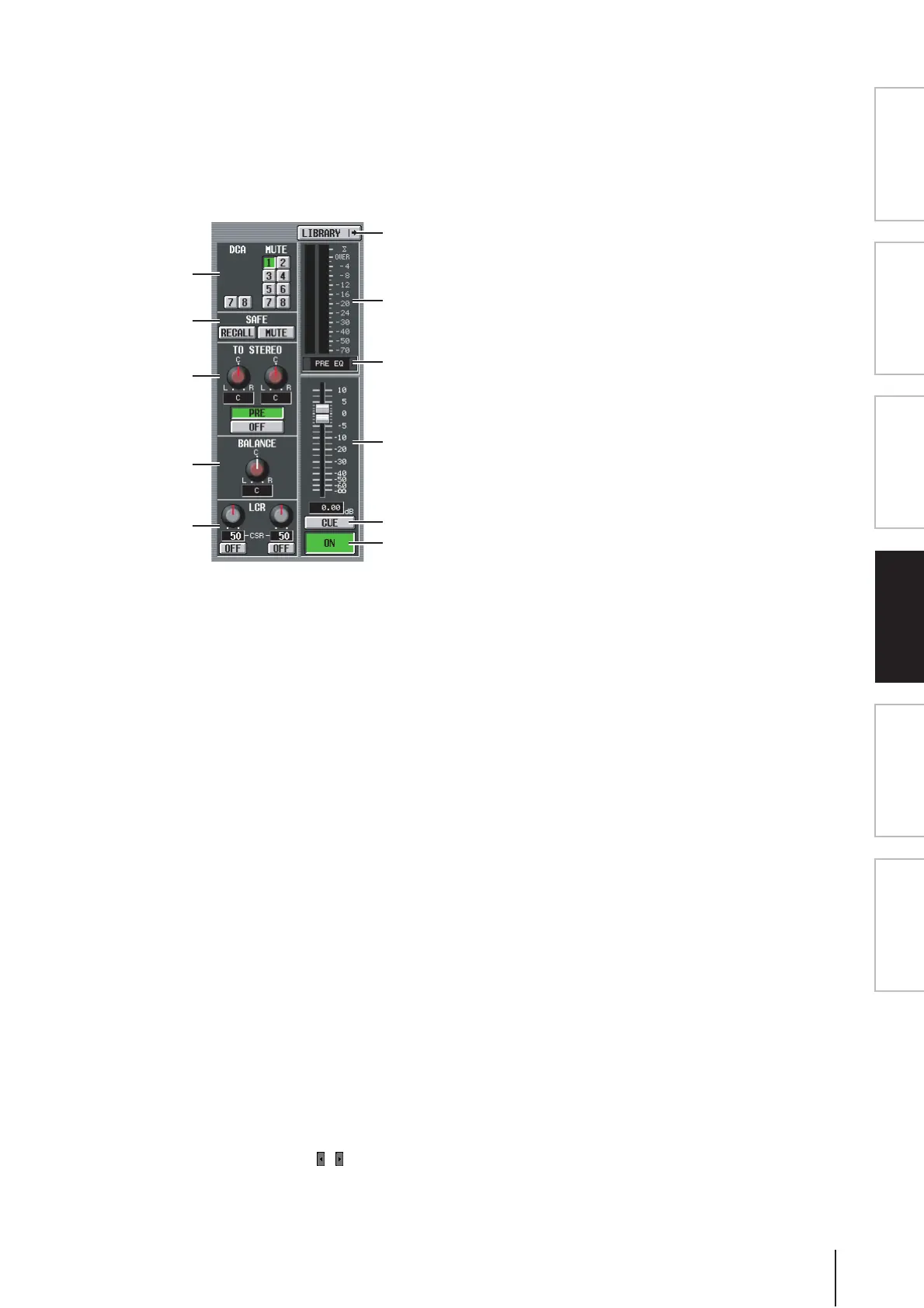
G DCA group / Mute group
Here you can assign or cancel DCA group and MUTE
group assignments.
H RECALL SAFE / MUTE SAFE
Here you can enable or disable Recall Safe and Mute
Safe settings.
I TO STEREO (MIX channels only)
Here you can switch the signal sent from a MIX chan-
nel to the STEREO bus on/off, and edit its panning and
send position (pre-on / post-on) (➥ p.264).
J BALANCE (only for paired MIX/MATRIX
channels and STEREO A/B channels)
This adjusts the left/right volume balance of the signals
output from paired MIX channels or STEREO A/B
channels.
K LCR (MIX channels only)
Here you can switch LCR mode on/off, and adjust CSR
(the level of the CENTER channel relative to the L/R
channels) (➥ p.267).
L LIBRARY
This button accesses the OUTPUT CH LIBRARY
screen (➥ p.275), where you can store/recall library
settings for output channels.
M Level meter
This level meter indicates the output level of the
channel.
N Signal detection point
This is the point at which the signal level shown in the
level meter (
M) is detected (PRE EQ, PRE FADER,
POST FADER, POST DELAY, or POST ON). You can
edit this setting by clicking the / buttons at the left
and right.
O Fader
This controls the output level of the channel.
P CUE
This button cue-monitors the signal of the channel.
This is linked with the [CUE] key of the corresponding
channel.
Q ON/OFF (Channel on/off)
This is an on/off switch for the signal that is output
from the channel. This is linked with the [ON] key of
that channel.
7
L
M
O
N
P
Q
8
9
J
K


 To Next Page