PAN/ROUTING function
300 PM5D/PM5D-RH V2 / DSP5D Owner’s Manual Reference section
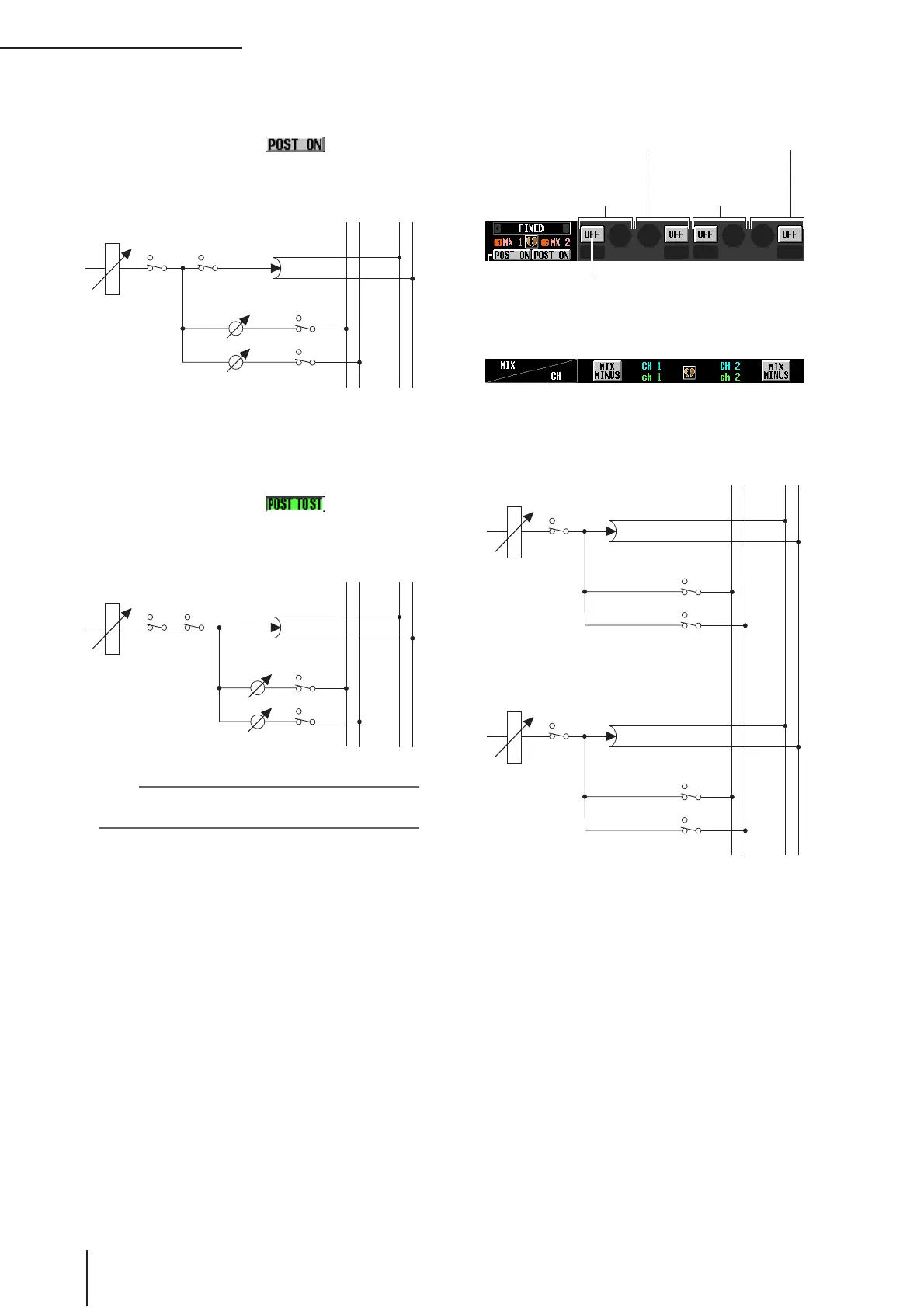
❏ POST ON
The signal will be sent from immediately after the
[ON] key.
POST ON/POST TO ST=
❏ POST TO ST
The signal will be sent from immediately after the [TO
STEREO] key.
POST ON/POST TO ST=
Hint
This setting applies to the signals sent from all input channels
to the corresponding MIX bus.
D CH to MIX (Channel to mix)
In this area, the signals sent from input channels / ST
IN channels (vertical columns) to MIX buses (horizon-
tal rows) can be switched on/off and their level
adjusted.
The buttons and knobs displayed here will differ
depending on the type (FIXED or VARI) of the send-
destination MIX bus, and on whether the MIX buses
are paired.
❏ Type = FIXED, Pairing = disabled
MIX1
MIX2
STEREO L
STEREO R
……
……
FADER
INPUT CHANNEL 1
ON TO ST
ON
ON
PAN
MIX1 (VARI)
LEVEL
MIX2 (VARI)
LEVEL
MIX1
MIX2
STEREO L
STEREO R
……
……
FADER
INPUT CHANNEL 1
ON TO ST
ON
ON
PAN
MIX1 (VARI)
LEVEL
MIX2 (VARI)
LEVEL
Input channel 1
↓
MIX bus 1
Input channel 1
↓
MIX bus 2
Input channel 2
↓
MIX bus 1
Input channel 2
↓
MIX bus 2
SEND ON/OFF button
On/off switch for the signal sent from
input channels to each MIX bus.
MIX1
MIX2
STEREO L
STEREO R
……
……
FADER
INPUT CHANNEL 1
ON
ON
ON
PAN
MIX1 (FIX)
MIX2 (FIX)
FADER
INPUT CHANNEL 2
ON
ON
ON
PAN
MIX1 (FIX)
MIX2 (FIX)


 To Next Page