5 Input channel operations
52 PM5D/PM5D-RH V2 / DSP5D Owner’s Manual Operating section
4
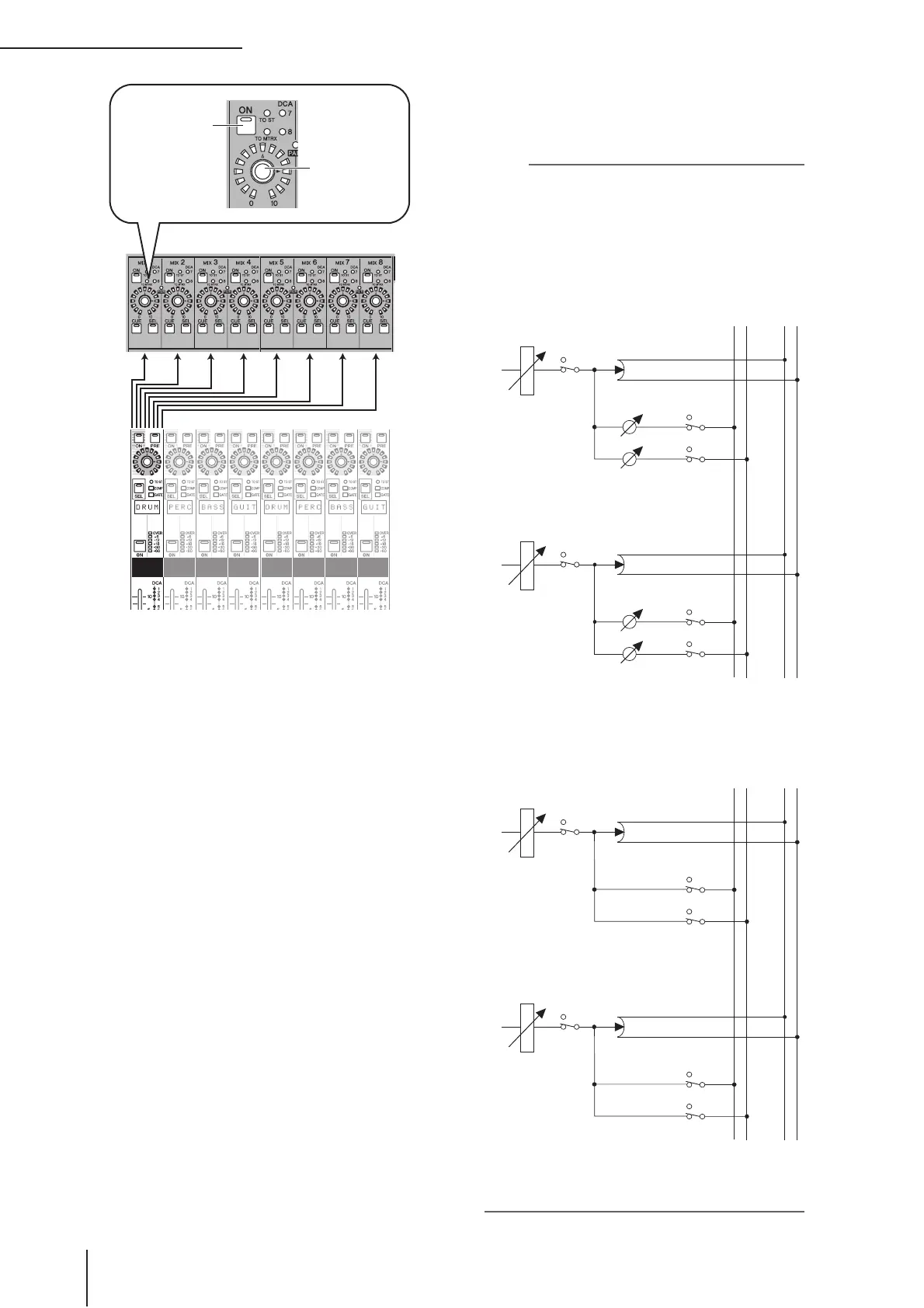
To turn off the signal sent from that channel
to a MIX bus, press the MIX [ON] key to turn it
off.
Press the MIX [ON] key once again to turn it back on.
Note
MIX buses can be switched (in units of two adjacent odd-num-
bered/even-numbered MIX buses) between VARI type (send
levels are variable) and FIXED type (send levels are fixed).
(For details on switching the type
➥
p.299)
If the send-destination MIX bus is set to FIXED mode, the MIX
encoders have no effect; the signal can only be switched on/
off by the MIX [ON] key.
MIX bus
Input channels
Switches the sig-
nal sent from the
input channel to
the MIX bus on/
off.
Adjusts the send
level of the signal
sent from the
input channel to
the MIX bus.
MIX1
MIX2
STEREO L
STEREO R
……
……
FADER
INPUT CHANNEL 1
ON
ON
ON
PAN
MIX1 (VARI)
LEVEL
MIX2 (VARI)
LEVEL
FADER
INPUT CHANNEL 2
ON
ON
ON
PAN
MIX1 (VARI)
LEVEL
MIX2 (VARI)
LEVEL
❏ When sending a signal from an input channel to
a VARI type MIX bus
MIX1
MIX2
STEREO L
STEREO R
……
……
FADER
INPUT CHANNEL 1
ON
ON
ON
PAN
MIX1 (FIX)
MIX2 (FIX)
FADER
INPUT CHANNEL 2
ON
ON
ON
PAN
MIX1 (FIX)
MIX2 (FIX)
❏ When sending a signal from an input channel to
a FIXED type MIX bus


 To Next Page