9
Setting Up
○○○○○○○○○○○○○○○○○○○○○○○○○○○○○○○○○○○○○○○○○○○○○○○○○○○○○○○○○○○○○○○○○
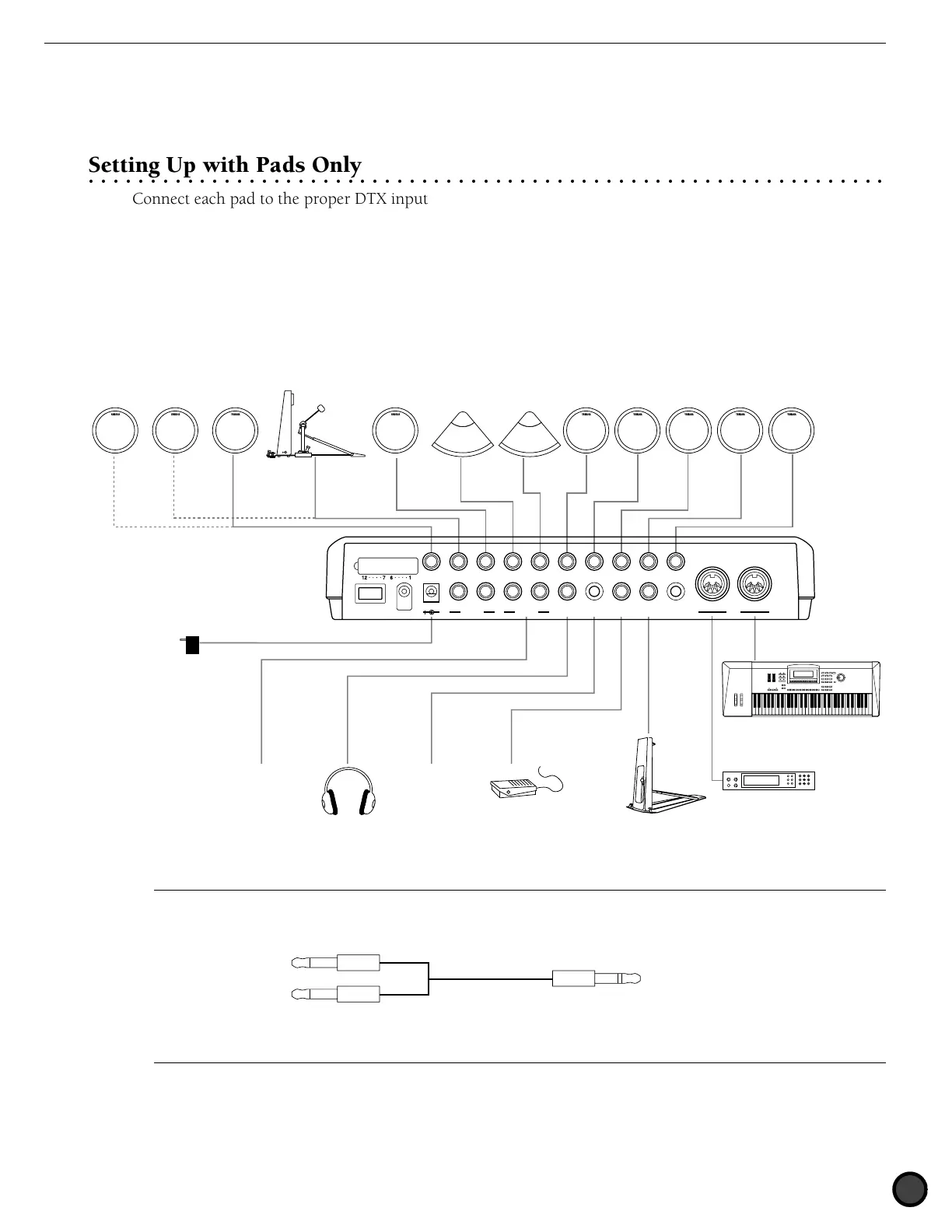
Setting Up with Pads Only
Connect each pad to the proper DTX input jack as shown below:
(This illustration is an example of the pads, triggers and devices that can be connected to the DTX. Refer to
P.8 for the types of pads or triggers that can be connected to each input jack.)
KP80,etc.TP80,etc.Additional Pads PCY80,etc. PCY80,etc. TP80,etc.TP80,etc. TP80,etc. TP80,etc. TP80,etc. TP80,etc.
MIDIkeyboard,etc.
MIDI tone generator,etc.
–
Audio output
FS-50,etc.
CD Player,etc.
HH80,etc.
Headphones
AC Power Adaptor
12/11
INPUT ATTENUATION
10/9 KICK
AUX OUT
8 H.HAT
7 CRASH
6 RIDE
5 TOM4
4 TOM3
3 TOM2
2 TOM1
1 SNARE
DC IN 12V
POWER
R L R L/MONO
PHONES
AUX IN
FOOT SW
H.HAT
CONTROL
OUTPUT
MIDI
CONTRAST
OUT
IN
A
To further add a pad, use a conversion cable (which separates the stereo plug to two monaural plugs) for INPUT 10/9 and 12/11 which enables
you to enter two different trigger signals. For most preset drum kits, a cupped cymbal voice is set to INPUT 10 and asuitable percussion voice for
each preset drum kit is set to INPUT 11 and 12.
Two monaural plugs Stereo plug
To the DTX Input 10/9 or 12/11To the pads
Conversion cable



 To Next Page