64
Feature Reference — Chain Play Mode
○○○○○○○○○○○○○○○○○○○○○○○○○○○○○○○○○○○○○○○○○○○○○○○○○○○○○○○○○○○○○○○○○
Selecting a Chain
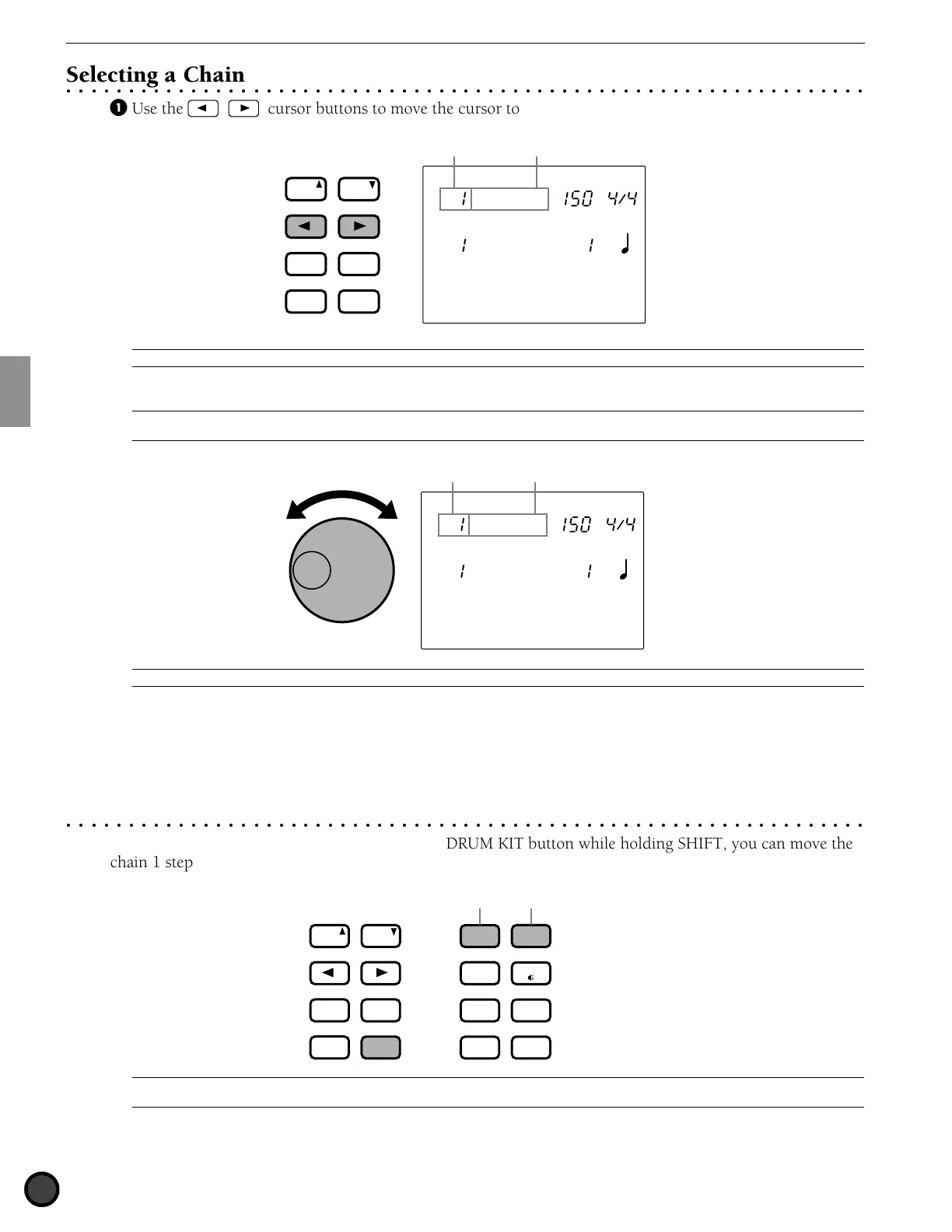
! Use the Q cursor buttons to move the cursor to the chain number focus area.
CHAIN
MISC.
SNARE
KICK
CYMBAL
TEMPO BEAT
MEASURE
CLICK
Chain 1
CityDogs
Chain nameChain number
PAGE
ERASE
SHIFT
+
1/YES
−
1/NO
TEMPO
MAIN B
FILL BA
ENDING
MAIN A
FILL AB
INTRO
PAGE
SONG
A
It is also possible to move up or down the LCD using the PAGE
¡
and PAGE
⁄
buttons.
" Select the chain number rotating the Data Scroll Wheel.
A
The LED display will show either the drum kit number set to the chain number, or the drum kit number that was chosen previous to entering the
Chain mode.
CHAIN
MISC.
SNARE
KICK
CYMBAL
TEMPO BEAT
MEASURE
CLICK
Chain 1
CityDogs
SONG
Chain nameChain number
A
You can also use the +1/YES and -1/NO buttons to change the chain number.
Settings:
The following chain numbers can be selected
1 to 16
○○○○○○○○○○○○○○○○○○○○○○○○○○○○○○○○○○○○○○○○○○○○○○○○○○○○○○○○○○○○○○○○○
Switching the Steps
Each time you press the TRIGGER button or the DRUM KIT button while holding SHIFT, you can move the
chain 1 step forward or backward, respectively.
+
DRUM
KIT
VOICE
TRIGGER
UTILITY
STORE
PATTERN
SONG
CHAIN
Move 1 step forward.Move 1 step backward.
PAGE
ERASE
SHIFT
+
1/YES
−
1/NO
TEMPO
MAIN B
FILL BA
ENDING
MAIN A
FILL AB
INTRO
PAGE
A
In order to quickly switch steps during live performances, it is recommended to use any 2 pad functions as a step-up/down switch (P.45). You
can also use the footswitch as a step-up/down switch (P.46).



 To Next Page