53
Feature Reference — Drum Kit Voice Edit Mode
1 VCE (voice)
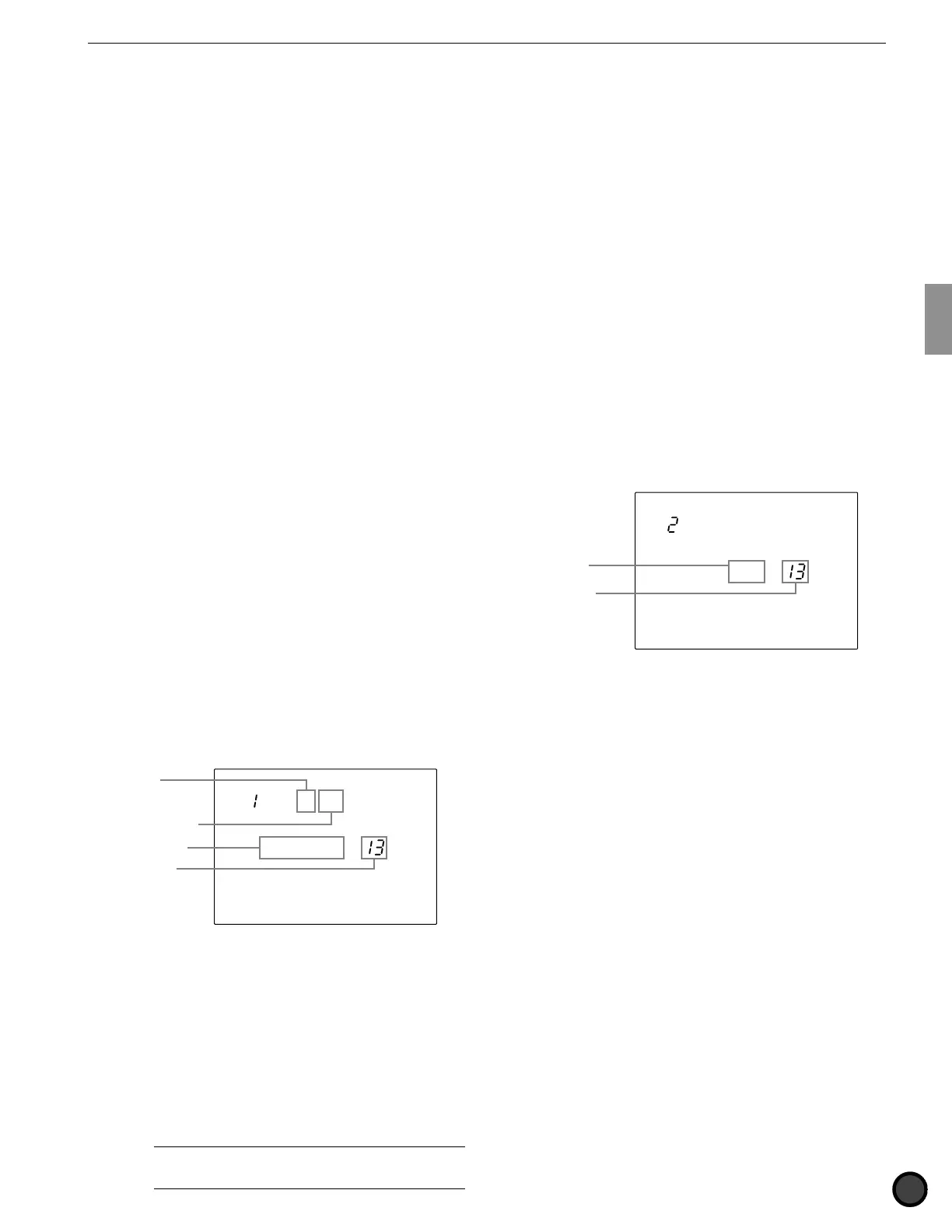
This assigns a drum voice (drum or percussion
sound) to each MIDI note number. Each voice
is grouped by category for easy handling as
follows:
K ................... Kick
S ................... Snare
T ................... Tom
C ................... Cymbal
P ................... Percussion
E ................... Effect
k ................... Keyboard
s .................... Strings
b ................... Bass
H ................... Hi-hat
! Move the cursor to the MIDI note number
focus area and rotate the Data Scroll Wheel
or use the +1/YES and -1/NO buttons to
choose the desired note number.
You can also enable the Learn mode (P.115)
to automatically select the MIDI note
number by hitting each pad or drum.
" Move the cursor to the group focus area or
voice number focus area and rotate the Data
Scroll Wheel or use the +1/YES and -1/NO
buttons to set the parameter. You can also
select by moving the cursor to the voice
name focus area and rotate the Data Scroll
Wheel or press the +1/YES or -1/NO
buttons. Check and audition the voice by
pressing the VOICE button.
# Repeat steps ! and " to set the voice for
each note number.
MISC.
SNARE
KICK
CYMBAL
VCE P 52
P SurdoM
Group
Voice number
Voice name
MIDI note
number
Settings:
The following group and voice numbers can be
selected for MIDI note numbers 13 to 84.
Group and voice number: off, K1 to 119: Kick, S1 to
250: Snare, T1 to 176: Tom, C1 to 105: Cymbal, P1 to
103: Percussion, E1 to 115: Effect, k1 to 21: Keyboard,
s1 to 8: Strings, b1 to 19: Bass., H1 to 12: (additional
hi-hat in V2) , Voice name: BD DRY1 to Sy Bass 3H
Refer to P.143 “Drum Voice List” for details on voice
name and voice number.
A
When you are assigning more than 2 pads (input jacks)
to the same MIDI note number, an asterisk “
✻
” will appear on
the right side of the letters “VCE” on upper level of the LCD.
2 Volume
This adjusts the volume of each voice assigned
to each MIDI note number. You can change the
balance among the voices in the drum kit.
! Move the cursor to the MIDI note number
focus area and rotate the Data Scroll Wheel
or use the +1/YES and -1/NO buttons to
choose the MIDI note number.
You can also enable the Learn mode (P.115)
to automatically select the MIDI note
number by hitting each pad or drum.
" Move the cursor to the Volume focus area
and rotate the Data Scroll Wheel or use the
+1/YES and -1/NO buttons to adjust the
volume. Press the VOICE button to audition
the volume.
! Repeat steps ! and " and set the volume
for each note number.
MISC.
SNARE
KICK
CYMBAL
Volume
= 110
Volume
MIDI note
number
Settings:
The following parameter can be set for MIDI note
numbers 13 to 84.
Volume: 0 to 127



 To Next Page