88
11
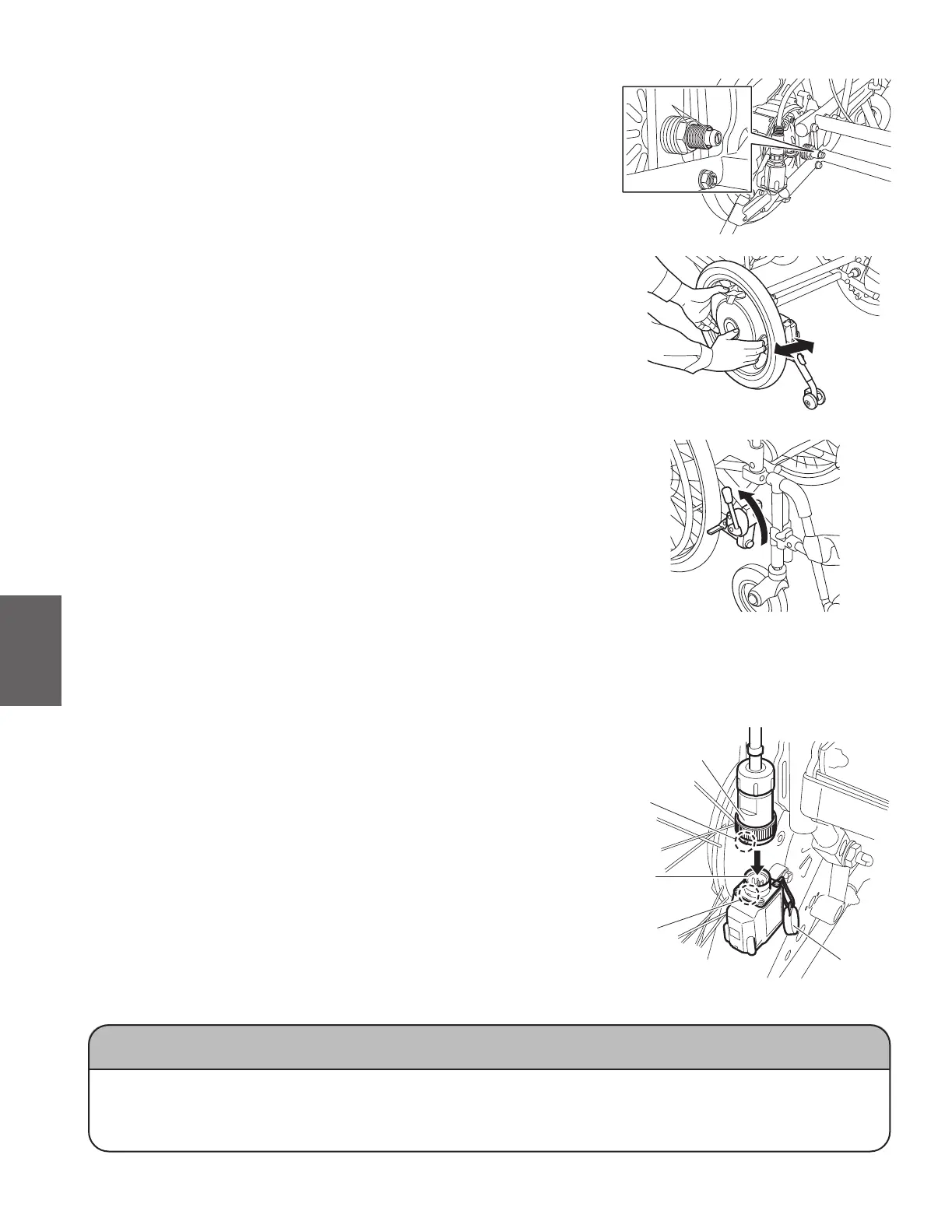
Push in each power unit completely. Check to ensure
that the two balls “a” on the end of the axle can be seen
completely.
White dot
Cap
Connector
(on the cable side)
Connector
(on the wheel side)
a
Pull each power unit to ensure that it will not come o.
Place the power units in their normal position, and then
apply the parking brakes.
Remove the cap from the connector on the left
wheel.
Align the white dot (arrow mark) on the connector
at the end of the cable with the white dot on the
connector on the wheel side, and then push in the
cable connector until it clicks.
Connect the cable with an L mark to the connector
with an L mark (on the wheel side), and connect
the cable with an R mark to the connector with an
R mark (on the wheel side).
Make sure that the connector will not be
disconnected.
NOTICE
● Whenyouinstalltherightwheelonmodelsthatfeatureanintegratedbattery,supportthe
battery storage compartment to prevent the wheel from turning. Otherwise, the wheel might
turn, possibly causing damage to the switch or the battery storage compartment.
White dot



 To Next Page