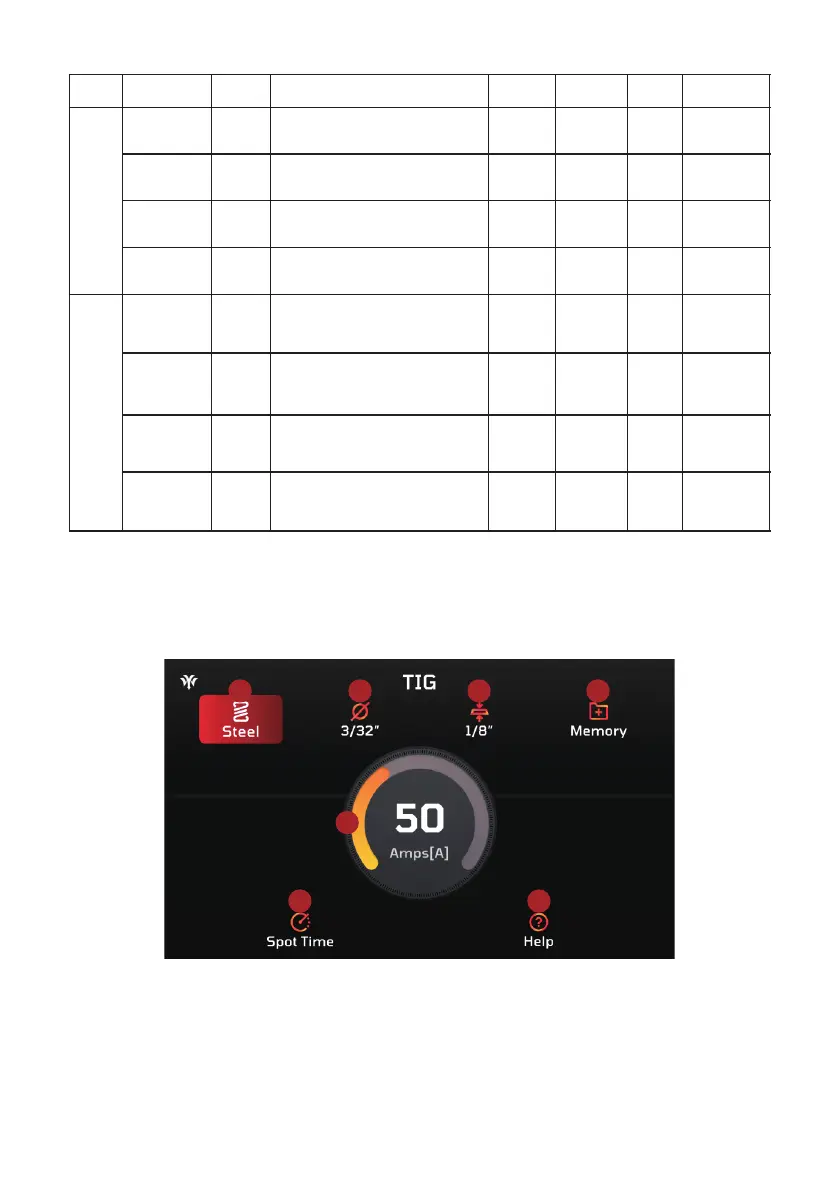
TIG Electrodes Specification Reference Table
2% Thoriated (Red)
2% Lanthanated (Blue)
2% Ceriated (Gray)
2% Thoriated (Red)
2% Lanthanated (Blue)
2% Ceriated (Gray)
2% Thoriated (Red)
2% Lanthanated (Blue)
2% Ceriated (Gray)
2% Thoriated (Red)
2% Lanthanated (Blue)
2% Ceriated (Gray)
2% Thoriated (Red)
2% Lanthanated (Blue)
2% Ceriated (Gray)
Rare Earth (Purple)
2% Thoriated (Red)
2% Lanthanated (Blue)
2% Ceriated (Gray)
Rare Earth (Purple)
2% Thoriated (Red)
2% Lanthanated (Blue)
2% Ceriated (Gray)
Rare Earth (Purple)
2% Thoriated (Red)
2% Lanthanated (Blue)
2% Ceriated (Gray)
Rare Earth (Purple)
This chart serves as a general guideline; actual results may differ based on welding methods, equipment calibration, and the
specific application.
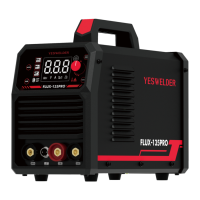
3.13.3 Overview of Basic TIG Parameters
1 2 3 4
7
5 6
1. Material Selection: Choose the material (steel or stainless steel) to set the appropriate welding parameters.
2. Tungsten Diameter Selection: Select the tungsten diameter (from 1/16" to 5/32") based on material and current. This affects arc
stability and heat distribution.
3. Thickness Selection: Set the machine to match material thickness (from 24 Ga to 3/8"). This ensures proper penetration and
weld bead formation, and aligns with the selected amperage and electrode diameter.
4. Memory Function: Access the memory settings with up to 20 memory slots for saving preferred welding parameters.
5. Spot Timer: Adjust the spot timer to control the weld duration, ensuring the desired weld quality and strength.
6. Help Function: Press to open the help information page for guidance.
7. Amperage Display: Shows the selected welding amperage on the main screen.
8. Real-time Amperage Display: Displays the real-time amperage during the welding process.
9. Pre-set Amperage: Shows the pre-set amperage as selected in the basic parameter page.
- 41 -
This section provides an overview of basic TIG parameters for welding tasks:



 To Next Page