OPERATION
Auto Focus equipment Auto Focus operation via the TFT display Carl Zeiss
06/2013 425131-7044-001 27
4.3 Auto Focus operation via the TFT display
• Press Home / Microscope and then XYZ on the TFT display.
• Select the Auto Focus tab.
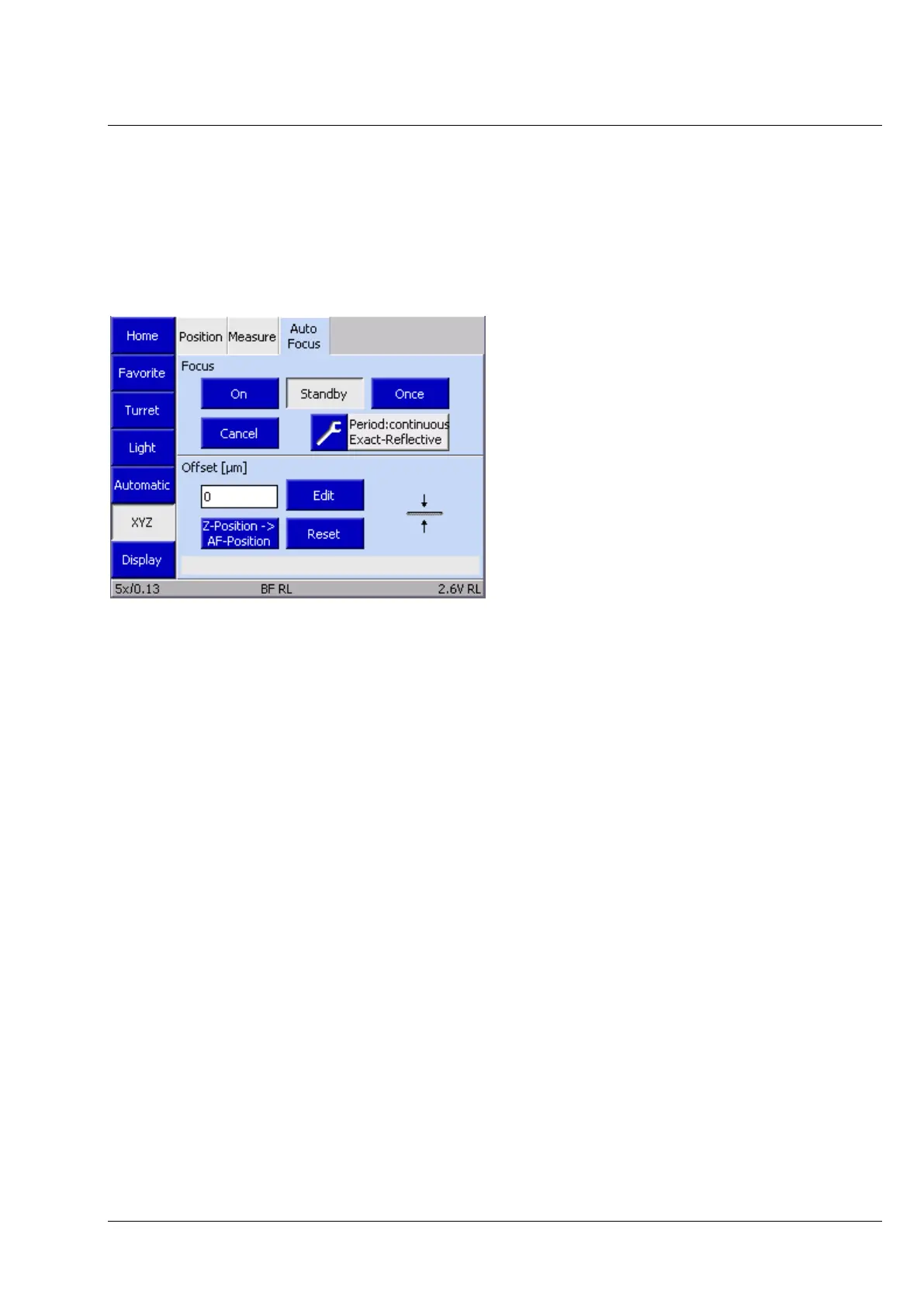
The current operating mode of the Auto Focus is shown in the Auto Focus (Fig. 13) tab - where it can
also be changed.
The operating status of Auto Focus can be changed using the following buttons.
Operating status of Auto Focus:
• On Turn on the Auto Focus
• Standby Turn off the Auto Focus, the Auto Focus is now in standby mode
• Once Perform one Auto Focus search
• Cancel Cancel the Auto Focus search
Auto Focus options:
• Options Call up / change the Auto Focus settings, see Setting up Auto Focus on
page 23.
Auto Focus offset:
Shows the current Offset [in µm] to the detected focus position of the Auto Focus. The offset to the
existing focus position is adjusted using the focus wheel on the microscope or via the software
(AxioVision, version 4.9.1 or later).
• Z-Position -> AF-Position Apply offset.
• Edit Manual setting of a specific offset value in ±µm.
• Reset Resets the offset value to 0.
13 TFT display, options in the Auto Focus tab




 To Next Page