Installation | 4.3 Removing the Transportation Lock
.3 Removing the Transportation Lock
Prerequisite ü The microscope is unpacked (see Unpacking and Setting up the Microscope [} 25]).
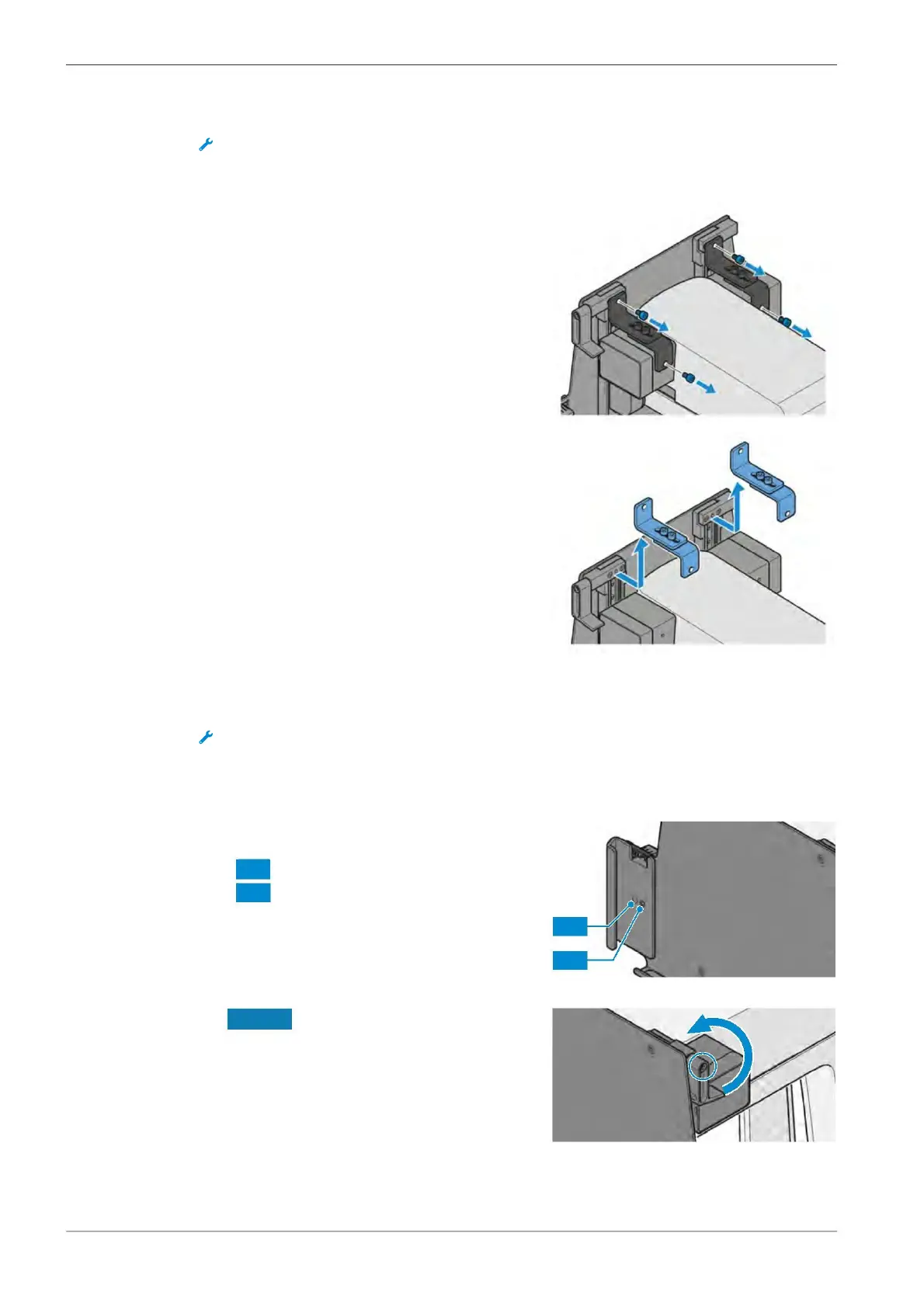
Procedure 1. Loosen two screws on each transportation
. Remove the transportation locks.
.4 Assembling the Tablet PC
Prerequisite ü The microscope is unpacked [} 25].
ü The transportation lock is removed [} 26].
Procedure 1. Attach the tablet handles to the tablet holder.
for Microsoft Surface Pro
for Apple® iPad Pro®.
. Put the Microsoft Surface Pro or the Apple® iPad Pro® on the tablet holder.
NOTICE The anti-theft device can cause
scratches on the Microsoft Surface Pro or
the Apple® iPad Pro®. To avoid scratches
its screw may only be fixed loosely.
Turn the anti-theft device down and fix its
screw.
Instruction Manual ZEISS Axiovert 5 digital | en-US | Rev. 1 | 431030-7021-101









 To Next Page