EasyManua.ls Logo

Zeiss Stemi 508 - Connecting Stereo Microscope to the Power Supply; Switching Stereo Microscope on or off

Zeiss Stemi 508
44 pages
Print Icon
To Next Page IconTo Next Page
To Previous Page IconTo Previous Page
Loading...
INSTALLATION Stereo microscope
ZEISS Connecting stereo microscope to the power supply Stemi 508
28 435064-7044-001 01/2015
3.4 Connecting stereo microscope to
the power supply
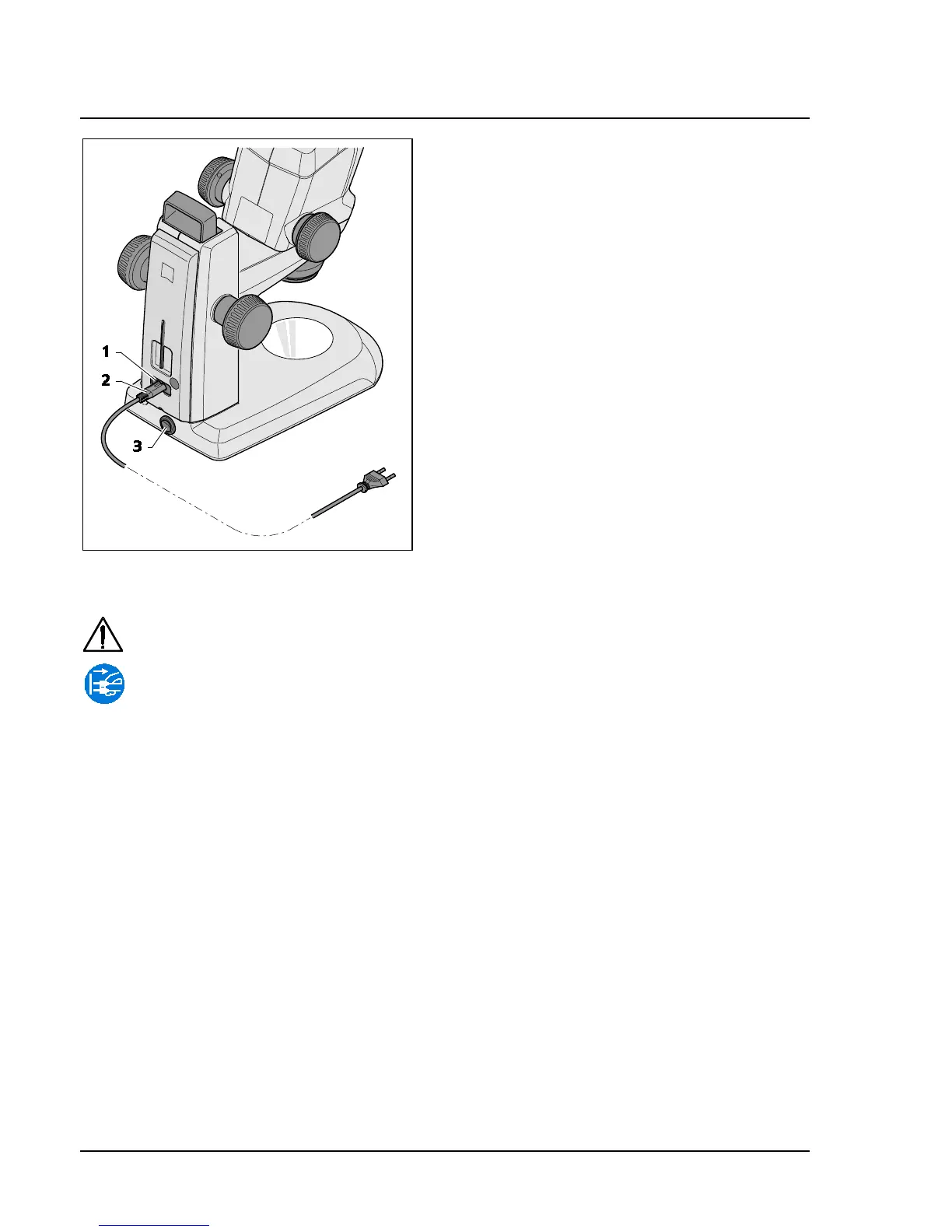
Insert the mains cable (Fig. 13/2) in the mains
supply socket (Fig. 13/1) of the stand.
Connect the mains cable (Fig. 13/2) to a mains
supply socket outlet.
3.5 Switching stereo microscope ON or
OFF
Use the power switch (Fig. 13/3) to switch the
stereo microscope ON or OFF.

Safe disconnection from the power supply is ensured exclusively by removing the mains plug.
The switch on the stereo microscope only switches into standby mode.
Do not replace detachable mains cables by inadequately designed mains cables. Only the
specified power supply lines may be used.
Fig. 13 Connecting the stereo microscope

Related product manuals