Stereo microscope OPERATION
Stemi 508 Setting reflected-light illumination ZEISS
01/2015 435064-7044-001 31
4.2.3 Ring illuminator
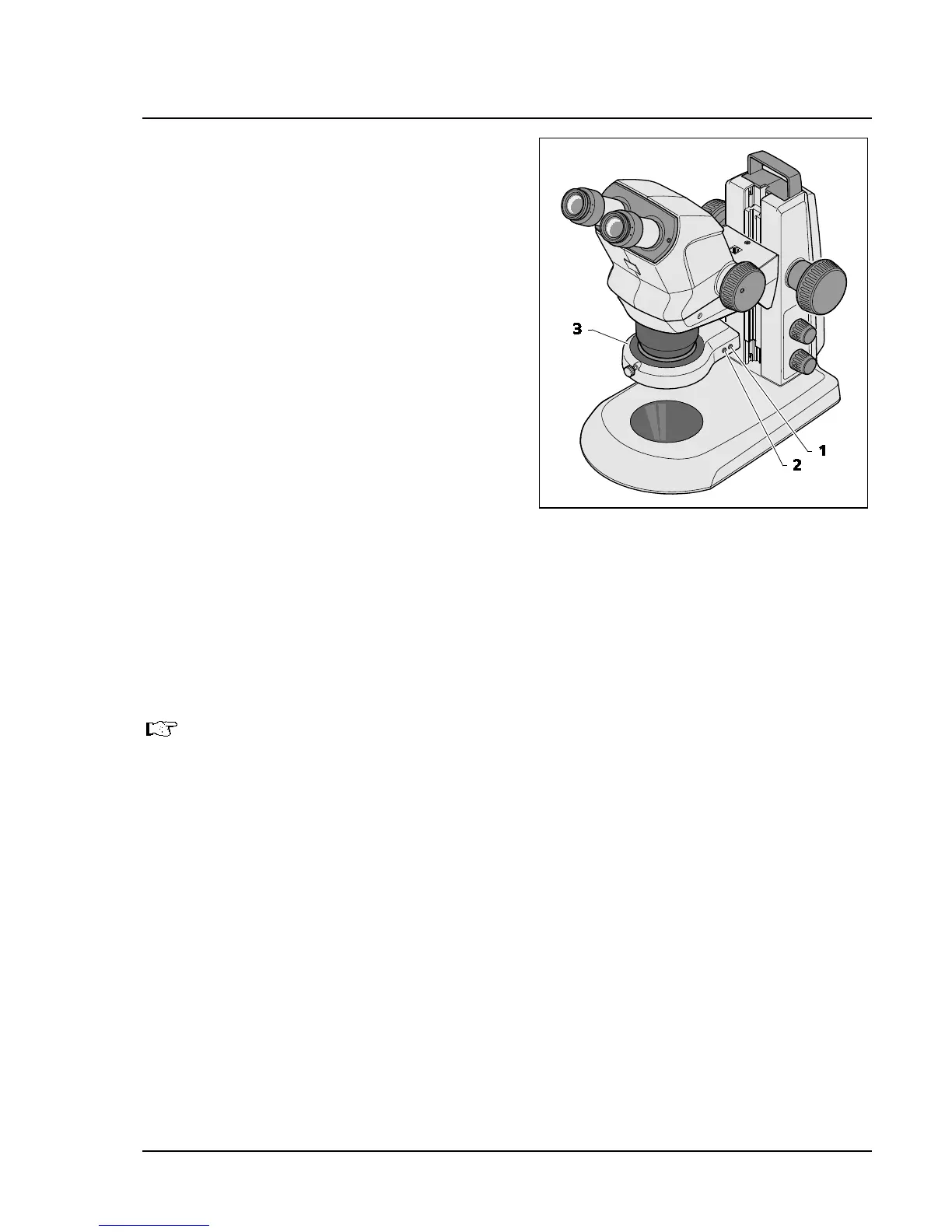
• By pressing the front button (Fig. 18/2)
successively, the user can change over between
four illumination states of the ring illuminator
(Fig. 18/3):
2. Press: semi-circle
3. Press: quadrant
4. Press: two quadrants
(opposite each other)
• When switching the semi-circle or quadrant
illumination ON, the specimen is first
illuminated from the rear (from the direction of
the stand column).
• By pressing the rear button once briefly
(Fig. 18/1), the adjusted segment is turned
forward clockwise by one quarter turn in each
case.
• By pressing and keeping the rear button
(Fig. 18/1) pressed for over 2 seconds, the
adjusted segment is set into continuous rotation
(rotation steps of 1/8 circle, 1 second per turn in
each case).
• By pressing the rear button once more (Fig. 18/1), rotation is stopped and the specimen is backlit
again.
For switching the illumination intensity ON and OFF and adjusting the illumination intensity
refer to Section 4.2, page 30.
Fig. 18 Ring illuminator










 To Next Page