CARE, MAINTENANCE AND SERVICE Stereo microscope
ZEISS Maintenance Stemi 508
36 435064-7044-001 01/2015
5.2 Maintenance
5.2.1 Replacing the power unit
device is opened.
• Remove the mains plug of the power cable
from the socket.
• Remove the power cable from the back of the
device.
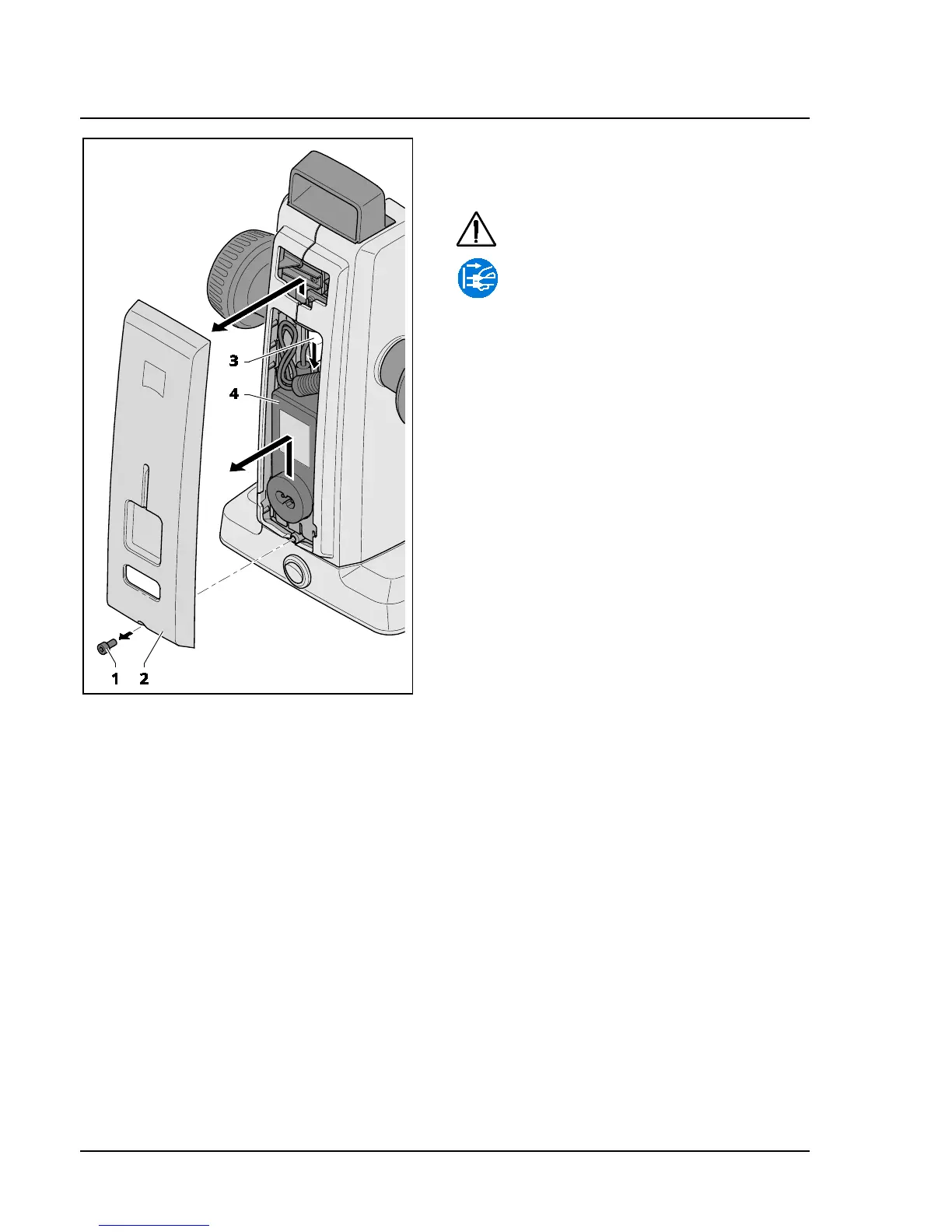
• Use an Allen key to release the screw (Fig. 22/1)
on the underside of the housing cover.
• Pull off housing cover (Fig. 22/2) slightly at the
bottom, then press it upwards.
• Release the plug (Fig. 22/3) and remove the
faulty desktop power unit (Fig. 22/4).
• Insert the new desktop power unit and connect
the plug.
• Press the upper part of the housing cover into
place and push housing cover down.
• Secure housing cover by means of the screw.
• Insert the power cable on the back of the
device.
• Insert the mains plug into a mains supply
socket.
Fig. 22 Changing the power unit










 To Next Page