17
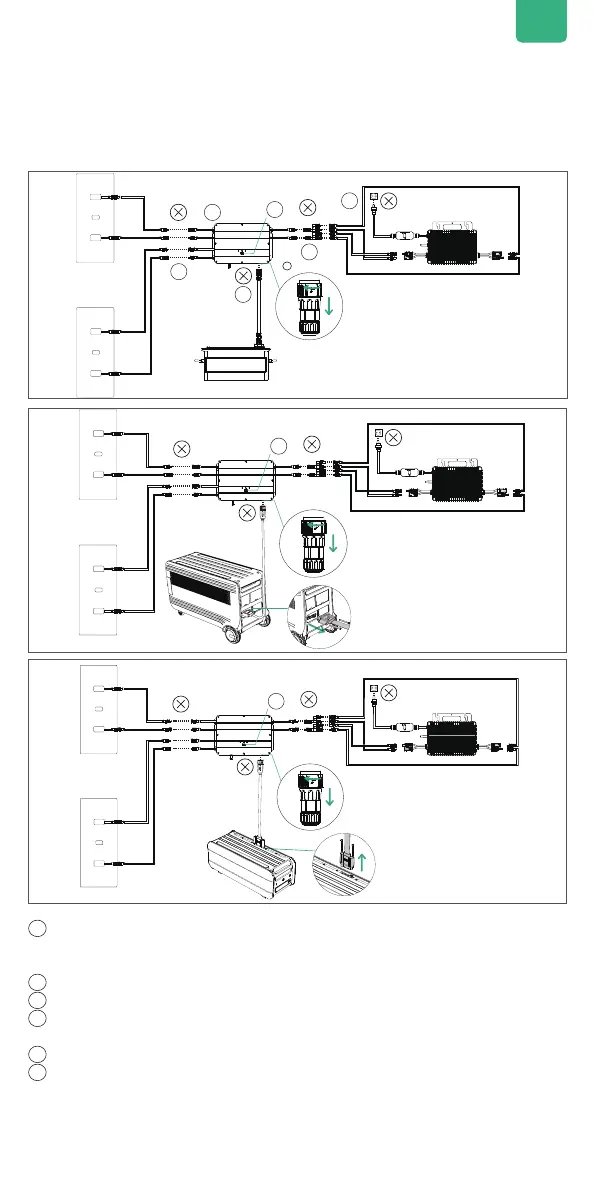
5.3.9 Disconnection of SolarFlow
1
4
5
6
2
3
5
1
First turn off SolarFlow . Press and hold IOT Button for 6s to shut off SolarFlow.
If battery is SuperBase V / Satellite Battery , then also hold its Power Button for 6s to
switch it off .
2
Disconnection of home grid,un plug the cables of Microinverter and home shuko.
3
Disconnection of solar panels,unplug the cables of the two solar panels and Hub 2000.
4
Disconnection of AB1000 or AB2000 or SuperBase V or Satellite Battery ,Unplug the cables
of Hub 2000 and AB1000 or AB2000 or SuperBase V or Satellite Battery.
5
Disconnection of m Microinverter,unplug the cables of Microinverter and Hub 2000.
6
Unscrew the mounting screws of Hub 2000 and Microinverter, remove Hub 2000 and
Microinverter from the wall.
Tips: During the disassembly, please pay attention to storing and keeping all the parts for re-
installation.
Tips:
Before disconnecting, please turn off SolarFlow
Press and hold IOT Button for 6s to shut off SolarFlow.
If battery is SuperBase V / Satellite Battery and still working , then also
hold its Power Button for 3s to switch it off .
EN
1
4
5
6
2
3


 To Next Page
 Loading...