6
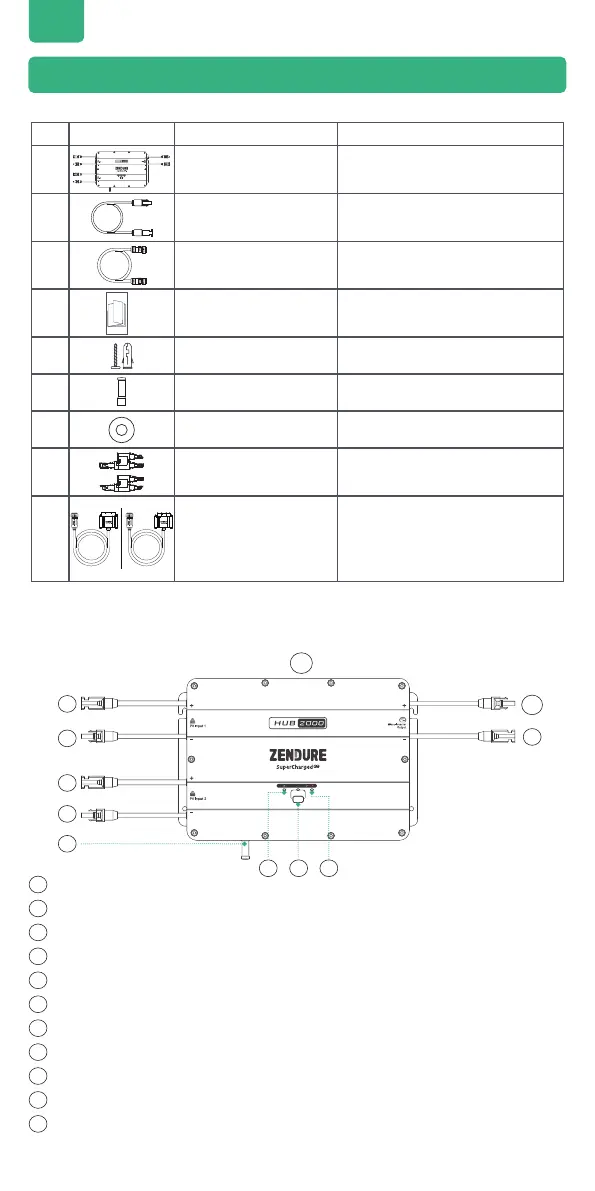
Button:
TOP
MC4 Connector PV Input 1 positive electrode
MC4 Connector PV Input 1 negative electrode
MC4 Connector PV Input 2 positive electrode
MC4 Connector PV Input 2 negative electrode
Aerial
Hub Status Indicator
IoT Button & Indicator
Battery Status Indicator
MC4 Connector Microinverter Output positive electrode
MC4 Connector Microinverter Output negative electrode
5.2 Product Overview
1
1
2
2
6
6
3
3
7
7
8
8
9
9
10
10
11
11
4
4
5
5
EN
5. Getting Started
5.1 What’s in The Box
No. Picture Name
1
Hub 2000
2
4*Microinverter Cable
0.6m
Microinverter Cable: Used for
Microinverter connection.
3
Battery Cable 1.5m
Battery Cable: Used for AB1000
orAB2000 connection.
4
User Manual
5
6* Mounting Screws
M4.7*39mm
Mounting Screws: Hooking up Hub
2000 and Microinverter.
6
1* Aerial
7
2* Flat Washeret
Flat Washeret: Used to xed the
Microinverter.
8
A Set of MC4 Y connectors
1-to-2
* 9
1*Hub to SBV Cable
or Hub to Satellite
Battery Cable
* Battery Cable: Hub to SBV Cable or Hub
to Satellite Battery Cable (not included).
This will be needed in order to connect
Hub 2000 to a SuperBase V or Satellite
Battery.


 To Next Page