Smart Connect Single Loop Touch Screen Panel
Doc: GLT-229-7-1 52
Issue: 3
Date: 12/05/2017
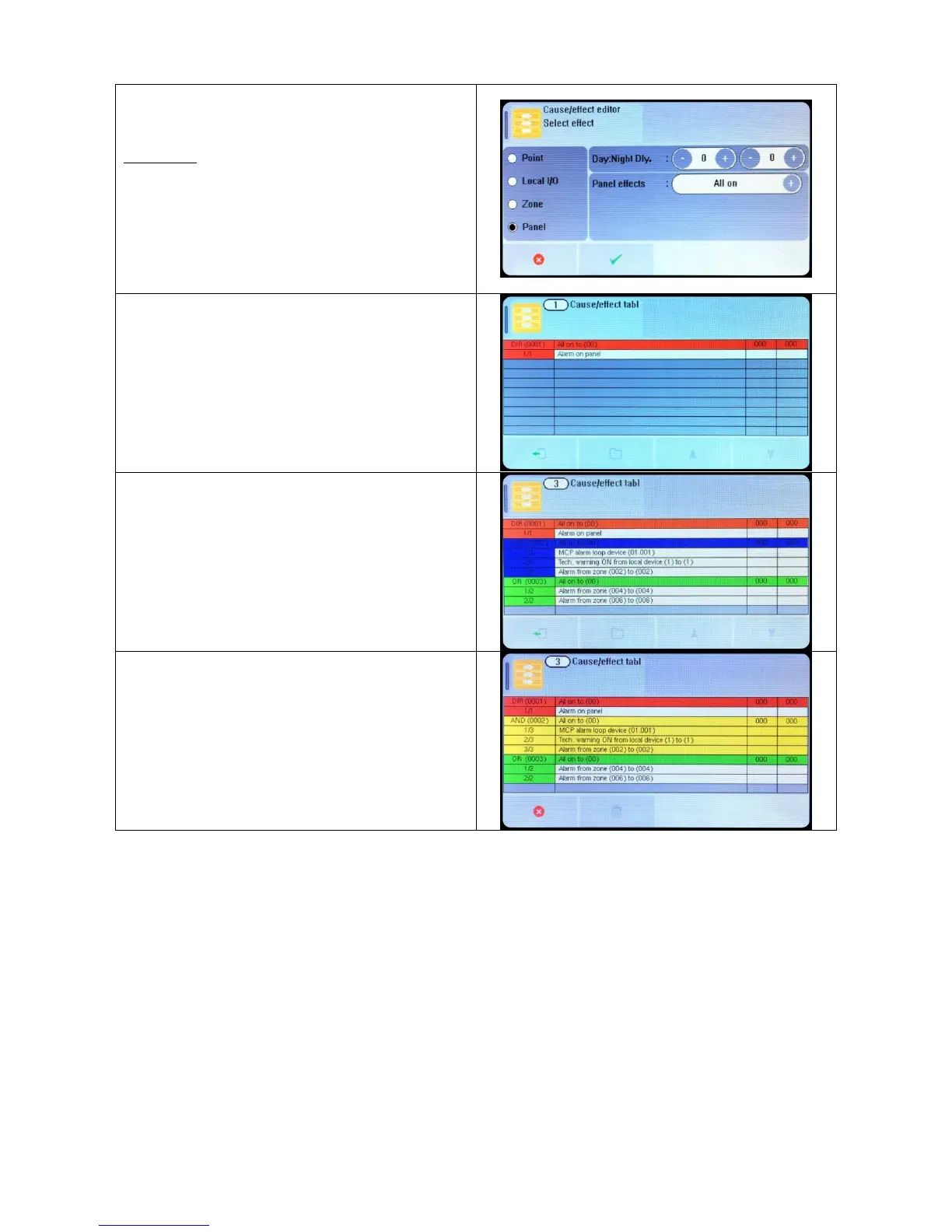
For a panel OUTPUT, the options are:-
Day Delay (seconds)
Night Delay (seconds)
Panel Effects:
All On Sounder + Beacon Off
Alarm + Beacon Relay On
Alert + Beacon Relay Off
Emergency + Beacon All Off
Alarm Disable Sounder
Alert Enable Sounder
Emergency Disable Relay
Beacon Enable Relay
The panel shows the Programmed cause and effect.
It shows:
First row
Event type (DIRect, AND, OR), and entry number
The programmed output.
Day time delay
Night time delay
Second row
Input number & number of inputs (for And & OR statements)
Description of input
The panel displays direct actions with a red header, AND actions
with a blue header, and OR actions with a green header.
It is not possible to edit a programming line. If a line needs to be
altered it must be deleted (tap so that it turns yellow), then the
new statement entered.


 To Next Page