Smart Connect Single Loop Touch Screen Panel
Doc: GLT-229-7-1 46
Issue: 3
Date: 12/05/2017
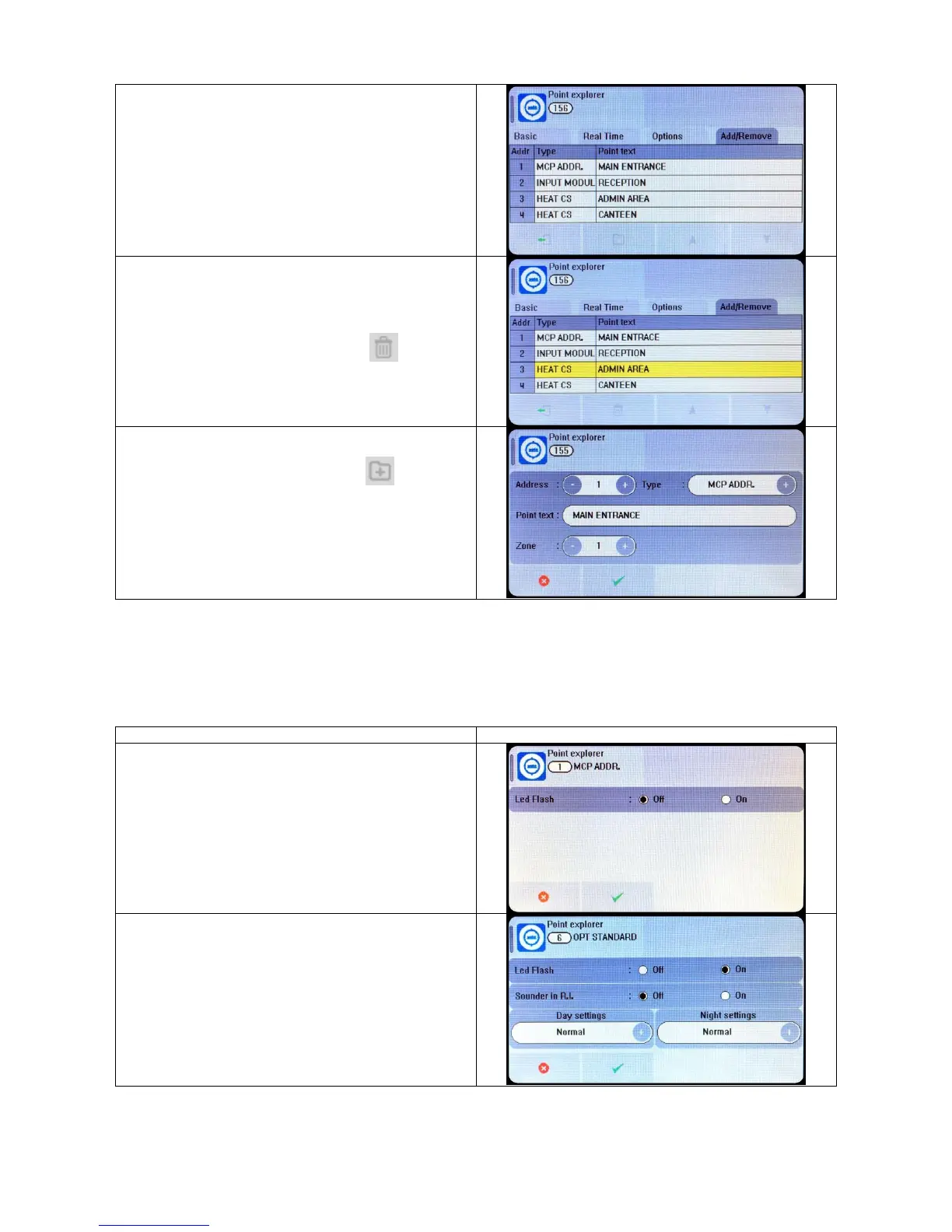
The Add / Remove tab allows devices to be manually added or
removed from the system. This is useful if it is not possible to
perform a loop learn (eg, if a detector is to be changed to a
different model, and the replacement is not available, or, if the
loop is disconnected to perform maintenance / repair work)
To manually remove a device, tap the device so that it is
highlighted yellow, then press the delete icon
To manually add a device, press the add icon
Select the address and device type of the item being added.
Enter the point text for the device, and select which zone it will
be in.
7.8 SETTING DEVICE OPTIONS
Each Smart Connect device has a number of configuration settings that can be programmed at the panel. The configuration screen
is accessed by selecting the device on the options tab. The options for each device are:-
MCP (ZT-CP3/AD)
Manual Call point
Available options:
LED flash
SMOKE DETECTOR (MK-II AOP)
OPTICAL SMOKE DETECTOR
Available options:
LED flash
Sounder R.I.
Day Setting (Off/Low/Normal/High)
Night Setting (Off/Low/Normal/High)


 To Next Page