Smart Connect Single Loop Touch Screen Panel
Doc: GLT-229-7-1 65
Issue: 3
Date: 12/05/2017
9.1 DISABLEMENTS
To aid commissioning and assist routine maintenance checks, various functions of the Smart Connect fire alarm system can be
disabled. The Smart Connect allows Disablement of Inputs in a zone, Outputs in a zone, a whole zone, or individual devices.
9.2 ZONE DISABLEMENT
When a zone is disabled, the panel will not respond to any fault or fire signals it receives from that zone.
This might be used if the system requires routine maintenance, and the user needs the rest of the system to continue running, but
doesn’t want spurious false alarms.
The panel will respond in the usual manner to any events in any non-disabled zones.
Any number of zones can be disabled, but it is good practice to only disable one zone at a time.
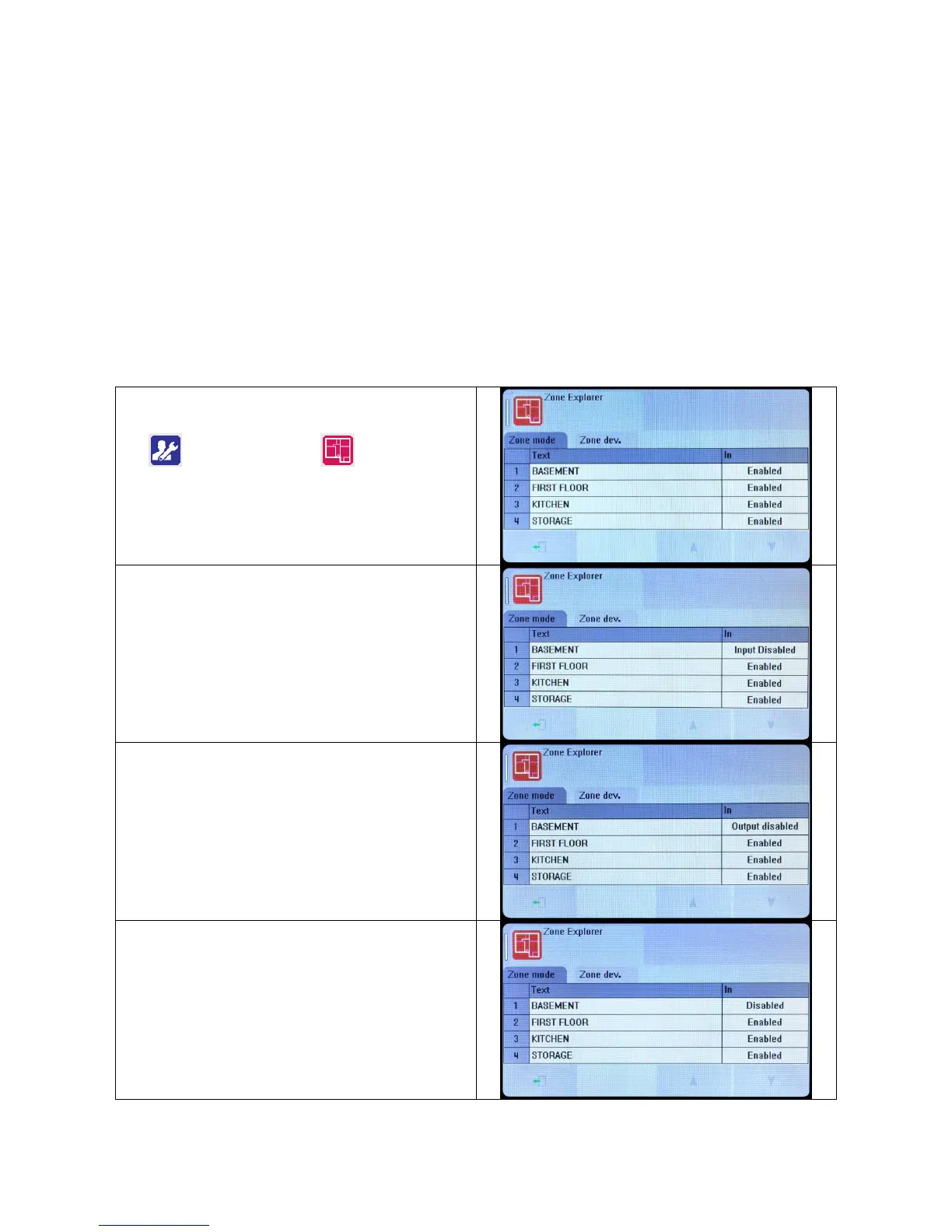
A zone can be disabled as follows:
Enter the Engineer or User Password, Press the menu access
icon , and select the zone Icon
(The disabling function is available to engineer & users).
The panel shows the Zone menu
Select the Zone to Disable by pressing the “In” field. The status
changes from enabled to Input Disabled.
This would disable all detectors, manual call points, and Input
interfaces in that zone.
Select further zones in the same way, or Press exit to save.
For further options, press the “In” field again.
The status changes from Input Disabled to Output Disabled.
This would disable all Sounders and Output interfaces in that
zone.
For further options, press the “In” field again.
The status changes from Output Disabled to Disabled.
This would disable everything in that zone.


 To Next Page