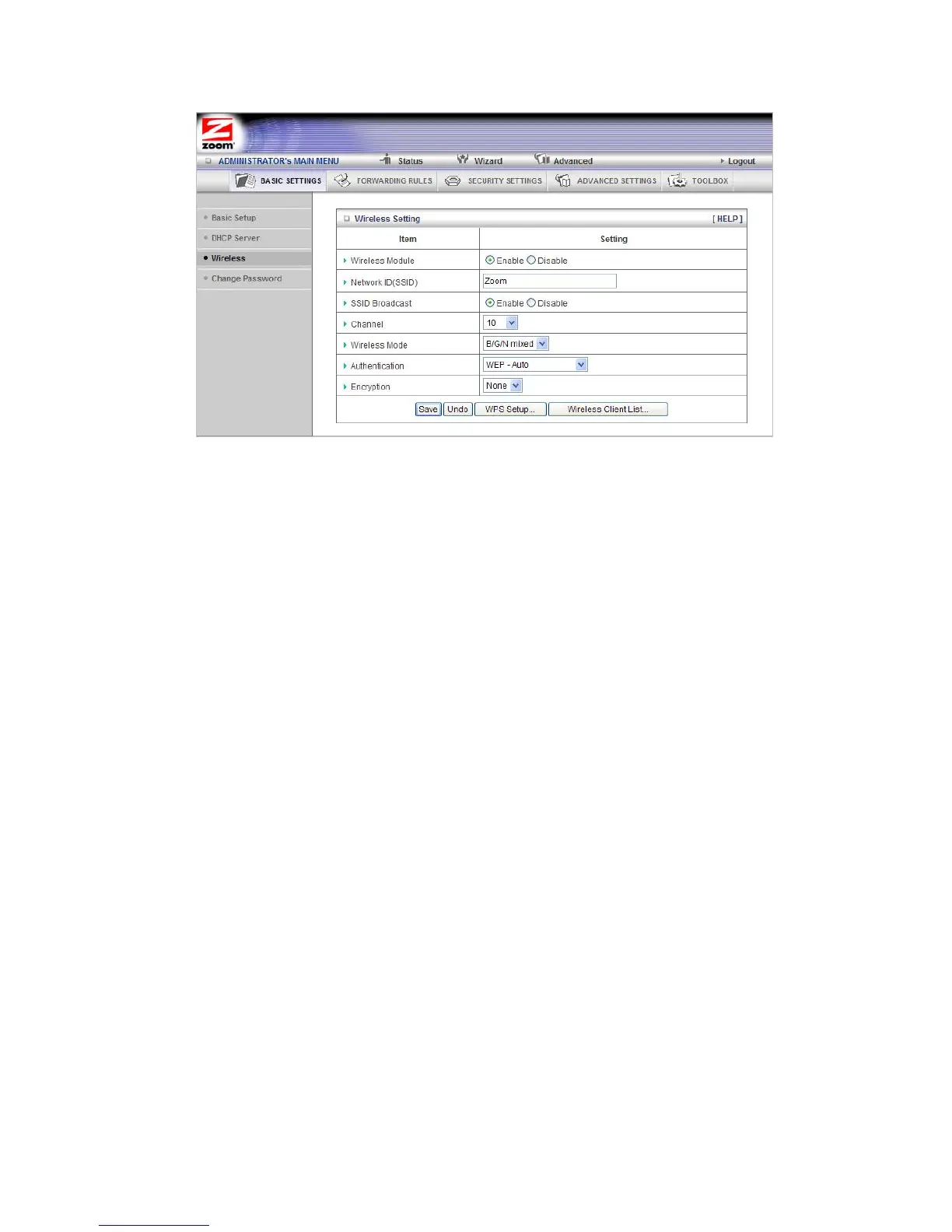
• Wireless Module
Accept the default, Enable. Click the Disable checkbox only if you do not want
wireless clients to access your network.
•
Network ID (SSID)
Refers to the
Service Set Identifier for your device. By default, the SSID for
the Travel Router with Wireless-N is
Zoom. You can change the SSID to a
name of your choice. The SSID can be up to 32 alphanumeric characters. If
you change the name, make sure that all devices on your network use the
new SSID as the access point.
• SSID Broadcast
To hide your network's SSID name, which disables automatic broadcasting
of the SSID and makes the wireless access point (your router) invisible to
wireless clients on the network, click the Disable radio button.
•
Channel
Refers to the wireless network channel assigned to your LAN. By default,
the Travel Router uses channel 10.
• Wireless Mode
Accept the default, B/G/N mixed if the client devices on your network use
various wireless standards. Otherwise, select the wireless standard used by
all wireless devices on your network. Having a single standard will speed up
the wireless throughput.
• Authentication
Select an Authentication method for all devices on your wireless network. If
you are using gaming devices that require WEP, then you must configure all
devices with this method.
39



 To Next Page