Home
Zoom
Camcorder
Q8
Page 23 (Adjusting the Angle of View)
Zoom Q8 - Adjusting the Angle of View
53 pages
Manual
Save Page as PDF
To Next Page
To Next Page
To Previous Page
To Previous Page
Loading...
Adjusting the angle of view
22
Adjusting the angle of view
Y
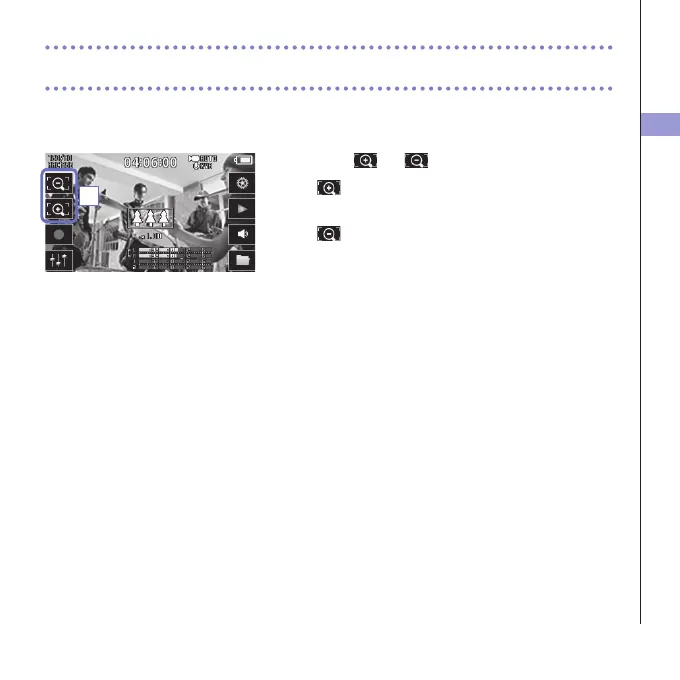
ou can set the digital zoom to one of five levels.
1.
T
ouch
and
on the Main Screen.
:
Zoom in.
Close in on the central subject.
:
Zoom out.
Record more of the scene.
1
22
24
Table of Contents
Main Page
User Guide
1
Table of Contents
2
Contents
2
Parts and Their Functions
3
MIC Overview
6
Connecting Mics to Inputs 1 and 2
8
Display Overview
9
Charging the Battery
12
Turning the Power on and off
13
Setting the Date and Time
14
Formatting SD Cards
15
Recording Mode Overview
16
Selecting Tracks to Record
20
Adjusting Recording Levels
22
Adjusting the Angle of View
23
Recording
24
Audio Monitoring Settings
25
Recording Mode Settings
26
Camera Settings
28
Playing Recordings
29
Deleting Recordings
32
Mixer Screen Settings
33
Headphones/Line and HDMI Output
41
USB Connections
42
LCD Rotation and FILE List
44
System Settings
45
Updating the Firmware
46
Troubleshooting
47
Specifications
48
Safety Precautions
49
Usage Precautions
50
Warnings and Requests Regarding Safe Battery Use
51
Other manuals for Zoom Q8
Firmware Update Guide
8 pages
Related product manuals
Zoom Q4
34 pages
Zoom Q4n
48 pages
Zoom Q3HD
24 pages
Zoom Digital Camcorder
4 pages



 To Next Page