System settings
44
System settings
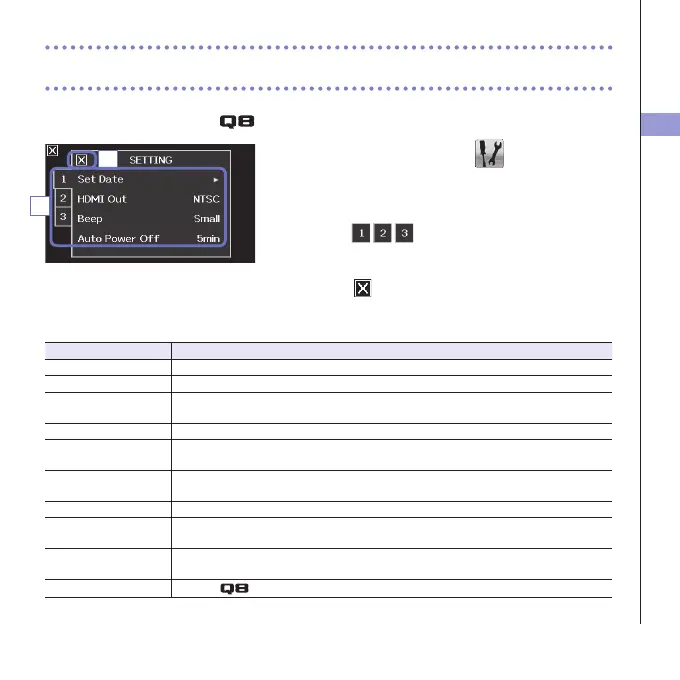
Make settings related to the system.
1. On the menu screen, touch .
2. In the sub menu, touch the item that you want to
set.
Touch
to show hidden items.
3. In the sub menu, touch the setting value.
4. Touch to return to the menu screen.
Thiswillclosethesubmenu.
Setting Explanation
Set Date Setthedateandtimeoftheinternalclock.(See"Settingthedateandtime"onpage13.)
HDMIOut SettheformatofthevideooutputfromtheHDMIporttoNTSCorPAL.
Beep Set whether a beep sound is made when the recorder it turned on and is operated.
SelectOff,SmallorLarge.
Direct Monitor Set whether the input sound is monitored directly when used as a USB mic.
AutoPowerOff Set whether the power turns off automatically when running on batteries if no recording
orotheroperationhasoccurredforsometime.SelectOffor2,5or10minutes.
Play Mode Setwhetherornotmultiple lesshouldbe playedconsecutively. Select"PlayOne"or
"PlayAll".
Playback Lv Meter Set whether or not level meters are shown on the playback screen.
SD Card Checktheopencapacityof theSDcard orformatit.(See"FormattingSDcards" on
page14.)
Reset Restorevideoandaudioquality, thesceneand othersettingstothefactory default
values.
Information
Viewthe
system version.
4
2



 To Next Page