USB connections
41
By connecting with a computer or iPad using a USB cable, you can use this recorder as a
card reader or USB mic, as well as to stream audio and video as a web camera.
Using as a card reader or USB mic (computer/iPad)
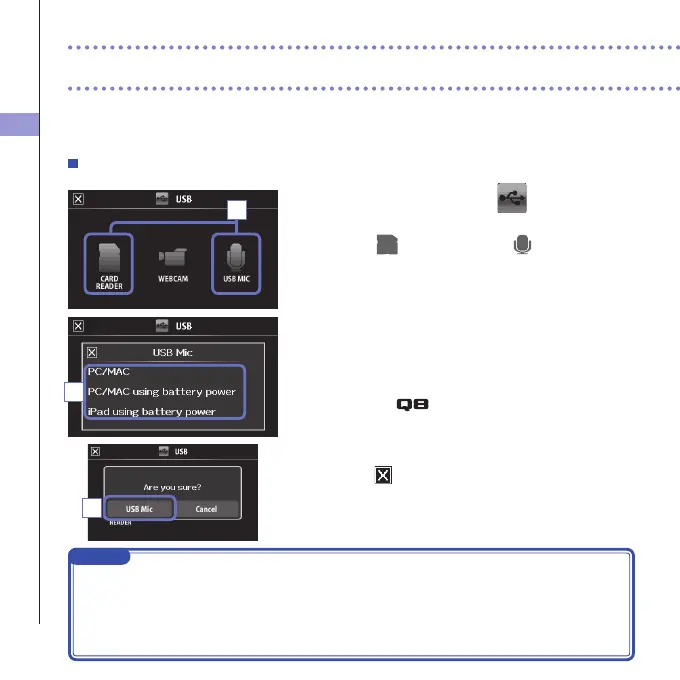
1. On the menu screen, touch
.
ThisopenstheUSBmenu.
2. Touch (CARD READER) or (USB MIC).
3.
In the sub menu, touch "PC/MAC", "PC/MAC using battery
power" (USB Mic only) or "iPad using battery power".
4. On the confirmation screen, touch "Card Reader" or
"USB Mic".
5. Use a USB cable to connect a computer or an iPad.
Whenthe
isrecognized,itwillbereadytouse.
6. To end use, conduct the necessary procedures from
the computer to end the USB connection. Then,
touch and disconnect the USB cable.
Whenconnectedto aniPadorwhen usingtherecorder asa
USBmic,noproceduresarenecessarybeforedisconnection.
NOTE
• Whenconnectedtoa computer, powercanbesupplied by USB.When connected toaniPad,
power cannot be supplied by USB.
• AniPadCameraConnectionKit(soldseparately)isnecessarytoconnectaniPad.
• If you wanttousephantom powerwhenconnectedtoacomputer thatcan only supply a low
amountofUSBbuspower,select"PC/MACusingbatterypower".
USB connections
2
3
4



 To Next Page