77
On the right side: time (default setting),
odometer, external temperature, date,
compass (where provided), car status
(ON, OFF, RUN).
CONTROL BUTTONS
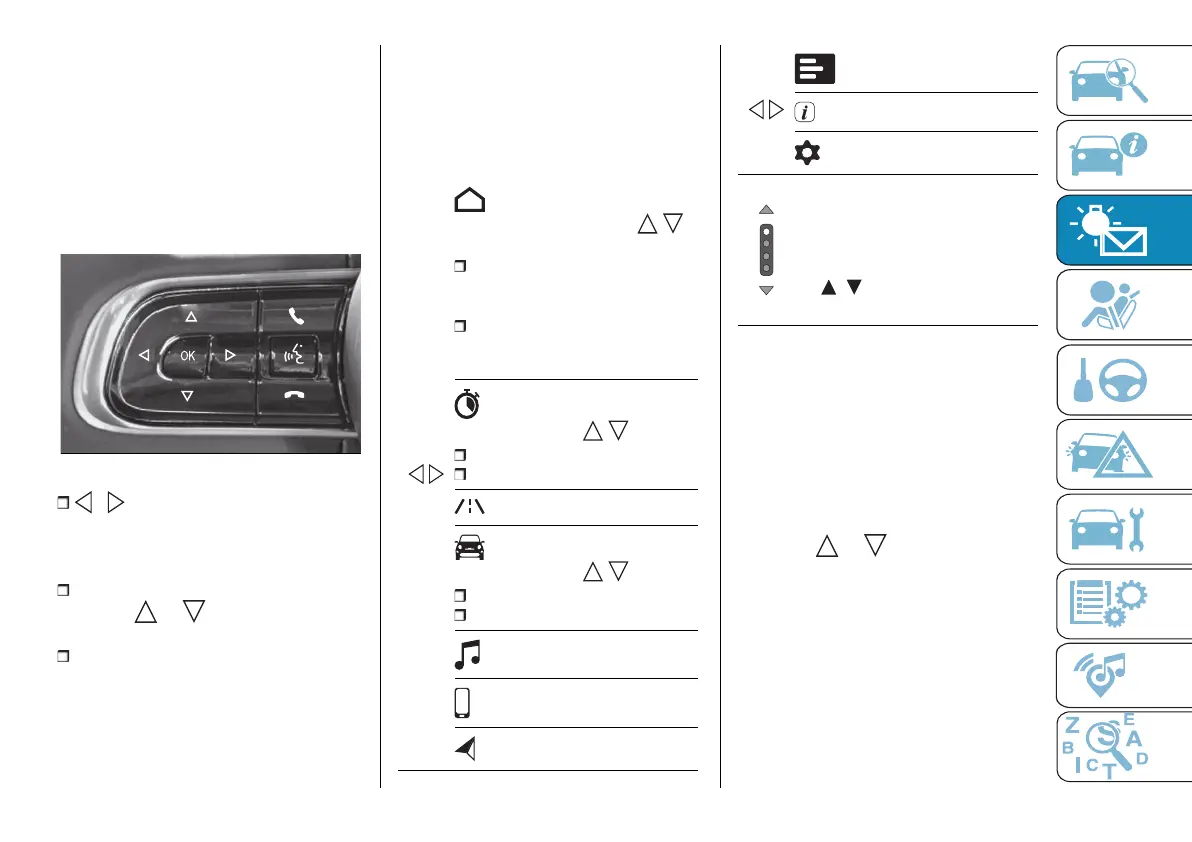
These are located on the left side of the
steering wheel fig. 91.
They can be used to scroll through the
display screens.
91 AB0A0488
/ : Press and release the
buttons to access the main menu and
to scroll the menu and the submenus
rightwards or leftwards.
After selecting the desired screen,
press the or button to access
any detail screens.
OK: Press the button to interact with
the screens. Press the button once
to confirm your selection. Hold the
button pressed for 1 second to reset
the displayed/selected functions.
DISPLAY PAGES
You can navigate through the following
main and detail screens using the
controls on the left side of the steering
wheel:
Screenshot list
/
Main screen
By pressing and releasing /
the user can choose to display:
the multifunction dial indicator
showing the speed of the car
or:
the use of motor power or the
state of charge of the high-voltage
battery
Trip A/B
Press and release / :
Trip A
Trip B
Driver assist
Vehicle info
Press and release / :
Tyre pressure
Service (scheduled servicing)
Audio repeat
Phone repeat
Repeat navigation
/
Recorded messages
Tutorials
Settings
In the case of multiple screens,
indicates the presence of screens
to the right and/or left of those
displayed. It is possible to navigate
between the pages by pressing
the / arrows or the dots on
the page.
Trip computer
The "Trip computer" page (fig. 92) can
be used to view several parameters
relating to the operational status
of the car. This function has two
separate memories, "Trip A" and
"Trip B", where the data for the car's
"complete journeys" (trips) is recorded
independently from each other.
Press the or button to switch
from "Trip A" to "Trip B" and vice versa.



 To Next Page