KNOWING THE INSTRUMENT PANEL
78
92 AB0A0507
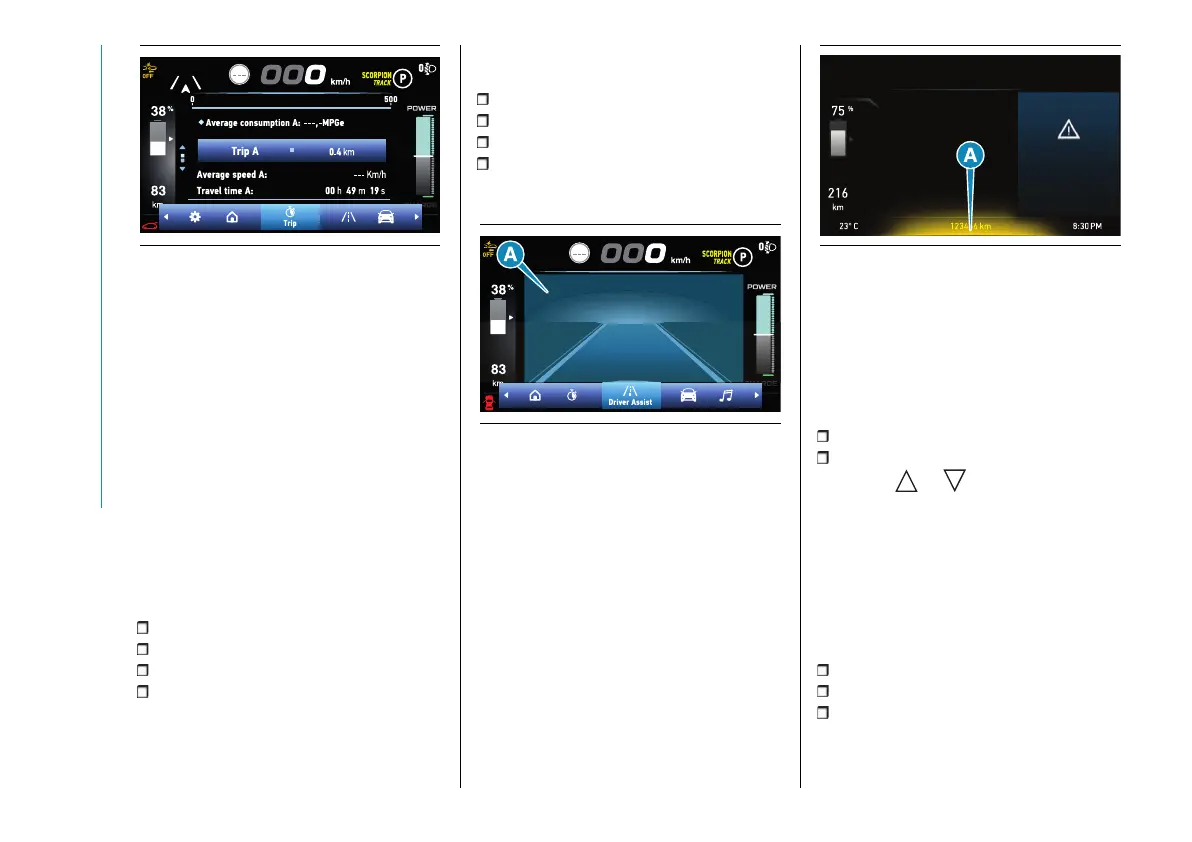
The screen can be used to show the
following items: "Current consumption",
"Average consumption", "Distance",
"Average speed", "Travel time".
The sizes are displayed in "km"/"mi"
and "km/h"/"mph" depending on the
display settings.
Both values can be reset: press and
hold down the OK button on the
steering wheel.
NOTE The total consumption cannot
be reset.
The instantaneous consumption
bar can take the following colours
depending on energy consumption:
Orange: very high consumption;
Yellow: high consumption;
Light green: low consumption;
Dark green: very low consumption.
Driver assist
The screenshot shows messages and
visual indication of the status of the
following driving aid systems in area (A)
fig. 93:
CC (Cruise Control)
Lane Control
TSR (Traffic Sign Recognition)
ISA (Intelligent Speed Assist)
As more recent notifications are shown,
previous notifications are overwritten.
93 AB0A0508
For some driving assistance devices,
pop-up warnings are marked in yellow
or red at the bottom of the screen
depending on the type of warning (B)
fig. 94.
94 AB0A0600
Refer to the "Starting and Driving"
section for more information about
driving assistance systems.
Vehicle info
The screen shows the following
information:
Tyre pressure
Service (scheduled servicing)
Press the or button to switch
between the "Tyre pressure" screen
and the "Service" screen.
Audio repeat
(where provided)
This screen repeats the audio playback
information shown on the Uconnect™
system:
FM/DAB radio;
Media (USB, Bluetooth®);
Android Auto, Apple CarPlay, Baidu
Carlife.
Refer to the "Multimedia" section for
more information.



 To Next Page