13
3 OPERATOR VIEWS
…3.6 View Logbook
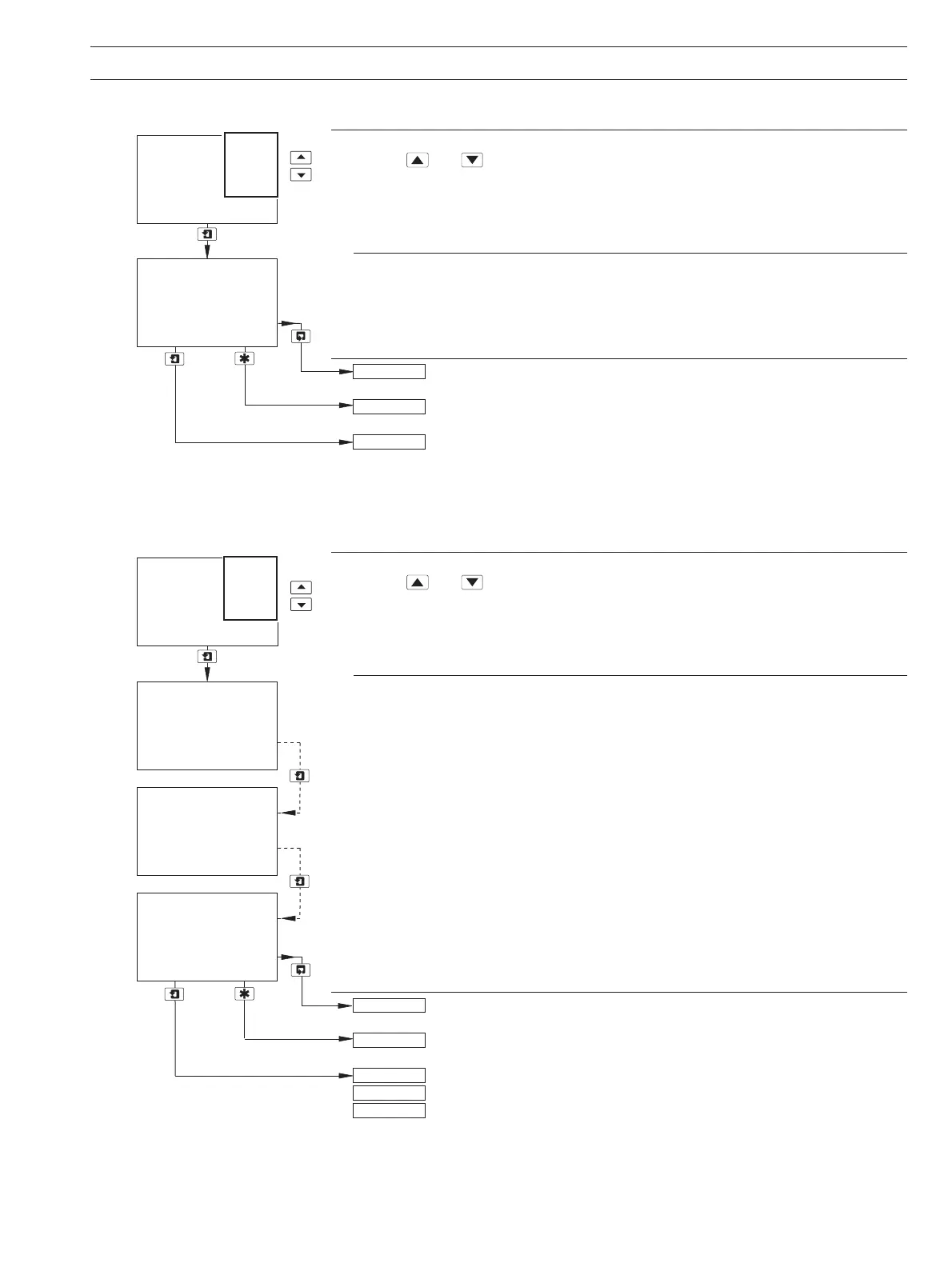
View Logbook
Use the
and keys to access the Power logbook.
Note. If no entries are stored in the
Power logbook, the display shows No More Entries.
Power
The
Power logbook contains up to 2 entries (entry 1 is the most recent), each comprising
the power state (On or Off), and the date/time of the occurrence.
Operating Page – see Section 2.3.
See Section 4.2.
Advance to entry 2.
Note. If no more entries are stored, the display shows
No More Entries.
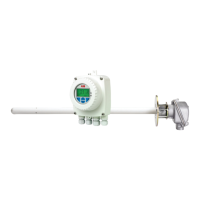
View Logbook
Use the
and keys to access the Cals logbook.
Note. If no entries are stored in the
Cals logbook, the display shows No More Entries.
Calibration
The
Cals logbook contains up to 5 entries (entry 1 is the most recent), each comprising
3 frames. Frame 1 contains the entry number, sensor letter, calibration type (Z = Zero,
S = Span, ZS = Zero and Span) and the date/time of the occurrence.
Frames 2 and 3 contain the raw outputs from the sensor for both the Zero and Span
solutions. These values equate to the percentage light transmission through the standard
solutions.
Operating Page – see Section 2.3.
See Section 4.2.
Advance to entries 2 to 6 for single input monitors.
Advance to entries 2 to 3 for sensor A on dual input monitors.
Advance to entries 4 to 6 for sensor B on dual input monitors.
Note. If no more entries are stored, the display shows
No More Entries.
-----
12:03:04 11:34
Diss. Organics
SENSOR CAL
2
-----
VIEW LOGBOOK
1
Off
Errors
Alarms
Cals
Power
Diss. Organics
-----
12:03:04 18:56
-----
VIEW LOGBOOK
1
Sen. A
ZS Cal
Ref Totals
SENSOR CAL
2 Sen.A
99.9
Zero A
Span A
98.3
Power
Errors
Alarms
Cals
30.5
Org Totals
99.2
Zero A
Span A
2 Sen.A
4 Sen.B


 To Next Page