15
4 SETUP
4.2 Sensor Calibration
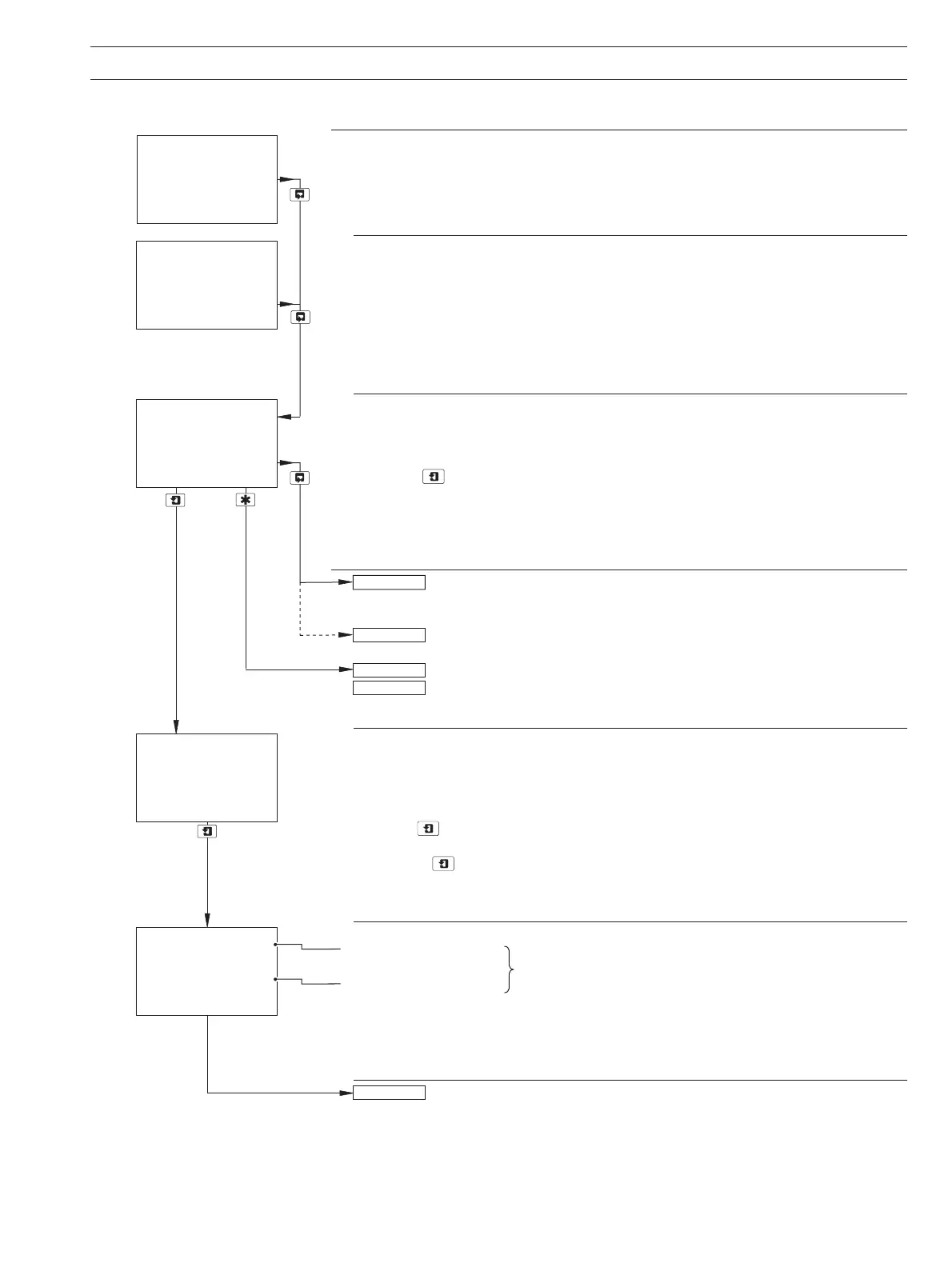
Sensor Calibration
Sensor Calibration Security Code
Note. This frame is displayed only if Alter Cal. Code is not set to zero – see Section 5.8.
Enter the required code number (between 0000 and 19999) to gain access to the sensor
calibration pages. If an incorrect value is entered, access to the calibration pages is
prevented and the display reverts to the
SENSOR CAL. frame.
Calibrate Sensor A
Note. A full calibration comprises a zero and a span calibration. However, it is possible to
carry out zero and span calibrations independently by aborting the one that is not required
(press the key to initiate the calibration and press it again before the calibration is
complete). If either calibration is aborted,
A:Cal Incomplete is shown on the lower display
line (see next page). The
Cals logbook records the calibration type as zero (Z), span (S) or
both (
ZS) – see Section 3.6, page 12.
Sensor B calibration (dual input monitors only) is identical to Sensor A
calibration.
Single input monitors only – return to main menu.
Alter Sec. Code not set to zero (Section 5.8) – see Section 5.1.
Alter Sec. Code set to zero (Section 5.8) – see Section 5.2.
Zero Calibration
Fill the flowcell with high purity water – see Section 4.1.1.
Press the key to initiate calibration.
Note. If the key is pressed again at any time before zero calibration is complete, the
display advances automatically to the
A:Fill Span Sol. frame.
Raw Output from Sensor
Organics total signal
These values equate to the percentage light transmission
through the sample.
Reference total signal
As calibration proceeds, a progress indicator appears in the lower display line. After 3
minutes, the lower display line shows
100%, the display then advances
automatically to the next frame.
Continued on next page.
Calib. Sensor A
-----
SENSOR CAL
-----
CAL. USER CODE
0000
Calib. Sensor B
SENSOR CAL
A:Fill Zero Sol.
0.0
mg/l C
100%
100.0
0.00
R100.0
A:Fill Span Sol.
SECURITY CODE
CONFIG. DISPLAY


 To Next Page