40
…6 INSTALLATION
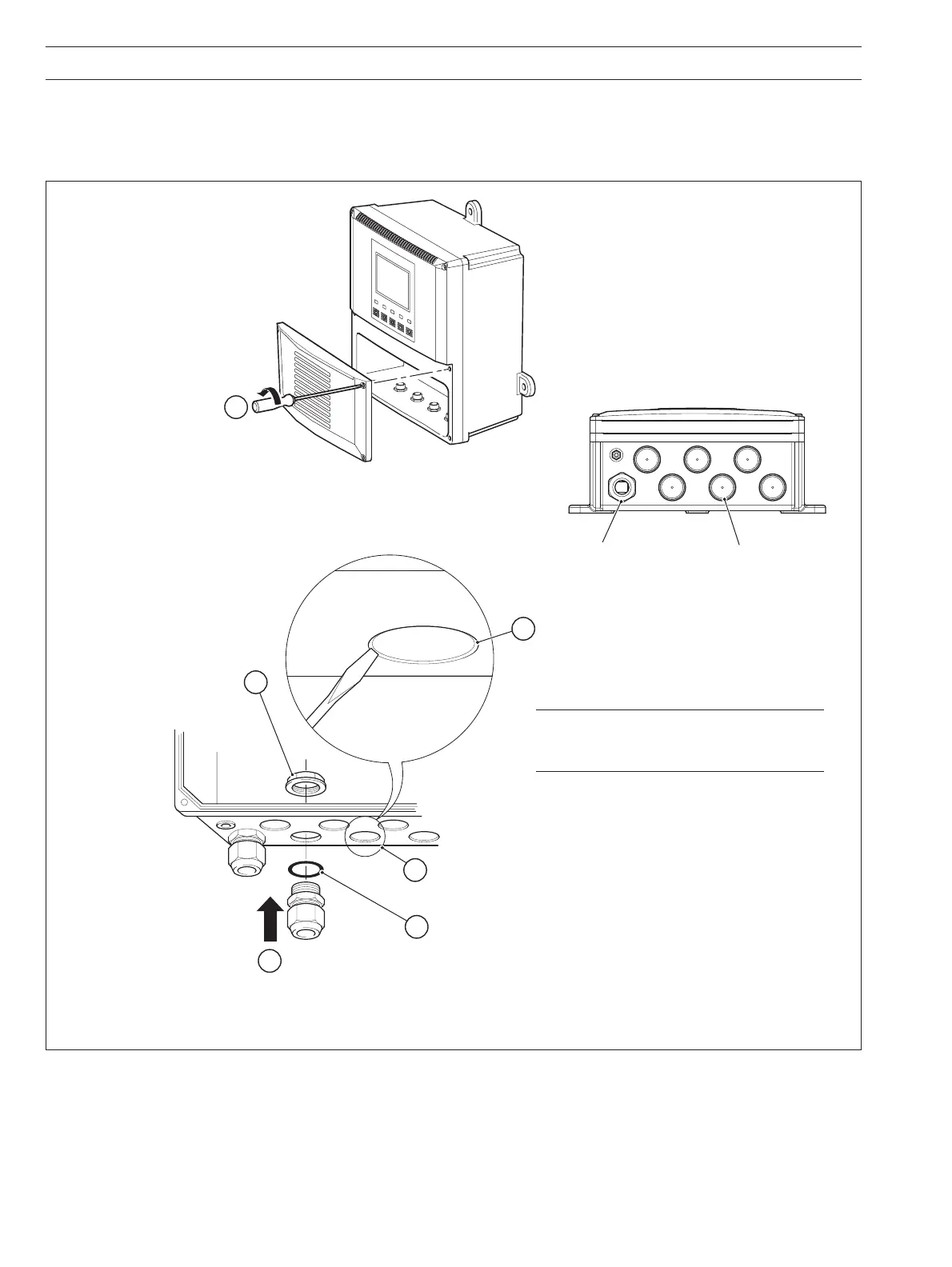
Fig. 6.9 Cable Entry Knockouts
…6.5 Electrical Connections
6.5.2 Cable Entry Knockouts – Fig. 6.9
The monitor is supplied with 7 cable glands, one fitted and six to be fitted, as required, by the user – see Fig. 6.9.
Caution. When removing knockouts,
take great care not to damage wiring and
components within the transmitter.
5
Place the blade of a small, flat bladed screwdriver
into the knockout groove and tap the
screwdriver smartly to remove the knockout
(see Caution below)
Smooth the edges of the hole
with a small round or half-round file
Fit an 'O' ring seal to the the cable gland
Insert the cable gland into the hole
in the monitor case from the outside
Secure the cable
gland with the nut
2
3
4
6
Cable entry knockouts
Factory-fitted cable gland
1
Release the four captive
screws and remove
the terminal cover plate


 To Next Page