27
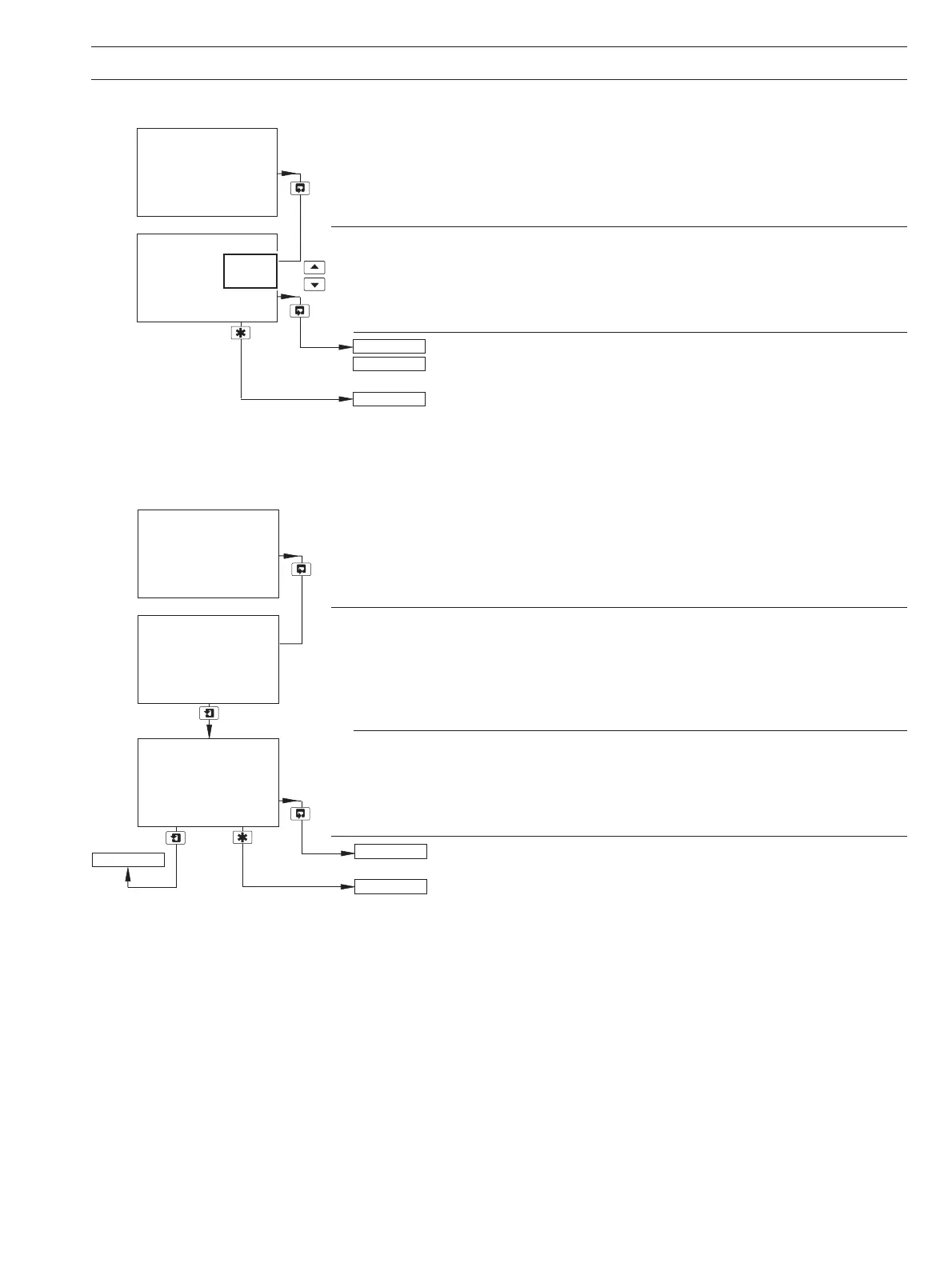
5.7 Configure Logbook
Configure Logbook
Set the logbook to
On or Off.
If
Off is selected, all data entries in the logbook are cleared.
Return to main menu.
Option board fitted and Serial Communications feature enabled (Section 7.1)
– see Supplementary Manual PROFIBUS Datalink Description (IM/PROBUS).
Option board not fitted or option board fitted but Serial Communications
feature not enabled (Section 7.1) – see Section 5.8.
5.8 Configure Security
Alter Security Code
Set the security code to a value between 0000 and 19999.
Alter Calibration Code
Set the sensor calibration access code to a value between 0000 and 19999.
Return to main menu.
See Section 5.9.
Logbook
-----
CONFIG. LOGBOOK
-----
Off
On
CONFIG. SECURITY
CONFIG. LOGBOOK
CONFIG. SERIAL
Alter Sec. Code
00000
Alter Cal. Code
00000
CONFIG. SECURITY
-----
TEST/MAINTENANCE
CONFIG. SECURITY
Alter Sec. Code
5 PROGRAMMING…


 To Next Page