26
…5 PROGRAMMING
5.6 Configure Clock
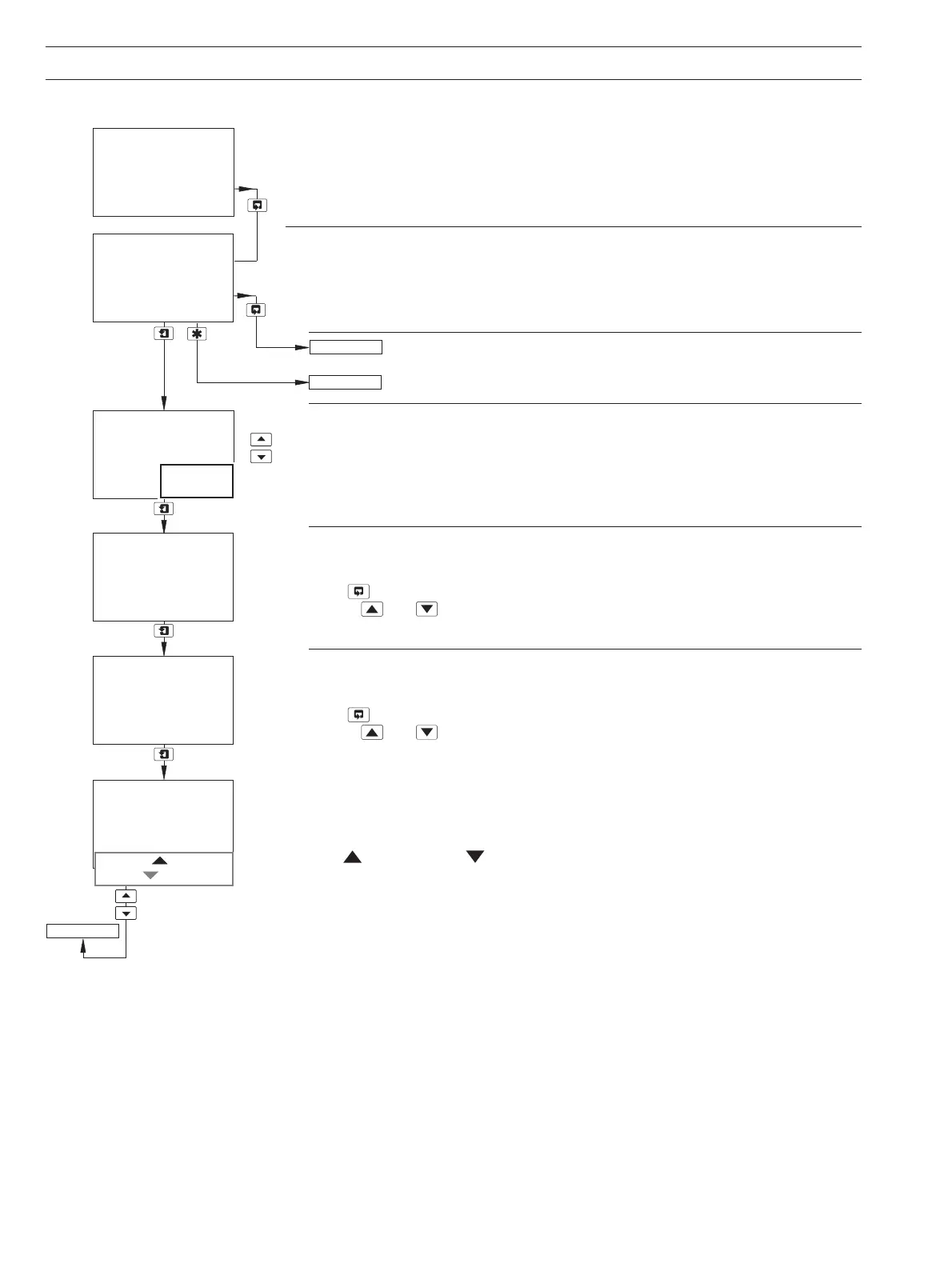
Set Clock
Set the system clock.
Return to main menu.
See Section 5.7.
Date Format
Select the required date format.
Date
Set the date in the format selected above.
Press
to move between the day, month and year fields.
Use the
and keys to adjust each field.
Time
Set the time in the form hh:mm.
Press
to move between the hours and minutes fields.
Use the
and keys to adjust each field.
Press to Set and Press to Abort are shown alternately on the lower display line.
Press the appropriate key to set the clock or abort the changes.
Set Clock?
-----
Date 16:03:04
-----
Day
Time 11:54
Set
-----
-----
Format
-----
Press To Set
Press To Abort
Set
Hours
CONFIG. LOGBOOK
Set Clock?
mm:dd:yy
dd:mm:yy
CONFIG. CLOCK
-----
CONFIG. CLOCK


 To Next Page