43
Chapter 5: Maintenance and Troubleshooting ACCU-CHEK Customer Care Service Center 1-800-858-8072
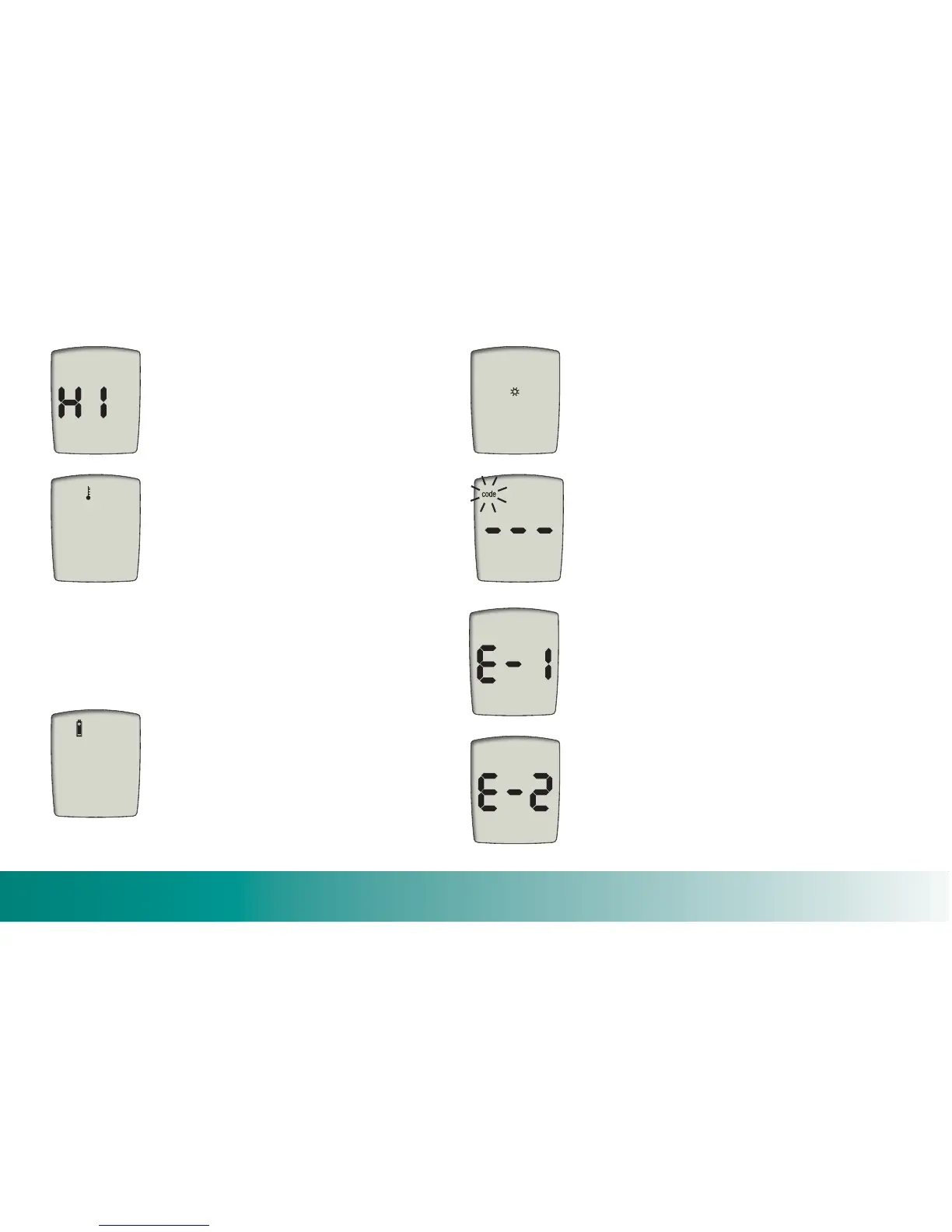
B lood sugar is higher than the
m
easuring range of the syste
m
.
S
ee Chapt er 3, “
U
nderst anding Your
Test
R
esults.”
The te
m
perature is above or below
the prop er range for the
m
eter
(
50°F to 104°F
)
. Move to an area
between 50°F and 104°F, allow the
m
eter to war
m
up or cool down
slow ly to ro o
m
te
m
perature.
D
o not
artificially heat or cool the
m
eter.
R
efer to “Proper Testi ng Conditions,”
Chapter 3.
Battery power is low.
Change the battery soon.
Your surroundings are too bright.
R
epeat the test in a darker environ
m
ent
(
shaded fro
m
direct sunlight
)
, using a
new strip.
The code key is
m
issing or not working
properly.
R
eplace the code key.
The test stri p is not inserted correctly.
Make sure the arrows are pointing
toward the
m
eter and th e orange square
is facing up and is positioned over the
m
easuring window.
The wrong code key is in the
m
eter.
Put in the orange code key that ca
m
e
with th e c ontainer of test strips you are
using.


 To Next Page
 Loading...