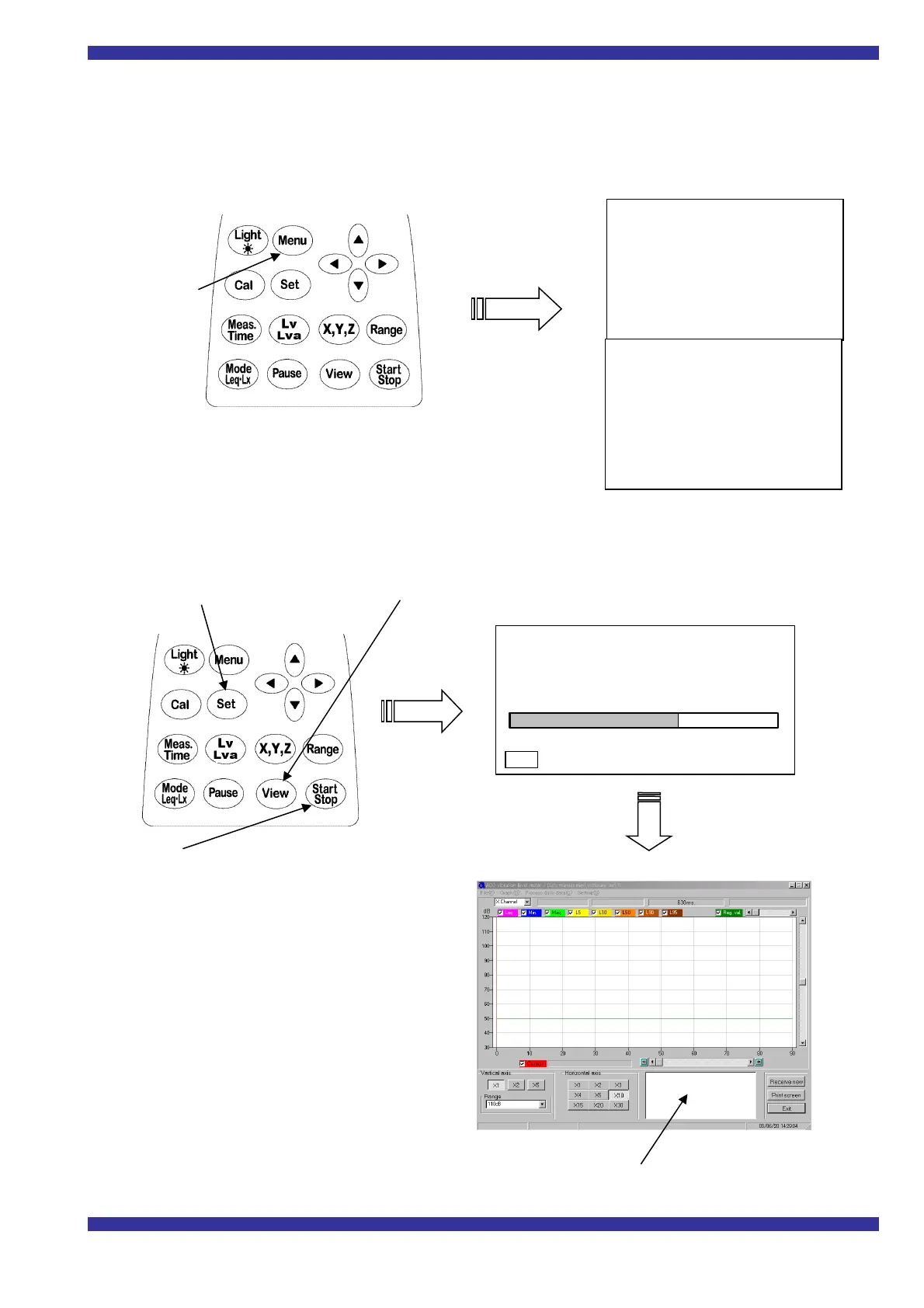
Transmitting data while making measurements
Connect the Vibration level meter and the PC
>>Settings on the PC side
(The settings are the same as when transmitting data after measurements)
>>Settings for and operation of the
Vibration level meter
.
1)
<menu> Screen settings
Interval :Off
I/O :Off
OUT Ch :X ←Set up the channel which is outputted to the PC
baud rate :9600
Note: Make settings for other items as needed to suit your purpose in making measurements
.
2) Press Set key to confirm, then press View key, and the measurements screen appears.
Latest numerical data received is displayed here.
3) If Start/Stop key is pressed, at the same time
measurements begin and data is
transmitted for each measurement
interval. The data is appended to data
displayed on the PC screen.
4) If Start/Stop key is pressed during
measurements,both measurements and
transmission stop.
Note: Transmitted data is not stored in the
memory of the
Vibration level meter
After transmission be sure to save it on
the PC
.
3s 000h00m00s
L
v
dB
100.0
50 110
Meas Mode :Manu
Interval :Off
I/O :Off
OUT Ch :Off
LCD cont :****
date y/m/d :00/11/20
Press Menu key
DC Out :Z
Meas time :***
View :L50
baud rate :9600
Smap Time :normal



 To Previous Page