Page 18 of 42
2.3.4.8 USB
The USB socket is for connection to a Laptop or
PC.
This can be used for upload of a new logo or
download of the configuration and log files.
Refer to section 3.3.9 for further information.
USB
R
uP
FL OW
Monitor
ctuator
Outpu t
PROG
Input-1
PROG
Input-2
P
R
O
G
I
n
p
u
t
-
3
P
R
O
G
I
n
p
u
t
-
4
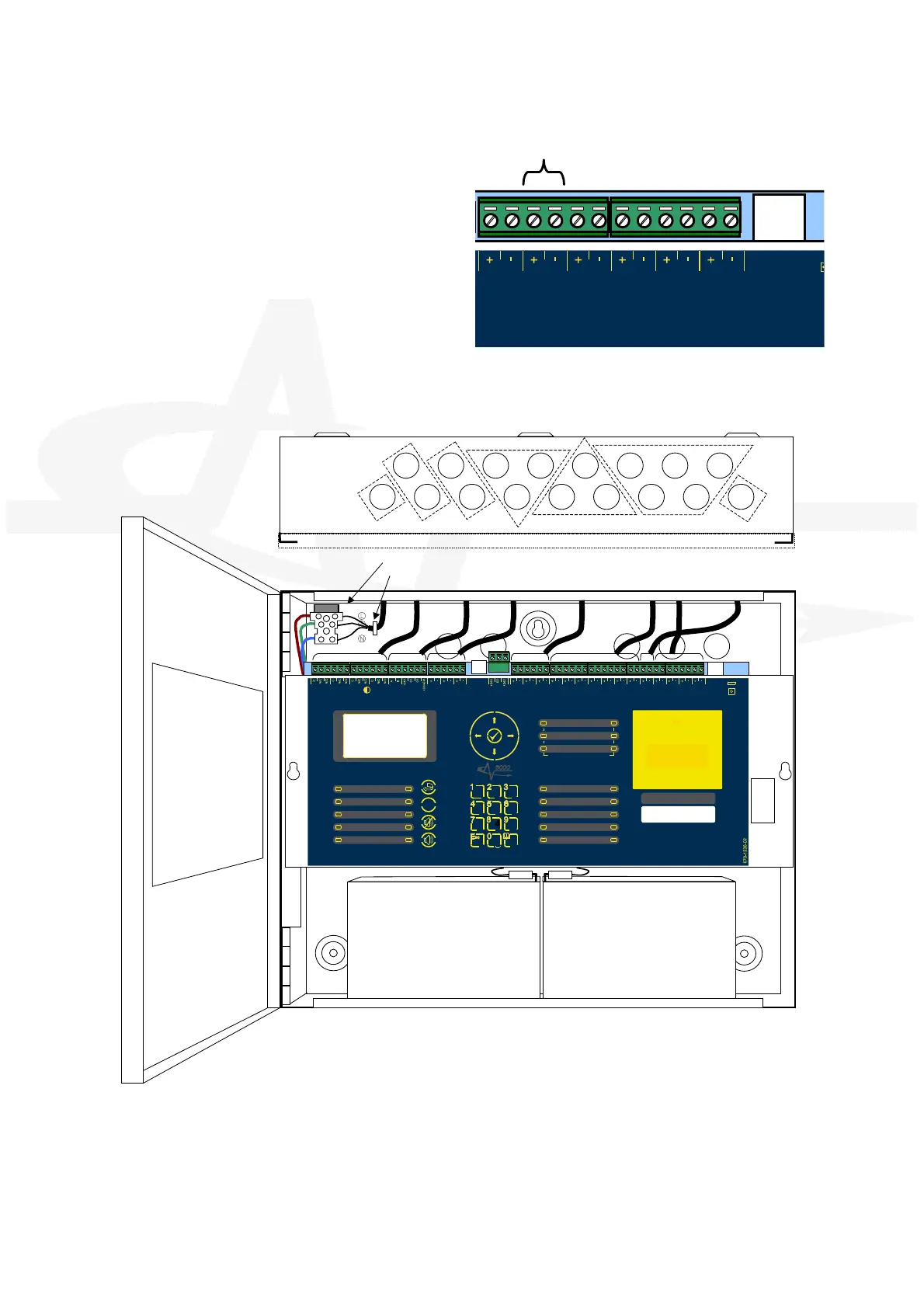
2.3.4.9 Recommended Cable Routing
The following diagram shows the recommended cable routing within the enclosure.
LIVE
EARTH
NEUTR AL
U S B
SUPPLY
PSU
Comms
P R O G R U N
u P M O D E
R E B O O T
R e l a y - 1
F I R E
R
e
l
a
y
R e l a y - 2
F
A
U
LT
R
e l a y
R S48 5 A UX
Sup ply
ZO NE
- 1 -
ZO NE
- 2 -
ZO NE
- 3 -
SN DR
- 1 -
SN DR
- 2 -
SN DR
- 3 -
MO DE
Se lect
Ma nual
Trig ger
HO LD A BOR T Pres sure
Mon itor
VALV E
Mo nitor
FL OW
Mo nitor
Ac tuat or
Ou tput
P
R
O
G
I n p u t - 1
P
R
O
G
I n p u t - 2
P
R
O
G
I n p u t - 3
P
R
O
G
I n p u t - 4
MANUAL ONL
AUTO +
MANUAL
LOW PRESSURE
MANUAL
DISABLED
DISABLED
FAULT
TIMER HELD
ABORTED
RELEASE
IMMINENT
RELEASED
EXTIN GUISHANT
P
O
W
E
R
S
STEMFAULT
T
E
S
T
S
O
U
N
D
ER DELA
ED
D
I
S
A
B
L
E
S
O
U
N
D
ER DISABLED
F
A
U
L
T
S
O
UNDER FAULT
F I R E
SILENCED
G
E
N
E
R
AL
- 1 -
DE TECTION ZONE S
FI R E FA ULT/
T ES T /
DI SA BLE
- 2 -
- 3 -
ESC MENU
WX
ZTUVPQRS
GHI JKL MNO
DEFABC
RES ET
SILENC E/
RE SOU ND
MUTE
!
SOU N D
ALAR MS
(HOLD 2s)
BS
E
N
5
4
-
2
:
1
9
9
8
B
S
E
N
5
4
-
4
:
1
9
9
8
BS
E
N
1
2
0
9
4
-
1
:
2
0
0
3
C
L
A
S
S
-
A
E
X
T
I
N
G
U
I
S
H
A
N
T
R
E
L
E
A
S
E
PU L L D O W N A N D P R E S S B U T T O N
C INPUT
Cable Tie
C IN
Relays
485 / AUX
Zone Inputs
Sounder Outputs
Inputs
ctuator
Output



 To Next Page