15
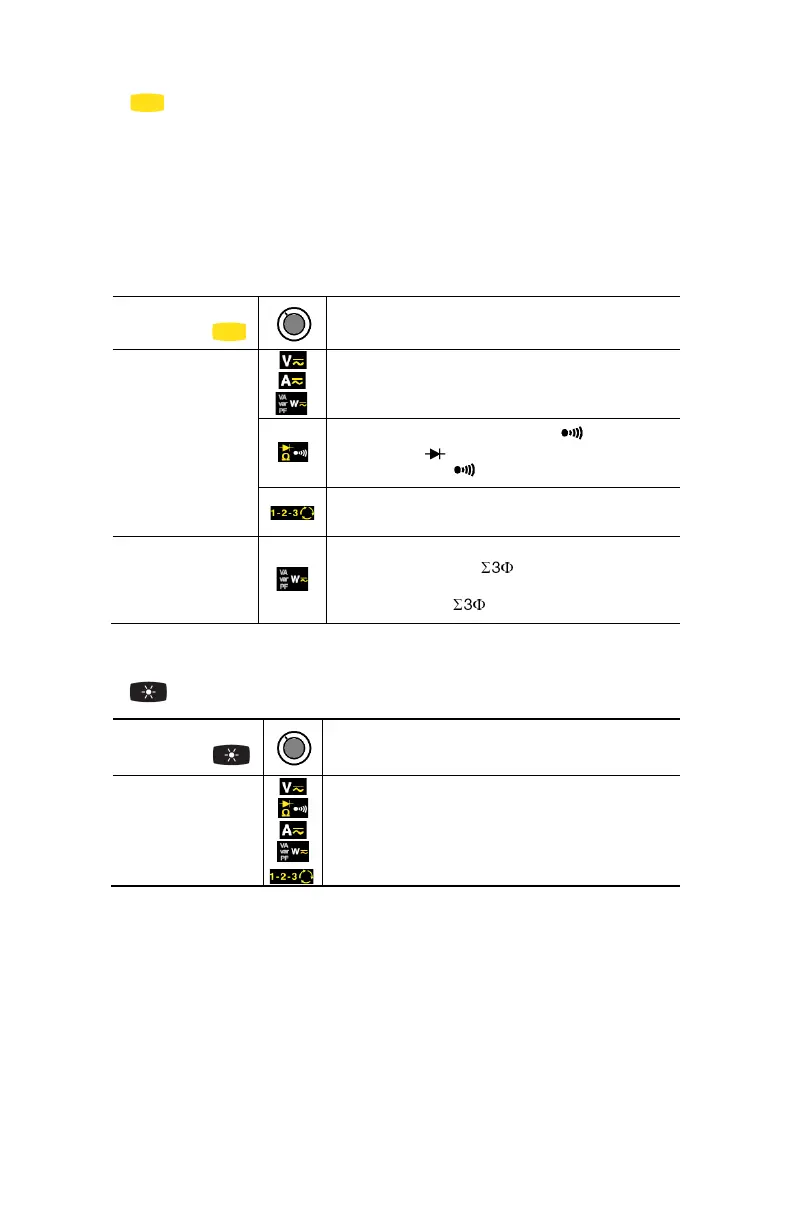
2.2 (YELLOW) BUTTON (SECOND FUNCTION)
This button is used to select the type of measurement (AC, DC, AC+DC) and the
second functions marked in yellow next to the relevant positions of the switch.
It can also be used to modify the default values in the configuration mode
(see § 3.4).
NOTE: This button is invalid in the MAX/MIN/PEAK, HOLD and ΔREL modes.
Successive
presses on
Function
short
- Selects AC, DC or AC+DC. Depending on
your choice, the screen displays AC, DC or
AC+DC
- Cycles through the continuity , Ω and
diode test modes and returns to the
continuity test
- Resets the measurement process for the
phase order indication function
long (>2 sec)
- Displays the total 3-phase power of a
balanced system ( is displayed). Press
again to return to the display of the single-
phase power ( is off)
2.3 BUTTON
Successive
presses on
Function
- Enables/disables display backlighting
NOTE: The backlighting is automatically disabled at the end of 2 minutes.



 To Next Page