20
3 USE
3.1 INSTALLING THE BATTERIES
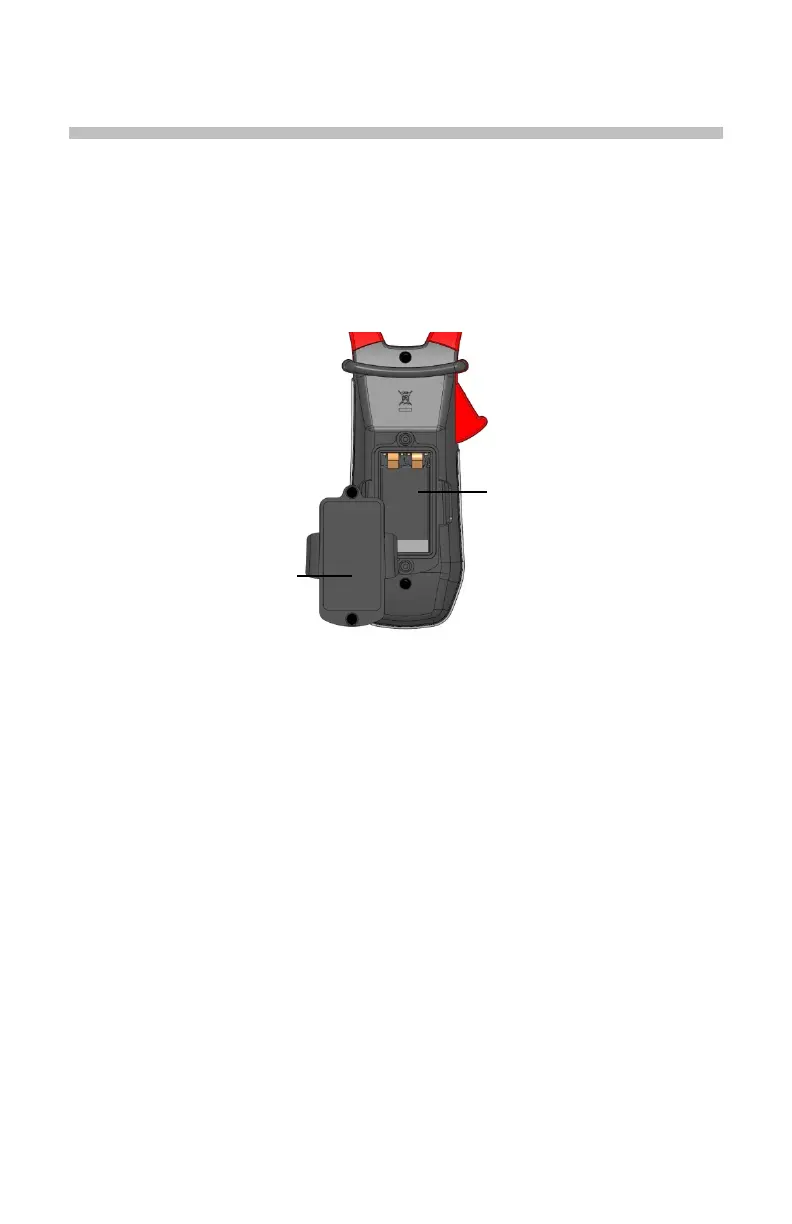
Insert the batteries supplied with the device as follows:
1. Using a screwdriver, unscrew the battery compartment cover (item 1)
from the back of the housing.
2. Insert the 1x9V batteries supplied (item 2), observing polarities.
3. Close the battery compartment cover and screw it onto the housing.
Figure 6 : The Battery Compartment
3.2 TURNING THE CLAMP-ON METER ON
• With the rotary switch set in the OFF position, turn the switch to the
desired function. The display lights (all symbols) for a few seconds (see
§1.3), then the screen of the function chosen is displayed.
• The clamp-on meter is now ready to make measurements.
3.3 TURNING THE CLAMP-ON METER OFF
The clamp-on meter can be turned off in two ways:
• Manually - Turn the switch to the OFF position.
• Automatically - After ten minutes with no activity, the instrument will turn
OFF. Thirty (30) seconds before the device is switched off, an audible
signal sounds intermittently. To re-activate the device, press any button
or turn the rotary switch.
3.4 CONFIGURATION
As a safety measure, and to avoid repeated overloads on the inputs of the
device, configuration operations should only be performed when the device is
disconnected from all dangerous voltages.
1
2



 To Next Page