20
By pressing the . key one of the fol-
lowing unit functioning modes can be
set:
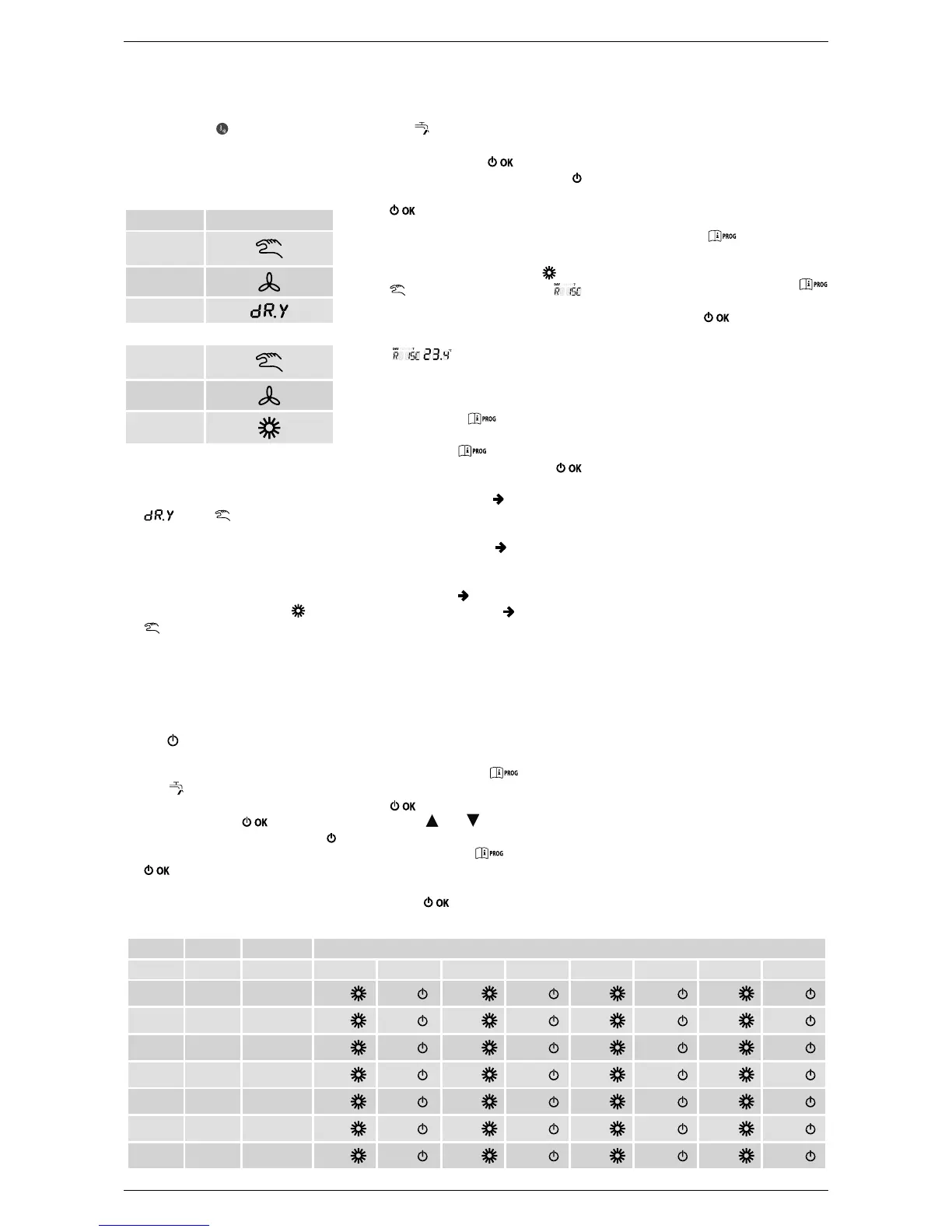
• Selecting DEHUMIDIFY MANUAL
the display shows the flashingi
, and symbols. The unit
satisfies the dehumidification re-
quests depending on the comfort
humidity set.
• Selecting HEATING MANUAL the
display shows the flashing
, and
symbols. The unit satisfies the
heating requests depending on the
temperature set managing the BO-
OSTER function whenever the rela-
tive probe is set.
• Selecting OFF the display shows
the
. The unit stays off, ignoring
any request.
• The
symbol will activate during
defrosting.
By pressing the
key all fun-
ctions are disabled: Only the
symbol will be on. By pressing the
key again, go back to the
mode before switch off.
• The
symbol will activate during
defrosting.
By pressing the
key all fun-
ctions are disabled: Only the
symbol will be on. By pressing the
key again, go back to the
mode before switch off.
• Selecting HEATING MANUAL the
display shows the flashing
and
symbols and the wording
. The unit satisfies the heating re-
quests depending on the tempera-
ture set and the display will be
.
10.4. SETTINGS MENU
By pressing the
key enter the
INFO – settings menu.
Always use the
key to scroll the
menu. To enter/modify press the
key.
• COMFR (Comfort)
Set the humi-
dity set point for the comfort level
(the set point will be memorised).
• ECONM (Economy)
Set the humi-
dity set point for the economy level
(the set point will be memorised).
• TIME (Time)
Clock setting.
• PROG (Time setting)
Set the weekly time programming.
• ESCAPE
At the end of the menu there is the au-
tomatic exit from the INFO – settings
menu.
10.5. CLOCK (TIME)
To adjust the clock, enter the settings
menu by pressing the
key.
Scroll the menu up to TIME and press
the
key to access the sub-menu.
Using the
and keys the time can
be changed. To pass to modifying the
minutes, press the
key and in the
same way to modify the day.
To confirm the modifications made,
press the
key (go back to the main
page automatically).
10.6. WEEKLY TIMER PROGRAM-
MING
In order to modify the weekly time set-
ting of functioning in dehumidification
mode, press the
key to enter the
settings mode.
Successively reach the programming
menu by repeatedly pressing the
key. To enter the time programming
menu, press the
key.
The time programming allows to set
automatic functioning of the unit in
dehumidification mode in determined
time periods and on determined days
of the week, selecting the level of humi-
dity for each time period.
The unit functioning settings can be
made for
individual
settings or for
groups
of several consecutive days.
10.6.1. Individual days
There are 4 time periods available for
each individual day selected (4 switch-
on/off periods of the unit in dehumidi-
fication mode, also at different times
from day to day), as shown in the table
that follows: Act as follows to set an in-
dividual time period:
MODE SYMBOLS ON
dehumidify
manual
heating
manual
FACTORY-SET VALUES
On 1 Off1 On 2 Off 2 On 3 Off 3 On 4 Off 4
MONDY day 1 monday
6:30
8:00
11:00
13:00
17:00
23:00
24:00
24:00
TUEDY day 2 tuesday
6:30
8:00
11:00
13:00
17:00
23:00
24:00
24:00
WEDDY day 3 wednesday
6:30
8:00
11:00
13:00
17:00
23:00
24:00
24:00
THUDY
day 4 thursday
6:30
8:00
11:00
13:00
17:00
23:00
24:00
24:00
FRIDY day 5 friday
6:30
8:00
11:00
13:00
17:00
23:00
24:00
24:00
SATDY day 6 saturday
6:30
8:00
11:00
13:00
17:00
23:00
24:00
24:00
SUNDY day 7 sunday
6:30
8:00
11:00
13:00
17:00
23:00
24:00
24:00


 To Next Page